


Tuesday, June 5, 2012
Adobe Photoshop Lightroom 4 Review
Posted by Lee Yuan Sheng in "Digital Home Software" @ 08:00 AM
Some photographers will consider the real heart of Lightroom to be the Develop module, which is based on Adobe Camera RAW. The advantage of Lightroom's editing approach is in its non-destructive editing: Any changes made are not written to the file itself, but to the catalogue file instead. This has the advantage of keeping the originals intact, and being able to reset the file of any edits is pretty handy. Here we will take a look at what the Develop module can do.
New to Lightroom 4 is the latest engine for Adobe Camera Raw (and thus Lightroom 4), called Process Version 2012, or PV2012. I have been told there are a lot of changes to how it works, but given that ACR for me is rarely used (see below for an explanation), I have no idea how much a difference the new version makes compared to the previous one.
Note for Nikon users
I am not sure if many know this, but ACR used to totally butcher colours coming out from NEFs. The reason is partly because Nikon decided to enter the software game and did some monkeying around with the White Balance info since the D2H. While the proprietary information has since been reversed engineered, programs that did not use Nikon's API tended to give some bizarre results.

Figure 9: While some might like the colours, the hues of blue and subtler cyan are gone in the ACR version on the right.
A camera calibration feature was introduced with ACR 6, which was used in Photoshop CS5. A friend raved about it, but while the results from the tests I did with him were better than before, ACR 6 still would mutilate the hues in certain areas. Editing the photo to bring it back to the original was not impossible, but it was an extra step, and sometimes not always successful.
The good news now is that now the Nikon camera calibration profiles include a "v4" version, which I am pleased to report pretty much matches up to Nikon's Capture NX2 output. It is great to have another alternative to the slow, crash-happy Capture NX2 (even if said alternative can be as slow). Since I tested this on an older Nikon D300, I wonder if anyone with the latest D4 or D800 care to share how their images held up with the newest ACR/Lightroom?
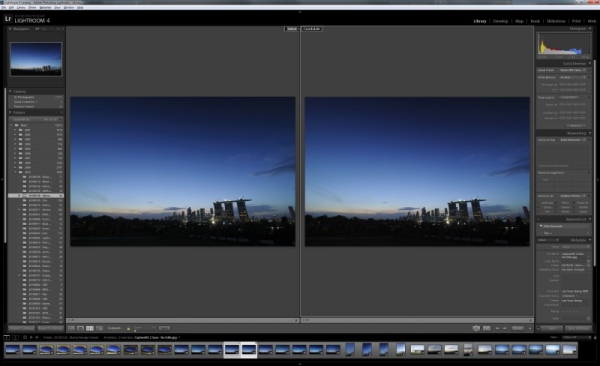
Figure 10: Oh my, are the colours finally matching? Image on the right is a JPEG directly converted from Nikon Capture NX2, while the left image is an NEF that has the Nikon Standard v4 Profile attached to it.









