


Tuesday, June 5, 2012
Adobe Photoshop Lightroom 4 Review
Posted by Lee Yuan Sheng in "Digital Home Software" @ 08:00 AM
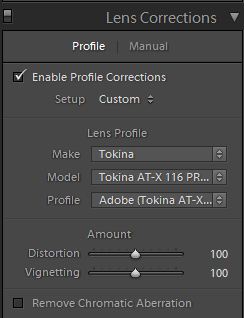
Figure 20: Lens Correction adjustments
If your lens does not have a profile, you can make adjustments manually. To create your own lens profile, you will need to download a tool from Adobe first.
One final note: there are also image editing presets that Lightroom comes with, which are on the left pane. You can add your own as well.
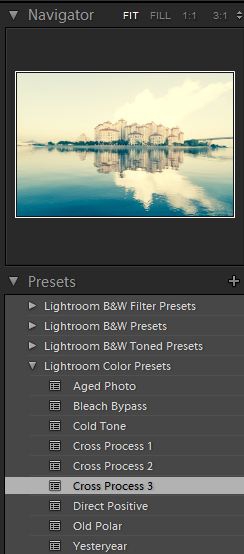
Figure 21: Image Presets, with Cross Process selected in the preview. Eww. Never did like those even back when shooting film.
Now, how does the final image look?
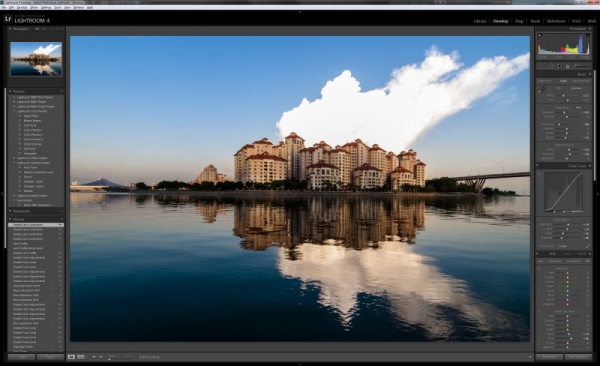
Figure 22: Total time - Less than a minute, really.
As it can be seen, it will not quite solve all the problems. The example here clearly has highlights that have been clipped beyond recovery, as seen in the lack of information in the storm cloud. Still I consider it quite impressive that there is still a little detail, and that a decent photo can be produced in a short period of time. In this case it took me less than a minute (typing this walkthrough took far longer). Overall, Lightroom allows a lot of adjustments to be made, and made quickly. I think this is Lightroom's greatest strength: non-destructive editing in a fast workflow.









