


Thursday, February 17, 2011
My Life in HD: The Samsung HMX-T10 HD Camcorder Reviewed
Posted by Don Tolson in "Digital Home Hardware & Accessories" @ 08:00 AM
Battery Life
There are two batteries in the HMX-T10. The first is the main battery which you insert via the bottom of the camera and runs the screen and most of the camera functions, and the second is an internal battery which maintains the clock and settings. The main battery was supplied completely discharged and took about two to three hours to recharge via the wall charger. I suspect it will take about double that if you charge via the USB connection.
I didn't do any 'extended' recording with the camera, but it seemed to do fine for the two weeks that I was working with it. One thing to note is that simply closing the screen does not shut off the camera but rather puts it in a standy mode with the screen off. This is great if you are simply pausing during breaks in the action, but it can cause the battery to get run down quickly if you forget and put the camera away in this mode.
To actually turn off the unit, you need to press the button on the inside of the screen compartment (see Figure 3). The manual suggests you actually take out the battery and SD card when not using the camera, which seems a bit excessive but that would maximize the battery life. The User Guide also warns that two weeks of non-use of the camera can drain the internal clock battery, necessitating resetting the date/time! If that's really the case, that would be a royal pain, but I didn't see any evidence of that in the two or three weeks working with the T10. I guess the best bet might be to leave the unit plugged into the wall socket when it's not in use...
Judging by the battery compartment location and size (figure 8), I don't think it's likely you'll see any 'extended life' replacement batteries soon.
Memory Usage
As mentioned above, the HMX-T10 stores video directly on the storage card in H.264 format. There are three selectable 'qualities' of format -- Superfine, Fine and Normal -- and since these don't seem to relate to the actual resolution of the video image, I'm guessing it has something to do with the compression algorithms applied. On an 8Gb card, you get about 60mins of recording in 'superfine' mode; about 75 mins in 'fine' and about 95 mins in 'normal'.
You can view any of the video or still pictures stored on the card by going into play mode. Here, the camera provides thumbnails of the video segments captured (as defined by the start/stop of the record button) or of the individual still photos. Selecting any one of them starts the play/display. It's also possible to get a slide show of your still photos.
PC Software
When the T10 is attached to a PC via the USB cord, it automatically downloads and starts the Samsung 'IntelliStudio' application which provides viewing, transfer and simple editing of your video and still photos. As I've seen with other image management software, it attempts to be a one-stop shop for all the image media on your PC, and trolls the entire unit looking for stuff.
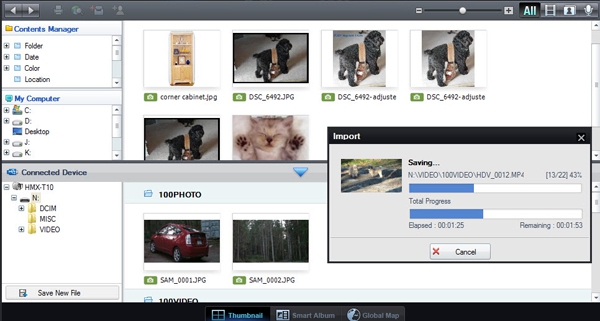
Figure 21: Here's a shot of Samsung's Intelli-Studio 2.0 application as it uploads the video and still photo content from the camera. The upload didn't take long at all, and as you can see from the top half of the screen shot, it is attempting to integrate with all the other image material on my desktop.
For those who have other image management software they prefer, the T10's storage card is also identified as a storage device to Windows 7, so you can simply drag and drop video and photo files wherever you want.
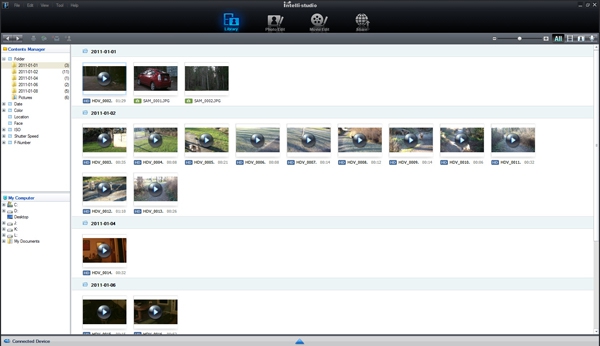
Figure 22: After the upload is finished, you can select whether you want to see just video, photos, or a combination of both. There's also a simple video editor included, which will let you do some simple editing of each video segment, then combine them together with simple transitions into a longer movie.
Conclusion
As you can tell from the article, I was mightly impressed with the HMX-10 from a portability point-of-view, and the simple controls make it a perfect companion for capturing family memories. It did a particularly good job with low light levels. And having it record directly into H.264 format is a bonus. Would I use it for wedding videos or other semi-professional requirements? Probably not, but that's not what it's designed for. I wish it had come with the mini-HDMI cord so I could truly see what the HD output looked like (I couldn't really get a good feel for it from my computer screen), and I'm hoping that Samsung can do something about the noise from the auto-focus/zoom motors. It was also cool being able to take still photos 'on the fly' and see some pretty reasonable results.
Don is a Solution Architect for Fujitsu Consulting, specializing in Enterprise Mobility, Security and Privacy. Two new Havanese/Poodle puppies provide lots of opportunities for him to spend time with the family outdoors, capturing memories to share (bore?) with friends and other family members!

Do you enjoy using new hardware, software and accessories, then sharing your experience with others? Then join us on the Thoughts Media Review Team! We're looking for individuals who find it fun to test new gear and give their honest opinions about the experience. It's a volunteer role with some great perks. Interested? Then click here for more information.









