


Thursday, February 17, 2011
My Life in HD: The Samsung HMX-T10 HD Camcorder Reviewed
Posted by Don Tolson in "Digital Home Hardware & Accessories" @ 08:00 AM
Speed of Zoom
I tend to use the telephoto zoom feature of my camera sparingly (and slowly) when I'm shooting, recognizing that viewers might find sudden changes rather jarring. But some other reviewers I spoke to thought that knowing how quickly the camera could move from wide to telephoto would be useful for some users. The HMX-T10 provides a 10x optical zoom, which is OK for my needs but not great, and takes about 6 to 7 seconds to go from one end of the zoom spectrum to the other (wide angle to tight). Yes, there is also a 100x digital zoom available but all this does is crop the pixels and I never use it.
Speed of Autofocus
While there are manual focus options available on the T10, I think most of our readers will tend to keep the camera in autofocus mode. In reasonable outdoor light, the camera did a pretty good job of keeping up with objects moving at less than 'ludicrous speed', such as a puppy running toward me.
Figure 13: Here's a Youtube version of a sample using the Autofocus with a moving object (The advantage with puppies is you don't need to get signed waivers!). It does an OK job. If you want to see the original full-resolution version straight off the camera, you can find it here (right-click and select Save As).
I also tried some shots at local water polo tournament, but the results weren't as good. It did fine on wide angle shots, but when you tried to get in close, the autofocus couldn't keep up with the changes in subject distance as well. I also tried panning across the front of my house to see how it did with selecting appropriate focal subjects. Optically, the results were fine, but when I played back the results, I was able to hear a slight whirring and clicking which was a bit distracting. It was a very quiet day, so I suspect what I was hearing was the autofocus mechanism in the camera.
Figure 14: I took this shot just outside my house on a particularly quiet day in the cul-de-sac. If you listen closely, you'll hear some clicks and whirs which I'm pretty sure are coming from the camcorder (we don't normally hear that around my house). If you want to see/hear the full resolution version, you can download it here (right-click and select Save As).
Touch Screen
The main interface to the camera's functions is through the touch screen, so I thought it would be useful to show you some of the menu screens provided for setting up the camera. Unfortunately there's no capability for screen capture, other than taking photographs of the screen itself, so I apologize for the imperfections.
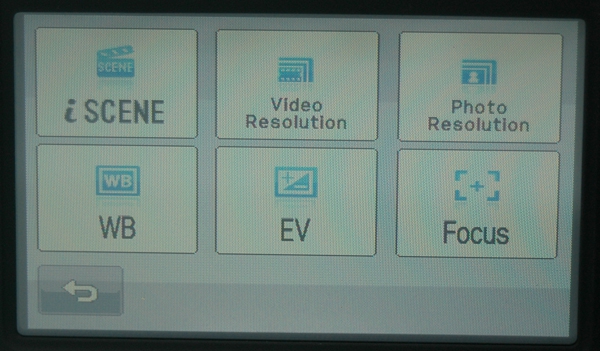
Figure 15: When you press the Quick Menu button, there's not a lot of options available to play with, but these are the ones most people will be familiar with.
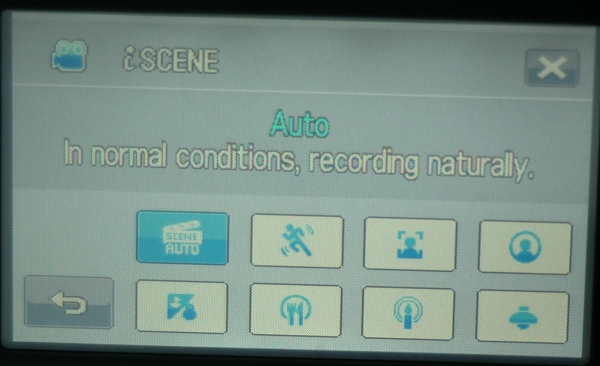
Figure 16: iScene is the brand name given to Samsung's automatic everything settings for the camera. While you can have iScene select the appropriate settings for the conditions, there are also options for the usual things we take pictures of -- sports, portraits, indoor settings, candlelit dinners, etc. etc.
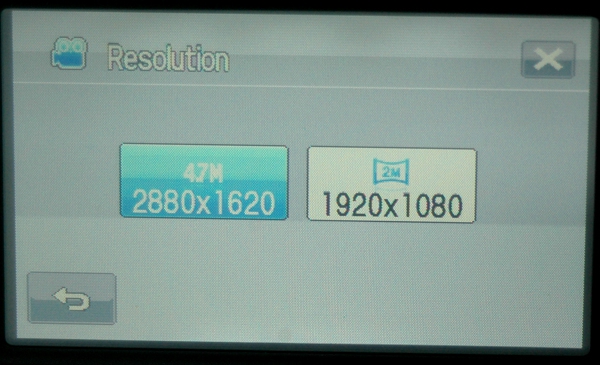
Figure 17: There are only two resolutions available for photo capture; 4 megapixel and 2 megapixel.









