


Monday, September 27, 2010
My Journey to a Media PC in the Living Room
Posted by Don Tolson in "Digital Home Talk" @ 07:00 AM
TV
As I mentioned above, the Dell I ordered came with a Hauppauge 1250 digital/analog TV tuner, so getting the TV side of things set up was pretty easy. Basically all I had to do was attach the cable from my wall socket to the card CABLE-IN socket and away I went. Set up of the TV signal under WMC went pretty smoothly. Once I told WMC where I was located and who my service provider was, WMC automatically downloaded a complete guide of shows for all the available channels. It was pretty cool being able to browse through the guide to select what I wanted to watch without having to 'channel scan', like in the old days. I can even add or delete channels from the guide, so it shows just what I have available to me (or I want people to be able to find :-)).
Now, forgive my ignorance if this is 'old school', but I have to say that recording a TV program is just a breeze with WMC. Instead of having to go into a special 'record' mode interface where I specify the start time, the channel, the duration, what format, where I want it stored, etc. etc., on WMC you just find the show you want in the guide and press the Record button on the remote! What could be easier! And if you 'right click' on the entry, you get a menu of options of which one is 'Record as a Series' which means it will schedule recordings of this show at this time every week. You can even tell it to ignore repeats and just get the new episodes as they are aired! Pretty cool.
The only problem was that the Hauppauge card will only recieve analog signals or unencrypted 'clear QAM' digital signals, so I was only getting about half of the channels I had subscribed to through my cable provider. As well, none of the HD channels were viewable. I knew the HD ones were going to be a problem, since Jason had warned me about this, but I wasn't expecting as many of the digital channels to be encoded. Hmmmm, how to get around this???
The Quest for Digital and HD TV
My first thought was that since I had a Shaw Cable set top box, maybe I could use it to decode the digital and HD signals and 'feed' them to the PC. The Shaw box is about 3 or 4 years old, so it doesn't have any HDMI outputs, but it does have S-Video, Component Video and Digital Audio (optical and RCA coax). The Hauppauge card only has two video inputs -- composite and S-Video. So, my first attempt was an S-Video connection to the card and a digital (RCA coax) connection to the input on the PC. Lo and behold, I could now 'see' all the channels I subscribed to (albeit in 480i, the maximum resolution of S-Video), but the sound was out of sync. I figured this was probably due to processing delays in the Hauppauge card, so I downgraded the audio to straight stereo coax via a 3.5mm phone jack on the Hauppauge card. Now the audio and video are synced and, after hooking up an IR blaster to change channels on the Shaw box, everything is integrated with the WMC TV guide. I know we're not using the full capability of the screen or the signal, but at least we can see everything without reconfiguring anything. (Yep, I know... I could take the component video from the Shaw box to a separate input on the AKAI screen, and push the digital audio to another input on the Yamaha amplifier, but that would defeat the purpose of integrating everything through WMC, and wouldn't allow me to record programs...).

Figure 6: Here's what a normal Analog (480i) station looks like on the monitor now. Almost half of the screen landscape is not being used. But at least it's not being stretched to fit, like some set top boxes do.
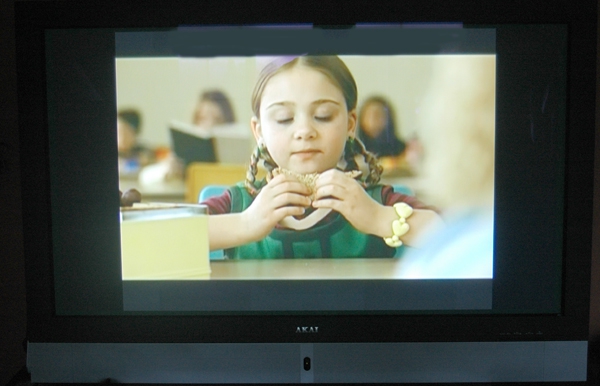
Figure 7: Here's what an HD channel looks like on the display. Even more of the display remains unused.
In an attempt to solve the HD display problem, I acquired the AVerTV HD DVR card from AVerMedia. It's a PCIe card which takes component video input via a HDMI dongle. I was hoping I could replace the Hauppauge card with this, and it would fit right in to WMC. Well, the card works exactly as described -- taking the component video from the Shaw box and pushing it directly through the PC to the monitor -- except only through AVerMedia's software, not WMC. When the AVerTV HD DVR card is installed in the PC, WMC thinks there's no TV tuner installed and won't let me configure it to accept video from the Set top box. Apparently, WMC wants to see an analog TV tuner of some kind in the box before it will configure, and the HD DVR is digital only. When I contacted AVerMedia support, they said there were no plans to support WMC with the HD DVR, so I returned it. Too bad.
My next attempt was a HAVA Platinum HD box. This box has way more functionality than I need, but the price is right ($130USD after discounts). It accepts component video input, and has a TV Tuner software plug-in to make it fully compatible with WMC. According to some other members of The Green Button forums, the output is not full HD, but a 'nicely formatted' 16:9 picture. Unfortunately, after it arrived, I found out that it assumes that you have your wireless router within cable distance of your video source. It requires a direct connection to be visible to the network and the MediaPC. According to the specs, the output over the network is only SDTV, so that doesn't get me any further than what I have now. I returned it without even opening the box.
The Wireless Network
Originally, I had a DLink DIR-655 Gigabit N router for the home wireless network, but I was finding the signal was a bit weak and we'd be losing connection frequently when using the Internet Radio or my phone. The problem is metal. We have forced air heating in our home, with a significant amount of ductwork in the walls and in the space between the basement and main floor. Unfortunately, the best place for the cable modem is in the basement in the office where the main home computers and the cable connection are co-located and everything else is one floor up. The 655 just didn't seem to have enough 'ooomf' to keep things connected, especially when the receiver was on the smaller, less sensitive side (like the Sanyo radio and my phone). Even some of our laptops were having difficulty at the other end of the house.
I tried various other routers from DLink and Linksys as they became available, but I didn't really see any improvement in signal strength. Then, I saw deal at the local Future Shop for a Netgear WNDR-3700 (a dual-band Gigabit N router) and decided to give it a try. Wow, what a difference it made in my house. I now get full-bar connections pretty well throughout the house on all my laptops and desktops on the 5Ghz band and coverage out to my back yard on my phone using the 2.4Ghz band.
Throughput is very good, as I am no longer getting complaints from the boys about their XBox Live connection 'stuttering' when I'm trying to download an update from Microsoft.









