


Monday, September 27, 2010
My Journey to a Media PC in the Living Room
Posted by Don Tolson in "Digital Home Talk" @ 07:00 AM
Creating a Media Library
Creating a media library from scratch can be a daunting task. Depending upon your age and 'audio collecting proclivities', it's possible to amass a huge array of different media in a variety of formats of widely varying quality -- everything from scratched up 78s from your grandmother's attic to an MP3 player chockablock full of audio and video snippets. In our own case, we had managed to amass a huge collection of records, CDs, video tapes, family video (edited down from miniDV tapes to DVD) and commercial DVDs.
Fortunately, we were already ahead of the game when it came to the CDs. Wanting to create a music library of everything we had, I already had all our 400+ CDs ripped to MP3s with the help of Nero's suite of applications, and then loaded them onto a 64G iPod.
About the same time (years ago), I transferred all our video tapes to DVD because I wanted to be sure to preserve them beyond the normal life of the tapes. The quality isn't the greatest, but what can you do from what was originally developed for normal, composite video resolution? Now the challenge is to change those into another digital format -- preferably mp4 or DivX or something like that, which could be accessed and directly played by PowerDVD or Windows Media Player or whatever. Fortunately, I found a DVD ripper which does the trick called WinX DVD Ripper. I'm now in the process of coverting all the 'family memory' DVDs and the old VHS tape conversions to DivX format. Fortunately, it works just fine on the DVDs since the copy protection was removed when they were originally created. I'm not going to rip copies of the commercial DVDs since I can just stick those in the drive on the MediaPC.
I've started ripping/transcoding the 500+ vinyl records using Acoustica's Spin It Again application, which I reviewed a couple of years ago. It's a fairly long, involved process, since you need to record the album first, then go in and set up the track starts and ends, then generate the MP3. On many of the albums, the track information is long lost to the annals of musical history somewhere, since many of them are unknown artists (anyone remember Syrinx?) or very old pressings. My Mom and Dad recently bequeathed me their collection of '40s records and even earlier 78s, so it's going to take a while to digitize and clean those up.
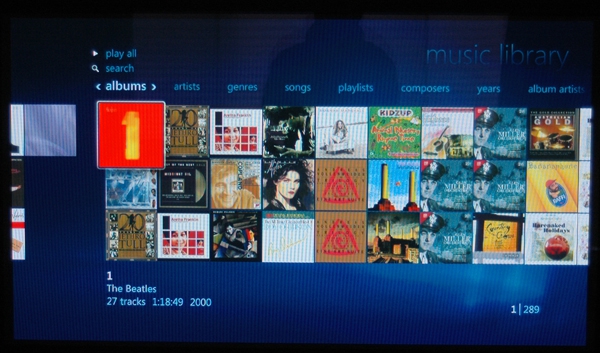
Figure 8: Here's how Windows Media Center displays your music library. The interface for the video library is very similar.
I have to admit, it's pretty cool being able to to access all of our digital music + Internet radio from the living room without having to go rooting around finding various CDs or video tapes.
And as desired, we've eliminated a bunch of different (and older) pieces of technology to interconnect and maintain.
Where we are now...
So here's what the setup looks like now...
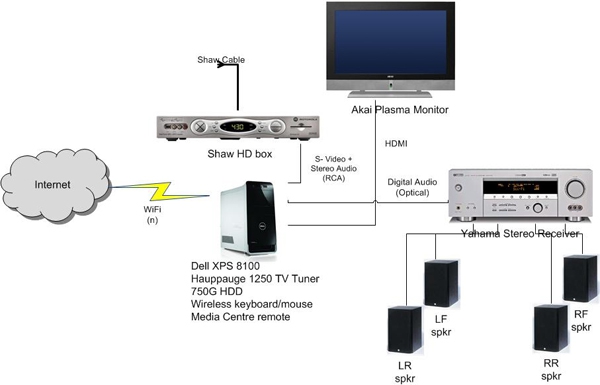
Figure 9: The revised schematic diagram of the 'After' transformation. Quite a bit simpler and with greater functionality than we had before.
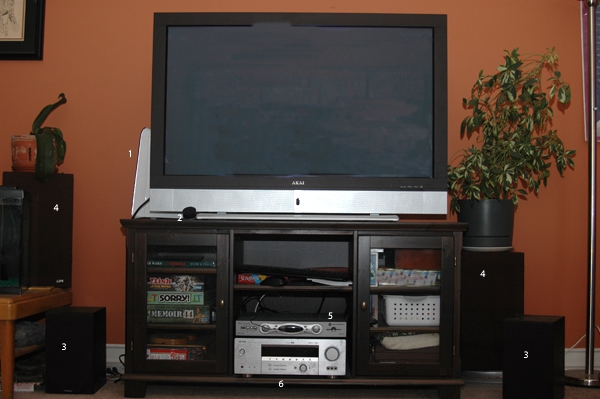
Figure 10: Here's a photo of what it all looks like now. (Sorry, I didn't think to take a 'before' shot -- just imagine a whole bunch more stuff hanging off the sides of the cabinet.)
As you can see from the photo above, the new set up is pretty clean and straightforward. For those interested in specifics about the equipment, the screen is an AKAI 50 inch plasma monitor (PDP5073TM) I picked up at Costco about 4 years ago.
At #1 above, you can just see the Dell XPS8100 peeking out from behind the screen. #2 is the infrared receiver for the Windows Media Remote which came with the package. It plugs into an IR jack in the back of the Dell.
#3 is a pair of Paradigm Titan bookshelf speakers which act as my front drivers. #4 are EPI 100 bookshelf speakers I bought about 35 years ago, which are handling the rear sounds. Yes, I know they're in the wrong place, but I didn't want to have their cables stretched across the floor of the living room just yet. The plan is to get up into the attic and route the rear speaker wires that way, or wait until we replace the wall-to-wall carpet in the living room :-)
#5 is the HD box from Shaw Cable. It's also about 4 years old, so while it has component video and digital audio outputs, it doesn't have HDMI. I bought it outright from Shaw, so I'll have to contact them to see if I could trade for a newer model with an HDMI output port (just to cut down on the number of cables.)
#6 is the Yamaha HTR-5750 receiver. Also about 5 years old, without any HDMI inputs. I might look at replacing that as well, but I'm pretty happy with its performance and it only really has one input -- from the media PC, and it's a digital optical cable.
Oh yeah, the cabinet/stand is from IKEA.
As I'm writing this, the MediaPC is a single source for all the music, Internet radio, TV and video we have in the house. It also handles (quite nicely, thanks) DVDs and Blu-Ray movie playing. The only slight downsides are a) We're still not seeing HD TV in HD at the moment, (see the discussion above) and b) we still have to deal with multiple remotes. Unfortunately, the Harmony remote I have (the 688) won't handle much of the media PC functionality. So we have the Harmony to turn everything on and set 'modes', then the WMC remote to navigate. But it's not a biggie.
If Wishes Were Horses
So, how could my digital life be even better? Well, there's a few things that I would like to see integrated into the WMC solution.
a) I wish that Windows Media Centre had better integration with Internet radio, and I didn't have to depend on a third party plug in. mcShoutCast works fine, but there are a number of radio stations which I know stream to the Internet, that I'm not able to get to work on the plug-in. Yes, there is also the Live365 stations provided within WMC, but the interface looks a little dated, and not all the stations I want are there. (Plus, the stations have commercials -- Yukkk).
b) I wish that WMC was also integrated better with TV shows available via streaming on the Internet. Apparently, this is a 'Canadian' thing, since there is apparently an Internet TV option on the WMC menu systems, but I don't see any of this in my version. Maybe with the announcements of expansion of Hulu outside of the US there will be some better integration of services like these. I've also heard talk around of the next version (8) of WMC providing Internet-TV, but at the expense of the live TV capability...Why can't they keep both?
c) I'm looking forward to a ZUNE-like interface on the music portion of WMC. The current interface is OK as far as it goes, but a ZUNE or WP7 interface would be much better and provide better flexibility.
Don is a Solution Architect with Fujitsu Consulting, specializing in Security and Project Value Management. He's been working with PDAs and Smartphones since the early days of the Sharp Wizard, iPAQ and Jornadas. As the Enterprise Mobility lead for North America, he works with clients who want to take their applications that one step further into 'mobility' by putting them right on the corporate phones.

Do you enjoy using new hardware, software and accessories, then sharing your experience with others? Then join us on the Thoughts Media Review Team! We're looking for individuals who find it fun to test new gear and give their honest opinions about the experience. It's a volunteer role with some great perks. Interested? Then click here for more information.









