


Digital Home Thoughts - News & Reviews for the Digital Home

Be sure to register in our forums and post your comments - we want to hear from you!


Zune Thoughts

Loading feed...

Apple Thoughts

Loading feed...

Laptop Thoughts

Loading feed...


All posts tagged "codec"


Tuesday, December 22, 2009

FastPictureViewer Offer Free RAW Codec Pack

Posted by Andy Dixon in "Digital Home Software" @ 07:30 AM

http://www.fastpictureviewer.com/codecs/

"Windows Vista introduced a modern and extensible imaging framework called Windows Imaging Component (WIC). The operating system comes with built-in support for several common image formats including jpeg, bmp, png, gif, tiff and HD Photo. WIC makes it possible for 3rd parties to add first-class support for image formats to Windows, complete with thumbnails in Explorer, preview and slideshow support in Photo Gallery / Photo Viewer and metadata search integration."
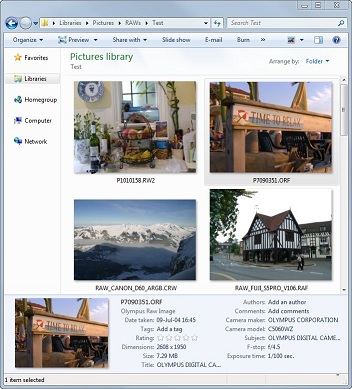
If you take your photos in RAW format to give you more control over the final image once you get home, then you might want to download this free codec pack from FastPictureViewer. It allows you to view the RAW images as thumbnails in windows explorer without having to load them in to a third party application first to view them. This makes it much easier to quickly scan your pictures to find the one you want to edit or display. It also allows you to view the RAW images through other viewers such as Windows Live Photo Gallery and Windows 7 Media Center.


Thursday, September 24, 2009

Windows 7's Expanded Video Format Support Rocks!

Posted by Jason Dunn in "Digital Home Talk" @ 09:30 AM

I'm slowly but surely migrating my computers from Windows Vista to Windows 7, and one of the things that is impressing me more and more as I use it is the expanded video codec support. With Windows Vista, one of the first programs I'd install would be VLC Media Player because Vista was incapable of playing pretty much anything but WMV and AVI files. With Windows 7, I chose not to install it because I wanted to see how good the new MPEG4/h.264 support was. In a word? Great! Going through my archive of old video files, which are in a variety of formats (AVI, WMV, h.264/MPEG4, AVI Divx), it looks like the only videos that won't play with Windows Media Player are some old-school Quicktime MOV files. No big loss there.

On to today's task: I had downloaded a video in XVID format and I wanted to burn it to a DVD for my wife to watch. The first thing that impressed me was that Windows Media Player 12 on Windows 7 was able to play this XVID file just as easily as it would play a WMV file. That's exactly how it's supposed to work. We should have had support like this in Vista, but Microsoft didn't seem to want to invest in the codecs - thankfully that has changed with Windows 7. Taking this XVID file, I loaded it into Windows DVD Maker, and it burned a DVD. That sort of smooth "A to B" task has sometimes been difficult on previous versions of Windows, so I'm impressed that Windows 7 finally gets it right. Read more...


Featured Product

The Canon PowerShot S100 - The incredibly fun and small camera that offers you 12.1 megapixels with a bright f/2.0 lens and full 1080p video recording . MORE INFO

News Tip or Feedback?

Contact us

Thoughts Media Sites

Windows Phone Thoughts

Digital Home Thoughts

Zune Thoughts

Apple Thoughts

Laptop Thoughts

Android Thoughts

Reviews & Articles

Loading feed...

News

Loading feed...

Reviews & Articles

Loading feed...

News

Loading feed...

Reviews & Articles

Loading feed...

News

Loading feed...

Reviews & Articles

Loading feed...

News

Loading feed...

Reviews & Articles

Loading feed...

News

Loading feed...






