Digital Home Thoughts - News & Reviews for the Digital Home

Be sure to register in our forums and post your comments - we want to hear from you!


Zune Thoughts

Loading feed...

Apple Thoughts

Loading feed...

Laptop Thoughts

Loading feed...


All posts tagged "cloud"


Wednesday, November 23, 2011

Build Your Own Cloud Service

Posted by Lee Yuan Sheng in "Digital Home Articles & Resources" @ 10:30 AM

http://www.tweaktown.com/articles/4...oday/index.html

"I don't know about you guys, but I'm sick and tired of hearing about the Cloud. When people talk about it they use future tense as if it isn't already here. The Cloud is going to be this big, giant wonderful thing that is going to change humanity forever. They make it sound like we are talking about something that will end starvation and human suffering. Well, I have news for you, The Cloud isn't really all that new and you don't have to wait for tomorrow to use it."

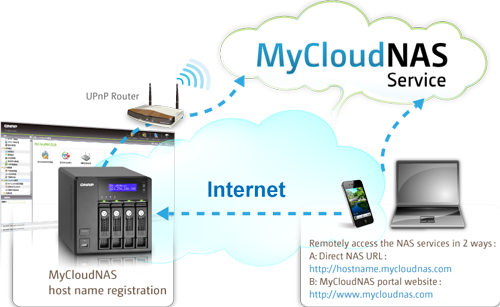
TweakTown takes a look at QNAP's MyCloudNAS service, which comes with some of their NAS boxes. This sounds like an awesome feature, but with ISPs starting to come down on heavy data users, not to mention most services having fairly poor upload speeds, the advantages may not be that great. What do you think?


Tuesday, August 9, 2011

Building Your Own Cloud

Posted by Hooch Tan in "Digital Home News" @ 02:00 PM

http://www.pcmag.com/article2/0,281...,2390307,00.asp

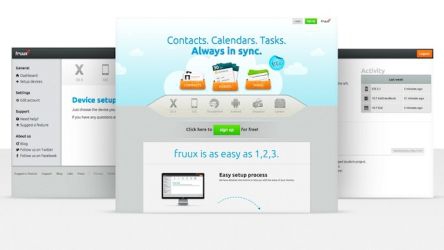
"But what if you can’t wait? Or what if you haven’t subscribed to the Jobsian reality distortion field? Certainly, there must be ways to replicate the iCloud experience with existing services. It turns out there are—in spades. The challenge is in paring them down. Once you do that, you can get everything you get from iCloud—and more—for free if you’re willing to mix together a cocktail of services. Here’s your shopping list."

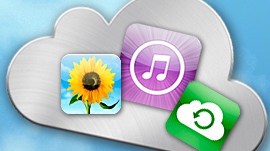
Now that Apple has announced its iCloud service, the whole cloud industry is going to get a huge shot in the arm from the added attention. If you are someone who is either impatient, or not privy to the Apple world, there are a wide range of cloud services that you can take advantage of, some which can even mostly replicate the exact same services that iCloud will bring. The biggest thing you should pay attention to, though, is how efficient each service is. I imagine that the draw of a lot of these services is that you will have access to your digital life from anywhere, and that means data. And at least for Canada, and large growing part of the world, that means that your data caps may come into play.

Tags: software, cloud

Tuesday, July 12, 2011

Primadesk: One App to Rule All Your Clouds?

Posted by Jason Dunn in "Digital Home Articles & Resources" @ 09:00 AM

https://www.primadesk.com/

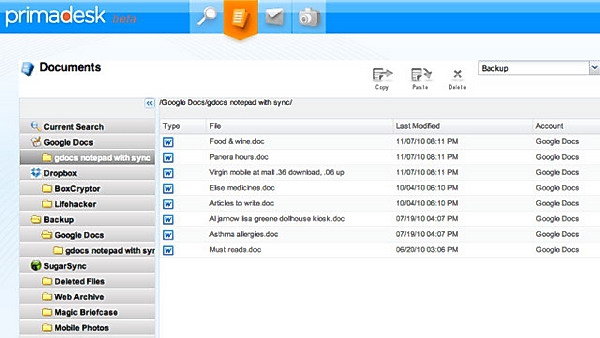
"Many of us rely on several different online services, like Google Docs, file syncing services, photo sharing and image hosting sites, and even probably a mix of webmail and corporate email providers. If you'd like a unified view of all your cloud content and way to drag and drop files between them, check out webapp Primadesk."

There are some Web startups that make you think "Do we really need that think you're creating?", but this is not one of them. I've long wondered who would be the first to create a tool that would unify disparate Web-based storage and sharing systems. This looks like it might be the solution - a system that allows you to view and search all your cloud data, and better yet, move data between services. I'll be following this with intense interest!


Thursday, March 10, 2011

2015 The Tipping Point for Cloud Computing? Intel Thinks So

Posted by Jason Dunn in "Digital Home Articles & Resources" @ 09:00 AM

http://www.tgdaily.com/hardware-fea...g-tipping-point

"Intel, like many other industry heavyweights, believes we are navigating towards a cyber future that will be heavily dominated by Cloud-based computing. According to Intel exec Jason Waxman, the rapidly evolving Cloud is already serving consumers and businesses by hosting terabytes of games, videos, pictures, databases and e-mail accounts.
"

Ah, the cloud. You can't go for ten minutes nowadays without hearing the word. This article discusses one of the potential pitfalls of the cloud that will need to be addressed going forward: where the data actually resides, how vulnerable the data is to legal prying, and how much confidence the consumer has it the system. One thing's for sure: with an increasing number of consumers storing more and more of their information online instead of a local hard drive, these questions will need to be resolved.


Wednesday, January 26, 2011

Google Takes Printing to the Cloud

Posted by Craig Horlacher in "Android News" @ 09:00 AM

http://gmailblog.blogspot.com/2011/...og+(Gmail+Blog)

"Let’s say you need to print an important email attachment on your way to work so that it’s waiting for you when you walk in the door. With Gmail for mobile and Google Cloud Print — a service that allows printing from any app on any device, OS or browser without the need to install drivers — you can."

Google Cloud Print lets you print from Gmail in any current web browser, desktop or mobile. You need a Windows PC connected to the printer your want to print to right now but they're going to add support for Mac and Linux machines as well. Just go into Gmail from a browser and you will see a "Print" option in it's drop down menu near the top right. Besides just printing your messages it supports the printing of some attachments like .doc and .pdf files. Give it a try! Does this solve a specific printing need for you?


Sunday, January 23, 2011

Making Use Of The Cloud: Lifehackers Top 10 Clever Uses

Posted by Andy Dixon in "Digital Home Talk" @ 06:00 AM

http://lifehacker.com/5734265/top-1...s-for-the-cloud

"The "cloud" is where we've been sharing our lives and storing our files for awhile now, but with so many cloud services there's much more you can do that may not have crossed your mind. Here are our top ten ideas."

The cloud has become a big buzzword over the last year or so. You may or may not understand what it means but you probably do use it in some form or other if you use applications such as Dropbox. Lifehacker has a list of 10 uses of the cloud you might find useful, some of which you might already be doing.


Friday, December 17, 2010

Dropbox Hits the Big 1 Dot 0

Posted by Jason Dunn in "Digital Home Software" @ 04:00 PM

http://blog.dropbox.com/?p=581

"We're super excited to announce the new hotness that we've been cooking up for the past few months: Dropbox 1.0! In addition to hundreds (yep, hundreds) of bug fixes, vastly reduced resource usage (think of it as the Prius model of Dropbox), Dropbox 1.0 ("Rainbow Shell") also offers support for extended attributes, selective sync, and a shiny new installation wizard. Those are just the CliffsNotes though - here's the true story behind Dropbox 1.0..."

If you need to keep files in sync, Dropbox is a great tool to do it - they've reached the big 1.0 milestone, and added a few new features. The most important of which is likely selective sync; if you're synching 30 GB worth of files between your PCs and you have a netbook with 32 GB of storage, you might want to trim that down a bit - now you can.

Don't have a Dropbox account yet? Sign up for free using this link and you'll get a bonus 250 MB of storage (and so will I).


Wednesday, July 21, 2010

Wuala: Online Backup and File Sharing

Posted by Reid Kistler in "Digital Home Software" @ 05:30 PM

http://www.makeuseof.com/tag/what-d...and-mozy-wuala/

"Wuala is definitely one of the most under-reported start-ups, and there's no good reason for that. It takes the best features out of both Dropbox and Mozy to create a must-have online file storage service for anyone with a computer. Developed by Dominik Grolimund and Luzius Meisser, the technology behind Wuala is truly amazing. By using a ‘grid' algorithm, Wuala can take advantage of unused disk space across its network of users in addition to data-centre storage."

Wuala presents an interesting option for online backup, storage, and file sharing, and the reviewer for Makeuseof.com certainly is impressed with the service, which is available for Windows (XP, Vista & 7), Mac (OS X 10.4 or higher), and Linux systems. As with many online backup services, users are allocated a small amount of "Free" storage space (1 GB for Wuala), and have the option to purchase additional storage if needed. Wuala, however, adds two additional - and optional - ways to gain storage, as indicated in the above screen shot: 1) you can "trade" space on your computer, which will then be used by the Wuala Cloud to store other user's files, and 2) you can be awarded space by inviting others to join the service. Be certain to read both the linked review, as well as Wuala's own website, for additional features - some of which are apparently reserved for "Pro Users" (those that Buy and/or Trade for additional storage).


Saturday, June 19, 2010

HP's ePrint Delivers Content Directly to Your Printer

Posted by Reid Kistler in "Digital Home Hardware & Accessories" @ 11:00 AM

http://h30495.www3.hp.com/about/eprint

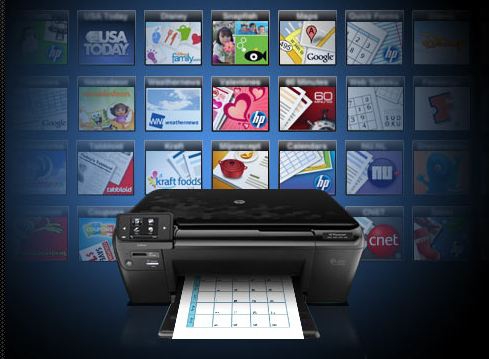
"HP ePrint lets you print from virtually anywhere. One of the ways that ePrint works is to assign an email address to your printer. To print, simply send an email containing your document to your printer's address. You can print images, Microsoft Word, Excel* and PowerPoint documents, PDFs, and photos. Note: .... Documents printed with ePrint may appear different from the original. Style, formatting, and text flow may differ slightly from the original document. For documents that need to be printed with a higher quality (such as legal documents), we recommend that you print from the software application on your computer, where you will have more control over what your printout looks like."

Sending a print job via the internet is not new technology, but HP's ePrint service raises the ante by simplifying the process, and by signing on content providers such as CNET, USA Today, and Google Maps in hopes of increasing the desirability and usage of the service. Indeed, while HP mentions the ability to store documents in "the cloud" for later printing, most of the emphasis appears to be on the "Print Apps" which provide "Instant access to relevant, printable web content from your printer screen," and appear to be primarily home or family based in their appeal. To utilize the service you need a HP printer with ePrint capability, and you must create an account, which will assign a random e-mail address to your printer. A typical Print App will then allow you to print content such as a Google map, a daily news summary, or perhaps a page of coupons. If the service catches on, HP would realize an increase in printer sales, and - perhaps more significantly - an increase in profitable printer ink sales. However, given the popularity of smartphones, netbooks, and tablets (Apple or otherwise), I would question how many people are clamoring to have more printed pages as opposed to having content sent to (or natively available on) their portable device of choice. Does HP's ePrint service seem significant enough that you would be willing to base your next printer purchase upon it?


Tuesday, March 30, 2010

Forget Web 2.0, behold Cloud 2!

Posted by Hooch Tan in "Digital Home News" @ 10:00 AM

http://techcrunch.com/2010/03/29/ipad-cloud-2/

"The future of our industry now looks totally different than the past. It looks like a sheet of paper, and it’s called the iPad. It’s not about typing or clicking; it’s about touching. It’s not about text, or even animation, it’s about video. It’s not about a local disk, or even a desktop, it’s about the cloud. It’s not about pulling information; it’s about push."

Predictions about the future, or near future are always fun. Marc Benioff's analysis about where the future of the Internet is heading has some interesting points, and as CEO of salesforce.com, a company that has survived a lot of changes, including the original dot com bust. To put things in a nutshell, it seems that he is talking about the shift of the Internet from a tool of work, to a tool of consumption. Sure, we all have had fun with the Internet over the years, from the Hampster Dance to Keyboard Cat but social websites like Facebook and platforms like the iPad have created a new opportunity that is much more consumer focused. I liken it to the difference in how we recorded shows. Way back, when we just got electricity, programming VCRs meant using a cryptic menu system where we used sacred remote controls to say when and which channel we wanted to record. No, it no longer feels like programming, but just saying, I want to record all the new episodes of this show, and the magic box does the rest. Oddly, while touch is touted as a large part of this, I wonder if there is room for gestures and voice to play a part. Touch is certainly natural, but the next logical step if with motions and talking to your devices.

Tags: internet, cloud

Monday, January 26, 2009

Sharpcast Launches SugarSync 1.5, Shared Folders Added

Posted by Jason Dunn in "Digital Home News" @ 11:00 AM

http://www.sugarsync.com/blog/2009/...s/#comment-4539

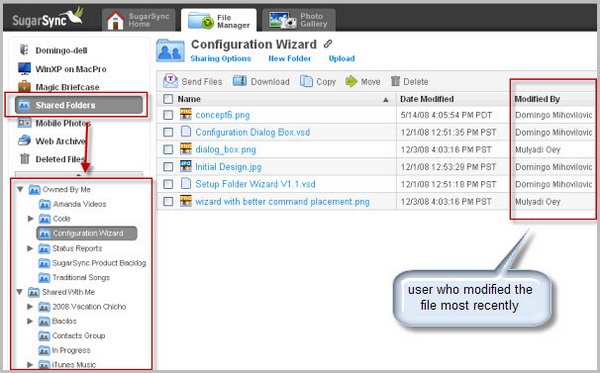
"Today, I'm very happy to unveil SugarSync 1.5, now with the much-anticipated Shared Folders feature designed to enable super easy sharing and collaboration with friends, family and colleagues. You've been asking for it, and we heard you loud and clear. In the past, you had the ability to send files of any size and also to share folders containing photos as Web Albums. However, you wanted to work collaboratively with team members on projects or and share entire folders. Now, you can."

I've always thought that SugarSync was a cool concept, but two things have stopped me from using it: first, the price is too high. I'm paying less than $5/month to Mozy [Affiliate] to back up just under 200 GB of data. Mozy doesn't have any remote data access or any of the other cool things that SugarSync does, so I'd be willing to pay more for that. Maybe $10/month...but not $25/month. If SugarSync wants to compete with the online backup services, they'll need to be more competitive.

Secondly, I wouldn't need all that storage if SugarSync allowed me to specify what I stored on their servers. If it functioned like Live Sync, allowing me to keep folders in sync, but putting some of that data up in the cloud (say, photos), that's something I'd be willing to pay for. I'd still keep my Mozy account for backup, but I'd be interested in a $5/month account from SugarSync to give me what Mozy does not.


Featured Product

The Canon PowerShot S100 - The incredibly fun and small camera that offers you 12.1 megapixels with a bright f/2.0 lens and full 1080p video recording . MORE INFO

News Tip or Feedback?

Contact us

Thoughts Media Sites

Windows Phone Thoughts

Digital Home Thoughts

Zune Thoughts

Apple Thoughts

Laptop Thoughts

Android Thoughts

Reviews & Articles

Loading feed...

News

Loading feed...

Reviews & Articles

Loading feed...

News

Loading feed...

Reviews & Articles

Loading feed...

News

Loading feed...

Reviews & Articles

Loading feed...

News

Loading feed...

Reviews & Articles

Loading feed...

News

Loading feed...


Local Guides

Sponsored links