Digital Home Thoughts - News & Reviews for the Digital Home

Be sure to register in our forums and post your comments - we want to hear from you!


Zune Thoughts

Loading feed...

Apple Thoughts

Loading feed...

Laptop Thoughts

Loading feed...


All posts tagged "Adobe"


Tuesday, December 2, 2008

Adobe Camera Raw 5.2 Released

Posted by John Lane in "Digital Home Software" @ 03:00 PM

http://www.dpreview.com/news/0811/0...awupdate5_2.asp

"Adobe has released an update to its Camera Raw Plug-in for Photoshop CS4. Camera Raw 5.2, which replaces v5.1, extends support to seven more cameras, including Canon EOS 5D Mark II and Panasonic DMC-G1. The update includes enhanced color profiles, output sharpening and a new Targeted Adjustment tool. In addition, users can save all image adjustments and settings as a single snapshot for future reference."

The latest release of Adobe Camera Raw adds more than just the usual new cameras. It also adds some great new features. The targeted adjustment tool is especially useful in developing your raw images as you can adjust parts of the photo differently. Kudos to Adobe for continuing to add features to their raw processor. The only downsides I see is that you have to manually remove the beta camera profiles (the only change was to remove the words Beta 2). Some devotees still think the Nikon and Canon software does a better job of raw conversion, but, each new version from Adobe reduces the gap. ACR 5.2 is available for Photoshop Elements 6 & 7, Premiere Elements 4 & 7 and Photoshop CS4.


Monday, October 27, 2008

Learning the Ropes with Adobe TV

Posted by Jason Dunn in "Digital Home Articles & Resources" @ 04:47 PM

http://tv.adobe.com/

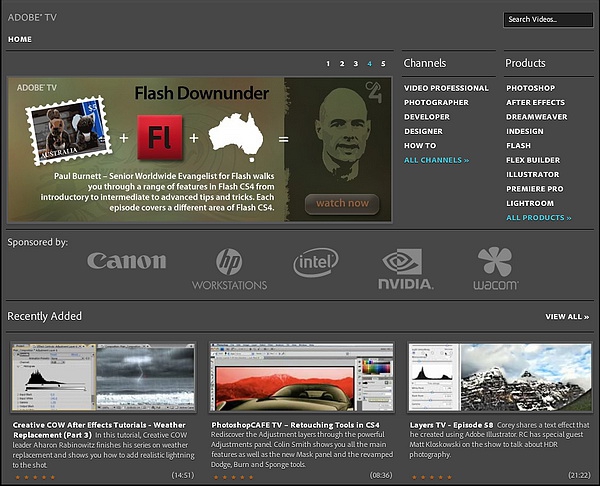
If you're using any sort of Adobe product - from Photoshop to Lightrom, from Flash to Premiere Pro, Adobe TV has great training vidoes you should check out. I'm a bit picky when it comes to training videos, because frankly so often they come across as thin marketing pieces, but I've been watching some of the Lightroom 2.0 videos, and I'm really impressed. I learned a few new things about the software as I was using it, and I'm definitely going to spend some more time with these videos. One complaint I have though is that they don't allow you to filter by versions of all software. For instance, there are Lightroom 1.0-specific videos mixed in with the Lightroom 2.0 videos, and the sorting options reference CS/3 and CS/4, which is of course Photoshop. Taxonomy issues aside, there's some great content here that's worth checking out.


Thursday, August 28, 2008

Adobe Releases Photoshop Elements 7 and Premiere Elements 7

Posted by Jason Dunn in "Digital Home Software" @ 01:00 AM

http://www.adobe.com/digitalimag/consumer/

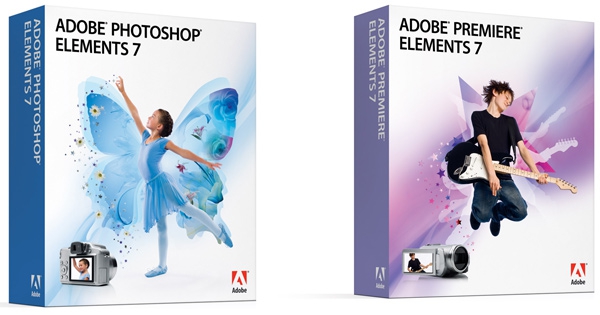
"New Adobe® Photoshop® Elements 7 & Adobe Premiere® Elements 7 software with Photoshop.com Plus** membership combines two powerful yet easy-to-use products, so you can do so much more with your photos and videos. Easily create extraordinary photos and incredible movies, use them together in cinematic slide shows and other creations, and stay connected with your favorite people and memories."

Photoshop Elements is a superb program, and provides most of the photo editing needs for beginner to enthusiast users - a good number of people that dish out the megabucks for Photoshop CS3 would be well served by Photoshop Elements. It's a bit hard to decode exactly what's new, but looking at this page, I'd say they've added the ability to combine a mask with a paint effect - they're calling it Adobe Smart Brush. Might be dodging and burning on steroids? The description is pretty vague. They have Adobe Photomerge as well, which allows you to combine several near-identical photos to get the best parts of each one. It's listed as "new" but this feature is in Photoshop Elements 6, so Adobe calling it new is confusing. Adobe really needs to come up with a better list of what's new and what's not - they can look to Ulead for how it should be done.

One of the new features of this software, and seemingly what they put most of their efforts into, is actually a software service: Photoshop.com Plus. If you sign up for the yearly service, you get template updates, 20 GB of online storage for your photos and videos, online album sharing, and the rather-vague-sounding "access your photos and videos from anywhere". Read more...


Thursday, March 27, 2008

Photoshop Express: Runs In Your Browser

Posted by Suhit Gupta in "Digital Home News" @ 08:00 AM

http://www.photoshop.com/express/landing.html

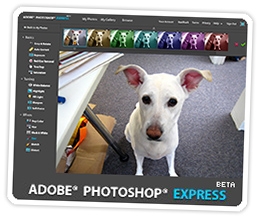
"We all knew this day would come sooner or later, but that doesn’t make it any less exciting, does it? Today, Adobe releases Photoshop Express for the web. Now before you go berserk, let us exercise some journalistic caution — it’s not everything you can do in Photoshop fit into a web browser. Not nearly. No layers here, no fancy pants masking. But for 95% of your photos, it offers pretty much all you need to fix ‘em up, and it does it with style. Whether adjusting exposure, white balance, or hue, touching up blemishes, or distorting your image, Photoshop Express provides an easy slider and thumbnails to give you an instant preview of your image at various settings. Even undo is better than you’d expect. Being on the web, this Photoshop’s made for sharing. Everyone gets their own URL at photoshop.com, and the slideshows are top-notch — big, beautiful images with classy transitions. Want to load in and edit photos from Picasa, Photobucket, or Facebook? No problemo."

I just gave it a whirl and I am not entirely sure I am a huge fan. Maybe I went in with really high expectations. First off, you need Flash Player 9 which requires a browser restart. The interface is a little heavy, I found that it slowed my browser down quite a bit. The options for image editing are understandably quite limited but perhaps too limiting for my taste (although it may just be the UI that I didn't like). While I can see how this will be a useful app, I am not sure whether it makes things easier to edit images in-browser then to save the image on your desktop and open it up with Photoshop or Paint .NET or some such. Try it out and let us know.

Tags: Adobe, Photoshop

Featured Product

The Canon PowerShot S100 - The incredibly fun and small camera that offers you 12.1 megapixels with a bright f/2.0 lens and full 1080p video recording . MORE INFO

News Tip or Feedback?

Contact us

Thoughts Media Sites

Windows Phone Thoughts

Digital Home Thoughts

Zune Thoughts

Apple Thoughts

Laptop Thoughts

Android Thoughts

Reviews & Articles

Loading feed...

News

Loading feed...

Reviews & Articles

Loading feed...

News

Loading feed...

Reviews & Articles

Loading feed...

News

Loading feed...

Reviews & Articles

Loading feed...

News

Loading feed...

Reviews & Articles

Loading feed...

News

Loading feed...


Local Guides

Sponsored links