Digital Home Thoughts - News & Reviews for the Digital Home

Be sure to register in our forums and post your comments - we want to hear from you!


Zune Thoughts

Loading feed...

Apple Thoughts

Loading feed...

Laptop Thoughts

Loading feed...


All posts tagged "ram"


Sunday, February 19, 2012

What Is The Best Bang For The Buck Upgrade

Posted by Richard Chao in "Digital Home Talk" @ 07:47 PM

http://lifehacker.com/5883376/what-...only-afford-one

"What Hardware Upgrade Will Best Speed Up My PC (If I Can Only Afford One)?"
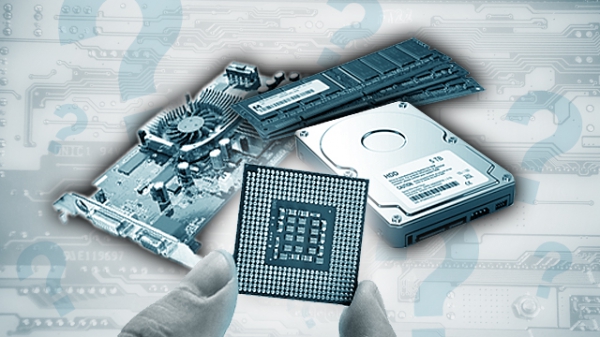
What hardware upgrade is your best bang for the buck if you can only choose one? Of course there is no definitive answer as PCs vary in configuration and it also assumes you are able to make upgrades to begin with. Many people are moving from desktops to laptops at home so this question will depend on your equipment.

If you are running a laptop, your hardware upgrade options are typically limited to RAM or storage. If you have a desktop, your options are wider and range from video cards, processors, RAM and storage. So, the first step is to examine your system. If your PC has 512MB to 2GB of RAM, an upgrade to 4GB will be the cheapest way to get a performance boost. However, if your PC already has 4GB, another few extra gigs won't give you the same boost and therefore your money will be better spent elsewhere. If you have a laptop, your other option is converting from a HDD to a SSD. If you can swing the money on a good SSD, you will not only see performance gains but noticeable gains in run time as SSDs use much less energy.

If you have a desktop, you have a few additional options. If you game, you may want to take a look at your video card. If you run multiple intensive process at once, you may want to take a look at upgrading to a multi-core processor.
Thursday, October 1, 2009

Do You Really Need More Video RAM Than Regular RAM?

Posted by Hooch Tan in "Digital Home News" @ 02:00 PM

http://www.tomshardware.com/reviews...-4870,2428.html

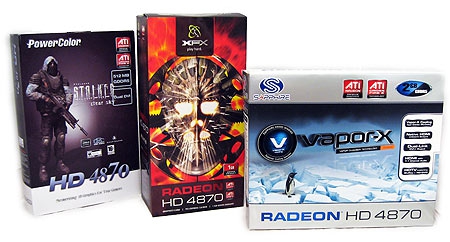
"The focus of this article isn't to dig into the minutia of where your graphics card RAM is being used. Instead, we're more interested in looking at the tangible impact that different amounts of graphics card RAM will have on your gaming experience. Our goal is to let you know exactly what advantage, if any, you can expect from a graphics card that has more RAM on-board."

I do not actually know anyone who has a video card with more RAM than the PC has, but I do know people who still use computers with 256 or 512MB of RAM. If you've been shopping for a video card lately, you have probably noticed that a lot of manufacturers are promoting how much RAM is on the card. Why? Well, RAM is a cheaper "upgrade" to a card than a better GPU. And who can resist sexy numbers like 768 megabytes or 1 or even 2 gigabytes? For gamers, knowing how to make the most of your money is very important and Tom's Hardware does give you an answer at the end. Unfortunately, the trend is towards laptops, notebooks and netbooks, and while they are improving, the opportunity to cherry pick a sweet video card is quickly diminishing.


Wednesday, July 29, 2009

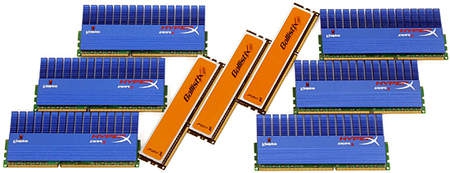
Do Fast RAM Clock Speeds Really Matter?

Posted by Jason Dunn in "Digital Home Articles & Resources" @ 12:29 PM

http://www.tomshardware.com/picture...aling-ddr3.html

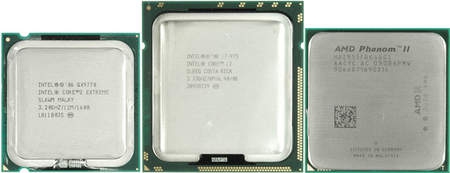
"In general, the benefit of expensive enthusiast memory is at least questionable. We found that tight timings are typically more beneficial than high memory clock speeds. But in the end, it's important to look at the benchmarks that are relevant to you. This picture story compares the performance benefits of using faster DDR3 memory across all three popular platforms: AMD's Phenom II X4 955 (3.2 GHz), Intel's Core 2 Extreme QX9770 (3.2 GHz), and the Intel Core i7-975 (3.33 GHz), which is Intel's current flagship solution for enthusiasts and professionals."

This is one of those hard-core articles that won't interest everyone, but if you're keen on maximizing performance and have wondered if that ultra-fast expensive RAM is worth it, this is worth checking out. The results may surprise you: in nearly every case, the improvement was in the 3% to 5% range, making it hardly worth it.


Sunday, July 12, 2009

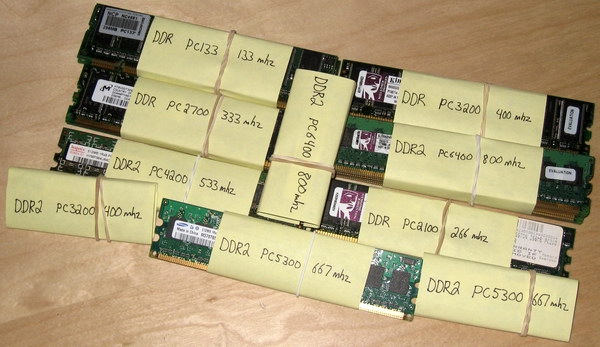
RAM Heaven: Where My Old RAM Goes

Posted by Jason Dunn in "Digital Home Talk" @ 12:47 PM

I've been mucking about with one of my computers this weekend, performing a couple of upgrades to it (details on Monday) and since one of those upgrades was a RAM upgrade, I retired the old RAM. I have a small plastic container that I use to store the old RAM, but I've never organized it into any logical fashion so if I need something I have to squint at tiny labels to figure it all out. Today I took a few minutes and sorted and labelled the RAM groups I have. It's quite funny to see all that RAM together in one place, ranging from the lowly 256 MB PC133 RAM up to the more modern 1 GB PC6400 chips. It's amazing how cheap RAM has become as well - yesterday I picked up 2 x 2 GB sticks of PC26400 RAM for $64.99 CAD. 4 GB of RAM for $65...it's amazing how things have changed. I don't tend to keep too many old part lying around, but RAM is so small it's easy to keep a collection for the occasion when you run across an old computer that could use a boost. What do you do with your old RAM or old PC parts?


Thursday, April 9, 2009

Tom's Hardware Asks How Much RAM You Really Need

Posted by Hooch Tan in "Digital Home News" @ 06:00 AM

http://www.tomshardware.com/reviews...grade,2264.html

"Once the pride of the so-called upper middle class in the United States, McMansions and SUVs have now become symbols of excess and waste--at least the reminders of an era past. Green movement proponents should certainly be happy that so many “earth abusers” are beginning to see the light, but what about performance-computing fanatics? With memory prices near record lows, is there any good reason not to fill every slot with low-cost 2 GB DIMMs?"

While netbooks and nettops are smoking sales charts, they usually come with pretty weak configurations, limiting their use. When you need to do more demanding work like editing large photos, video editing or gaming, a traditional PC, usually a desktop, is in order and with that the question is how much RAM should you get. Fortunately, gone are the days where manufacturers try to pass off systems that barely have enough RAM to load the OS without swapping, but extra RAM can certainly help. For the past while, 4-6GB has been the sweet spot in terms of price and performance. Tom's Hardware does a check to see if this still holds true or whether things have changed, and buckets of RAM can improve performance. I'll leave their results to the article, but I'll say that in general, someone should get as much as they can reasonably afford, even to the point of reaching at least 4-6GB of RAM over a faster CPU, because once the OS starts swapping, that smoking CPU will spend most of its time waiting for work. Another caveat is that if you plan on having more than 3GB of RAM and using Windows, make sure you use the 64 bit version (XP, Vista, etc) or the extra RAM you've got will just go to waste.


Featured Product

The Canon PowerShot S100 - The incredibly fun and small camera that offers you 12.1 megapixels with a bright f/2.0 lens and full 1080p video recording . MORE INFO

News Tip or Feedback?

Contact us

Thoughts Media Sites

Windows Phone Thoughts

Digital Home Thoughts

Zune Thoughts

Apple Thoughts

Laptop Thoughts

Android Thoughts

Reviews & Articles

Loading feed...

News

Loading feed...

Reviews & Articles

Loading feed...

News

Loading feed...

Reviews & Articles

Loading feed...

News

Loading feed...

Reviews & Articles

Loading feed...

News

Loading feed...

Reviews & Articles

Loading feed...

News

Loading feed...