


Friday, March 20, 2009
Adobe Lightroom 2 Delivers A Great Raw Photo Workflow
Posted by Jason Dunn in "Digital Home Software" @ 07:00 AM
Shortcuts and Speed Enhancements Galore
One of the great things about Lightroom is how heavily optimized it is for a fast-paced workflow. You can tell that this was designed by people who understand that every unnecessary mouse-click and keystroke is a waste of the user's time. That's not to say that this software requires memorization of arcane keystrokes; every function is available using the mouse or menu, but as you use the software more and discover they keyboard shortcuts, it becomes even faster to work with your images.
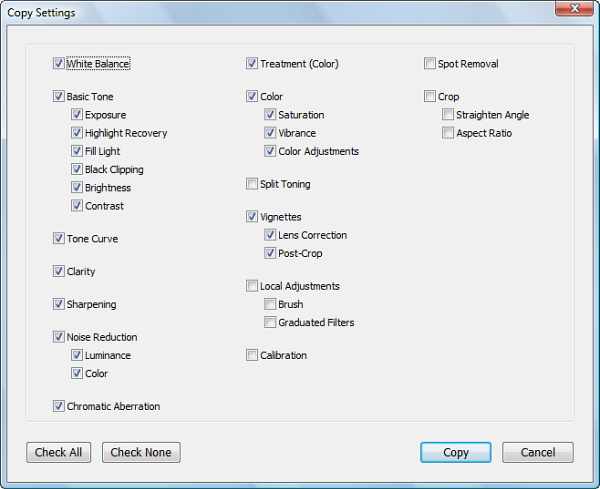
Figure 15: The Copy Settings window gives you a great degree of control.
One great example of this is the keyboard shortcut for Copy Settings. Let's say you have a batch of images where a dozen images were shot under the same lighting conditions, but the first image needed extensive adjustments before you were happy with it. With most image editing software, once you finish with the first image, you go onto the second one, re-doing all the same work. Not very efficient, is it?
With Lightroom, you simply press Control + Shift + C and the Copy Settings window appears. From this window, you can select which image adjustments you want to copy – and every image adjustment you can think of is there. Once you've set the adjustments, you go to your next image and press Control + Shift + V to paste the settings onto the image. You'll see your plain raw image transform to match the image you pulled the settings from: exposure, contrast, brightness, tone curves, and even local adjustments such as brush and graduated filters. Odds are you'll need to do some fine-tuning to the image, but it's a huge time-saver to be able to clone those settings from one image to another.
Adobe Lightroom 2: It's The One to Beat
Lightroom 2 is a deep product - I've only skimmed the surface of much of it. I didn't dive into the fact that, just like Adobe Photoshop, Lightroom can accept presets (similar to Actions). There are lots of great places to find free presets, all you have to do is look - there are also some commercial packages as well. Presets are a good way to quickly change your images, and especially if you're just getting started with Lightroom, they can be a good way to understand how the many sliders changing will impact your image.
Is Lightroom 2 missing anything? Sure. Two of the features I'd like to see in the next major version are HDR (high dynamic range) processing, and automatic lens barrel distortion similar to what DxO Optics Pro offers. HDR photography is all the rage now - whether or not you like the look - and a tool like Lightroom is the perfect place to do HDR work. I've yet to purchase a software bundle for HDR because I'm not sure which is the best out there - I think Adobe should buy up the best tool out there and integrate it into Lightroom and save me the trouble!
The best way to experience what Lightroom has to offer is to set your camera dial to raw, shoot some pictures, and download the 30 day free trial of Adobe Lightroom 2. If having great quality images and saving time is important to you, the $265 USD price tag is well worth the investment. Lightroom earns my highest recommendation and is the best tool for raw photo processing that I've ever used.
Jason Dunn owns and operates Thoughts Media Inc., a company dedicated to creating the best in online communities. He enjoys photography, mobile devices, blogging, digital media content creation/editing, and pretty much all technology. He lives in Calgary, Alberta, Canada with his lovely wife, and his sometimes obedient dog. He loves a good raw workflow!

Do you enjoy using new hardware, software and accessories, then sharing your experience with others? Then join us on the Thoughts Media Review Team! We're looking for individuals who find it fun to test new gear and give their honest opinions about the experience. It's a volunteer role with some great perks. Interested? Then click here for more information.









