


Friday, October 17, 2008
The Swiss Army Knife of Video Encoding: TMPGEnc 4.0 XPress
Posted by Jason Dunn in "Digital Home Software" @ 07:00 AM
Encoding a DVD: This Works Pretty Nicely!
Curious about using a DVD as a source, I inserted Where The Light Is, a John Mayer live concert DVD I'd recently purchased. Unlike many other programs, TMPGEnc 4.0 XPress wasn't smart enough to scan the DVD and pick up the files - I had to manually point it at the VIDEO_TS folder. Once that step was complete, the rest of the process was easy. After it scans the DVD drive, it displays a list of the videos on the disc - it's easy enough to pick the one you want because the main movie will usually be the biggest. I was given the choice of which audio track I wanted to use (6 channel Dolby Digital, or 2-channel stereo), and the next step involves how it will be imported.
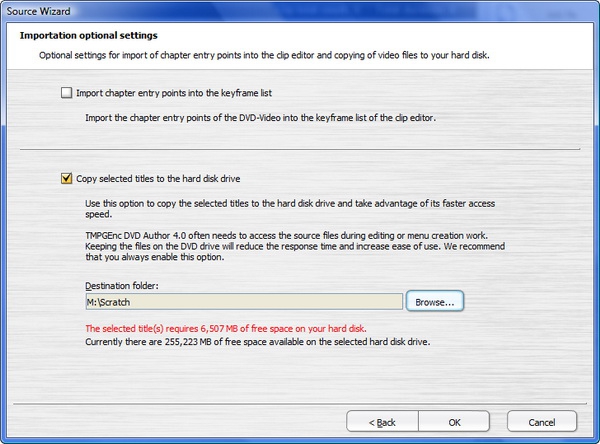
Figure 9: If you have the hard drive space, you can opt to copy the DVD files directly to your hard drive for faster access. This process adds several minutes to the process however.
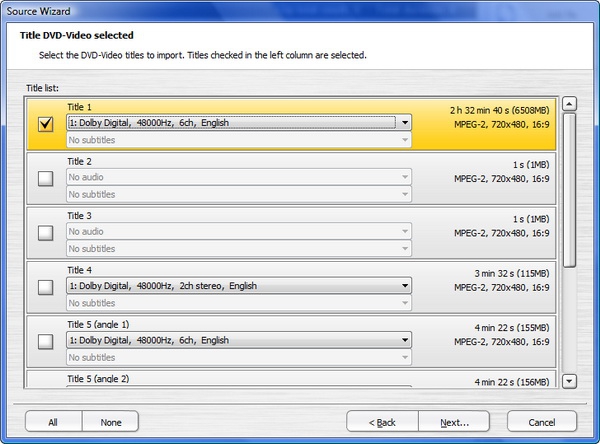
Figure 10: You can pick whichever audio track you want.
When I started the encoding process, the CPU usage shot to 90% and it began the first pass of the footage, analyzing it for optimal bit rates. After a few minutes the "remaining time" counter settled down to 3 hours 31 minutes. The CPU continued to pound at between 78% and 89%, meaning that all four cores were engaged in the process. That's a beautiful thing! The fact that I could easily move the window, and minimize it, are further testaments to the superb programming that TMPGEnc put into this product.
Further Testing Notes
I've been using this software intensely over the past few weeks, so I have a lot to say about it. First is that while it can import DVR-MS files (Windows Media Center recordings), be prepared for some serious disk grinding during the initial import, and don't bother clicking on the Output Preview in the Encoding stage - unless you want to have the software become completely non-responsive for several minutes. When getting to the encoding stage it gets stuck on "Preparing Output" for a very long time - and this is on my laptop with a 2.2 Ghz CPU, 4 GB of RAM, and a 7200 RPM hard drive.
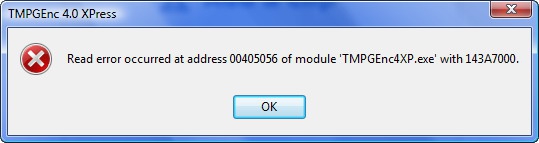
Figure 11: As stable as this software is in general, I still saw several crashes using it.
I also found that TMPGEnc 4.0 XPress had trouble with a series of AVI files that I had output from Adobe Premiere Elements. These were standard AVI files, 720 x 480 in resolution, but TMPGEnc 4.0 XPress refused to see them as anything other than 360 x 240 in resolution. Working with TMPGEnc tech support, they helped me find a codec that, once installed, allowed TMPGEnc Xpress 4.0 to see the AVI files in the correct resolution. What's curious about this is that these AVI files played back at the correct resolution in both Windows Media Player 11 and VLC - which means that the codec was on the system. I had an AVI file that I'd exported from Corel VideoStudio Pro X2, and despite help from TMPGEnc tech support, I was never able to get the software to read the AVI file at the right resolution. Codecs are really problematic on the Windows platform, and I've yet to see any programs that helps address the problem (by offering run-time codecs for instance).
Wrapping It Up
TMPGEnc XPress 4.0 is easily the most powerful video encoding tool I've ever used - I like using it so much that with many of my video editing projects, I'm exporting them as gigantic AVI files so I can use TMPGEnc XPress 4.0 to encode them. Why? The consumer-level video editing tools I'm using always seem to lack the type of output profiles I want to use. You'd think Corel, Pinnacle, Muvee, and Adobe had never heard of 720p h.264 files. Because I'm using this software as a secondary processing tool, it's frustrating to see the problems with AVI files - but tech support was able to help me through all but one of those problems.
As good as this software is, there's always room for improvement, so here are my suggestions. First, they should stop treating their customers like criminals and relax their activation process. Consumer backlash against DRM is very strong right now, and software activation is another form of DRM. I was pleased when ACD Systems, the makers of some of my favourite digital photo software, abandoned product activation after implementing it for one version of their most popular software. TMPG should do the same. Next, they should make their cutting/editing tools simpler and faster, and add some basic clip to clip fades. There's no reason why TMPGEnc XPress 4.0 couldn't be used as basic video editing software with a few minor tweaks.
Despite a few niggles here and there with the software, overall I've found it to be a powerful and useful tool. It's a bit pricey at $99 USD, but if you encode video on a regular basis and you want more control over the process, it will be the best $99 you've ever spent on software.
UPDATE: I found out after publishing my review that it DOES have fade in/fade out, but boy is it hard to find! When you go into Filters, click on EDIT FILTER LIST. You'll see the Filter Catalog list and there you'll see Video Fade-In/Fade-Out, along with an audio fade in/out. Click on one of them then click ADD, then click OK - it will then show up in the main list, where you can add it to your clip. After discovering this I'm able to do the two things I need: fade in/out, and cut clips (now that I figured out how).
Jason Dunn owns and operates Thoughts Media Inc., a company dedicated to creating the best in online communities. He enjoys photography, mobile devices, blogging, digital media content creation/editing, and pretty much all technology. He lives in Calgary, Alberta, Canada with his lovely wife, and his sometimes obedient dog. He wonders who will be the first OEM to truly cut out the crapware.

Do you enjoy using new hardware, software and accessories, then sharing your experience with others? Then join us on the Thoughts Media Review Team! We're looking for individuals who find it fun to test new gear and give their honest opinions about the experience. It's a volunteer role with some great perks. Interested? Then click here for more information.









