


Friday, October 17, 2008
The Swiss Army Knife of Video Encoding: TMPGEnc 4.0 XPress
Posted by Jason Dunn in "Digital Home Software" @ 07:00 AM
Step Two: Select Your Output Format
Once you're happy with the source, you move onto the second step, which is the Format tab - as in, picking which format you're going to output the video in. There are a lot of options: DVD standard MPEG2, HDV format MPEG, Blu-ray standard MPEG, AVI, WMV, Quicktime, Divx, MPEG-4, and even several audio-only formats. Oh, and an option for dumping the entire video file as a series of sequential still images. I'm a big fan of h.264 as a format, and since it's a variant of MPEG4, I selected "MPEG-4 File Output". I'm glad pressing F1 opens up the help PDF file right to the page with the screen I was looking at, because I didn't know that MPEG-4 AVC Format is the same as h.264. Since h.264 as a term has so much buzz nowadays, it would be nice if they had it listed as an option right up front.
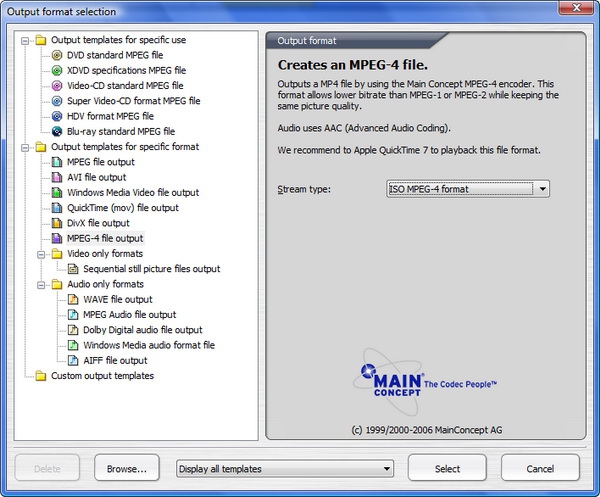
Figure 4: Selecting for video format you want to encode your file to.
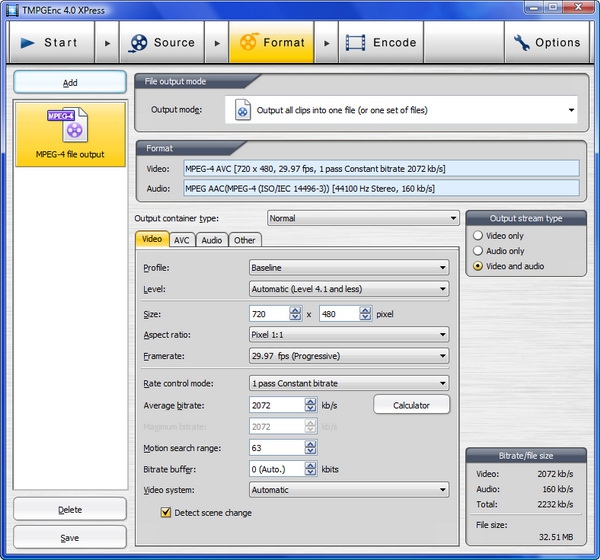
Figure 5: Getting down to the guts of your encoding settings.
With MPEG-4 as my output option, I was presented with the screen that has a bewildering array of choices (Figure 3), many of them over my head. Thankfully, every option has a default, so the only things I changed were the resolution of the output video file (from 720 x 480 to 640 x 480), the bit rate, and the type of encoding. The default MPEG-4 bit rate was 2024 kbps (2 mbps) which isn't bad, but I wanted to maximize the quality, so I used VBR and multi-pass encoding.
Multi-pass encoding is critical for maximum video quality, yet it's shocking how few video editors offer it as an option. The idea behind multi-pass encoding is that the video encoder will analyze your video first, before starting the encoding process, and while doing so the encoder will figure out the most efficient way to encode the video source. Neither Pinnacle Studio 12 nor Corel VideoStudio Pro X2 offer any options for two-pass encoding, on any file format. Most of these programs don't offer much in the way of variable bit-rate (VBR) encoding either, and VBR is important to maintain maximum video quality while keeping the file size from getting to big. Adobe Premiere Elements 4 offers two-pass VBR encoding on h.264 files, but only if you create a custom profile - and it's not very easy to find. I think most companies offering video editing software are short-changing their customers by not offering higher-quality video encoding. Why not offer users "Fast - Normal Quality" and "Slow - High Quality" encoding options? Let people make the choice for themselves. But I digress...
TMPGEnc 4.0 XPress, thankfully, offers quite a few options in this area: there are options for constant bit rate (CBR) and variable bit rate, as well as one-pass and two-pass encoding. I was a bit surprised to not see an option for three-pass encoding, because CloneDVD Mobile offers that, but I've never done any tests to confirm whether a three-pass encoding offers anything more than two-pass encoding, so maybe three-pass encoding is just empty hype.









