


Wednesday, February 13, 2008
Roxio's MyDVD 9: Feature-Rich but Problematic
Posted by Jason Dunn in "Digital Home Software" @ 07:00 AM
Using MyDVD 9
MyDVD 9 is Roxio software through and through. What I mean by that is that it has the Roxio blue/grey user interface, and it's fairly easy to figure out. But what that also means is that there are strange delays when you click on a menu, minimizing from the taskbar doesn't work, and there are stability issues (I'll get to those in a minute). Much to my frustration, MyDVD 9 also lacks an auto-save feature – I had worked on a wedding video project for about 30 minutes, hadn’t saved it yet, and after closing the preview window the application immediately crashed and I lost my work. That's just not acceptable for a modern application.
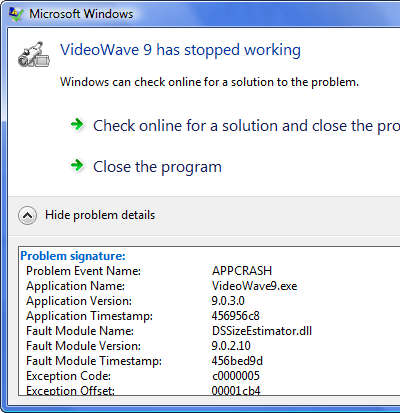
Figure 3: One of the frequent crashes I saw.
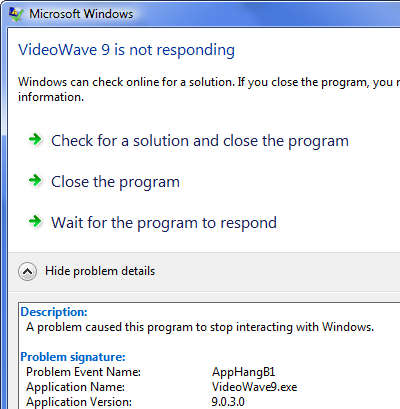
Figure 4: Another one of the frequent crash errors I saw.
Adding a sub-menu was one-click easy, but what showed up was confusing. I would have expected to be able to link a block of text to a sub-menu, but sub-menus can apparently only be linked to a button. I think buttons look a bit cheesy, so I would have preferred to be able to use text. More confusing was the fact that generating one sub-menu created four object layers: the button linking to the sub-menu, the sub-menu itself, a second sub-menu on the first sub-menu, and another sub-menu below that. Baffling, no? Thankfully, deleting the lowest-level sub-menu also deleted the third level menu - and it all still worked the way I thought it should. So what's the point then of the extra sub-menus? I have no idea.

Figure 5: The preview of the text titles was jagged and quite awful looking.
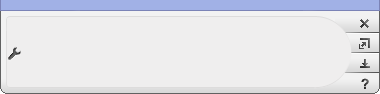
Figure 6: There's a mini mode for the main home screen, though what you're supposed to do with a blank work area is beyond me.
Two additional features offered are Slideshows and CineMagic Movies. I was eager to try the slideshow function, because earlier Sonic products had some of the best JPEG slideshows I'd ever seen. Most JPEG slideshows look fuzzy and blurry, because the JPEG is actually converted to 30 fps static video file, which results in a massive drop in quality. The Sonic slideshows were jaw-dropping crisp, so I was hoping they used that technology after Roxio got access to Sonic's technology portfolio. It was easy enough to select the 30 images for the slideshow, though after selecting them I was puzzled to see the import process seemingly do nothing for a full minute after it had imported the photos one by one. When the process finally freed up, I was able to select background music, and chose from several themes and transitions. I finished the process, burned a DVD, and all my hopes were dashed: the photo slideshow looked just as fuzzy and blurry as it did with MyDVD 8. Roxio clearly didn't take any of Sonic's vastly superior code for this task, which is very unfortunate.

Figure 7: The CineMagic results in a wide-screen format. It looked pretty good!
CineMagic is a sort of poor man's muvee AutoProducer; you select your footage, chose between 16:9 and 4:3 aspect ratios, optionally select the scenes, select a theme, and optionally select background music. It's nice to see some sort of automated video editing, but the results were a mixed bag – I selected the wedding theme and opted for no background music because I wanted to hear the audio from the source video. What I got was a video with no transitions between cuts (which made for some nasty jump cuts) and no audio at all. I tried again with another theme, and while there were transitions this time, there was still no audio. Why doesn't the application force you to pick a music file if there's no way to use the source audio? Better yet, why can't I use the source audio from my video? muvee AutoProducer is a far better choice if auto-editing is your goal.
I tried mixing in some photos, this time selecting the travel theme, and was again surprised by some weirdness: there's a 25 second intro with some canned music and it shows small versions of some of the photos – but they're so small that there's not much point in showing them at all. So, as you can doubtless tell, neither the slideshow function or the CineMagic auto-editing impressed me.

Figure 8: You'll be staring at this for a few seconds every time you exit the application.
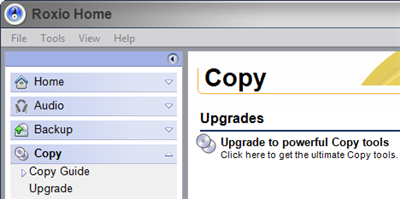
Figure 9: You'll be constantly reminded of functionality that your version of the software lacks.
Rounding out the bad news: the title engine (for text) isn't particularly impressive, the preview of the text is extremely poor quality (see Figure 5), and when you exit the program there's a splash screen that comes up telling you that the "component is closing" (see Figure 8). There's also the fact that this software tries to up-sell you to Roxio Media Creator 10 Suite at every possible opportunity – the start up screen contains ads for the suite (see Figure 1), and the main interface shows you options that you can't use...unless you upgrade of course (see Figure 9). It's not like MyDVD 9 is some sort of free download where the entire point is to up-sell you for more features (like Pinnacle's free VideoSpin is), so I think Roxio's aggressive up-sell tactics are over the line.









