


Wednesday, February 13, 2008
Roxio's MyDVD 9: Feature-Rich but Problematic
Posted by Jason Dunn in "Digital Home Software" @ 07:00 AM
Editor's Note: Roxio released version 10 of MyDVD this week. It may or may not fix the issues raised in this review.
Install and Setup
The software installation was straightforward - I entered the serial number and did a complete install from the first disc (which, according to Vista's control panel, takes up 364 MB of storage). Part of the setup process surprised me - the installation prompted me to install the Google Toolbar. I'm used to seeing a Google Toolbar being pimped with free software, or trial versions of some commercial software, but for software that you’ve paid for? And boxed retail software at that? It seems bizarre that Roxio would accept a subsidy from Google - it's not like MyDVD 9 is any less expensive than MyDVD 8. While all it takes to avoid the toolbar is clicking no, I think this sets a bad precedent. What’s next, an AOL trial? After the installation, Windows Defender flagged two system changes that were trying to load at startup: RoxioUPnPRenderer9.exe and RoxioUpnpService9.exe. From the file names the programs seem to be related to UPnP support, likely supporting a feature that allows you to stream content from your PC to a media playback device. My first question was why would I want this service from my DVD burning software? Roxio should focus on making MyDVD the best DVD creation software possible, not including extraneous features.
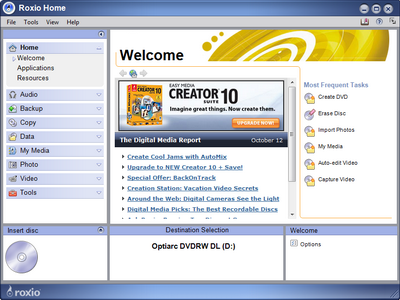
Figure 1: The main interface you see when you start the program - notice the ad for Easy Media Creator Suite 10.
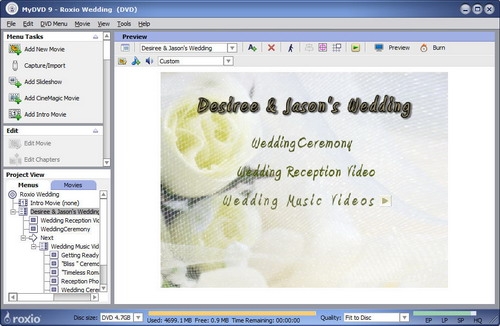
Figure 2: The main interface of MyDVD 9.
Broad Input/Output Support
As you might expect, the software supports a wide variety of audio, video, and image formats. It’s quite flexible in terms of the video, audio, and image formats that it can work with. Here's a breakdown:
Input formats: Video: AVI, DV, HD-V, MPEG-1, MPEG-2, MPEG-4, MPEG2-HD, IFO/VOB, DivX, DivX HD, XviD, DVR-MS, TiVo, ASF, MOV, WMV, QuickTime, 3GP, MPEG2 Transport Stream, H.264, OpenDVD
Audio: Audio CD, MP3, WAV, WMA, AAC, M4A, MP4
Image: JPG, PNG, TIFF, BMP, GIF
Output formats: Video: AVI, DV-AVI, HD-V, MPEG-1, MPEG-2, MPEG-4, MPEG2-HD, DivX, DivX HD, WMV, WMV HD, H.264, MP4, 3GP
Audio: WAV, WMA, MPEG-1/2
Image: JPG, PNG, TIFF, BMP, GIF
Video disc formats: DVD, Video CD (VCD), Super Video CD (SVCD), Mini DVD
Recordable media formats: CD-R/RW, DVD+R/RW, DVD-R/RW, DVD-R DL, DVD+R DL, DVD-RAM, BD-R, BD-RE, BD-R DL. Supports popular image formats: ISO, C2D, and BIN/CUE Different Versions, Different Features
So how does MyDVD 9 Studio ($49.99 USD) differ from MyDVD 9 Studio Premier ($69.99 USD)? Here's what the more expensive package offers:
It also offers DVD playback options, so if the above features are important to you (and you don't have DVD playback software on your PC already), the Studio Premier option may be the better choice. A complete list of differences is available.
Install and Setup
The software installation was straightforward - I entered the serial number and did a complete install from the first disc (which, according to Vista's control panel, takes up 364 MB of storage). Part of the setup process surprised me - the installation prompted me to install the Google Toolbar. I'm used to seeing a Google Toolbar being pimped with free software, or trial versions of some commercial software, but for software that you’ve paid for? And boxed retail software at that? It seems bizarre that Roxio would accept a subsidy from Google - it's not like MyDVD 9 is any less expensive than MyDVD 8. While all it takes to avoid the toolbar is clicking no, I think this sets a bad precedent. What’s next, an AOL trial? After the installation, Windows Defender flagged two system changes that were trying to load at startup: RoxioUPnPRenderer9.exe and RoxioUpnpService9.exe. From the file names the programs seem to be related to UPnP support, likely supporting a feature that allows you to stream content from your PC to a media playback device. My first question was why would I want this service from my DVD burning software? Roxio should focus on making MyDVD the best DVD creation software possible, not including extraneous features.
Figure 1: The main interface you see when you start the program - notice the ad for Easy Media Creator Suite 10.
Figure 2: The main interface of MyDVD 9.
Broad Input/Output Support
As you might expect, the software supports a wide variety of audio, video, and image formats. It’s quite flexible in terms of the video, audio, and image formats that it can work with. Here's a breakdown:
Input formats: Video: AVI, DV, HD-V, MPEG-1, MPEG-2, MPEG-4, MPEG2-HD, IFO/VOB, DivX, DivX HD, XviD, DVR-MS, TiVo, ASF, MOV, WMV, QuickTime, 3GP, MPEG2 Transport Stream, H.264, OpenDVD
Audio: Audio CD, MP3, WAV, WMA, AAC, M4A, MP4
Image: JPG, PNG, TIFF, BMP, GIF
Output formats: Video: AVI, DV-AVI, HD-V, MPEG-1, MPEG-2, MPEG-4, MPEG2-HD, DivX, DivX HD, WMV, WMV HD, H.264, MP4, 3GP
Audio: WAV, WMA, MPEG-1/2
Image: JPG, PNG, TIFF, BMP, GIF
Video disc formats: DVD, Video CD (VCD), Super Video CD (SVCD), Mini DVD
Recordable media formats: CD-R/RW, DVD+R/RW, DVD-R/RW, DVD-R DL, DVD+R DL, DVD-RAM, BD-R, BD-RE, BD-R DL. Supports popular image formats: ISO, C2D, and BIN/CUE Different Versions, Different Features
So how does MyDVD 9 Studio ($49.99 USD) differ from MyDVD 9 Studio Premier ($69.99 USD)? Here's what the more expensive package offers:
- DivX DVD movie production
- Blu-ray DVD movie production
- Edit DVD movie projects created with MyDVD 5 and MyDVD 6
- Set End-of-Play control for DVD movie playback
- Make duplicate copies of home movie and slideshow DVD discs
- Edit contents of a finished DVD movie disc
- Multi-trim Movie Editing
- Enhanced Hi-Definition Movie Editing
- Remove unwanted background noise from your movie productions
- Edit movies and photos recorded on mobile phones
It also offers DVD playback options, so if the above features are important to you (and you don't have DVD playback software on your PC already), the Studio Premier option may be the better choice. A complete list of differences is available.









