


Friday, June 1, 2007
LG's C1 Express Dual Series Tablet PC: Small And Fast, But Doesn't Last Long Enough
Posted by Jason Dunn in "HARDWARE" @ 07:00 AM
Battery Life
The most realistic battery life test is always that of real use, so I decided to use the C1 in the most real-world test I could imagine. I used it to write this review using battery power with WiFi and Bluetooth turned on, and audio turned off (the Bluetooth radio should take next to no power). The screen brightness was set to maximum � I find the screen not terribly bright overall, so anything less than maximum brightness in a well-lit room is simply too dim. After charging the standard-size 3-cell battery fully to 100%, I powered it down completely and booted it up to start writing. The battery was immediately at 97% according to Windows Vista�s measurement tools, and after the operating system settled (which takes a couple of minutes), it estimated I had 1 hour and 55 minutes of battery life remaining. I changed the battery level settings to keep the laptop running until it hit 1%, at which time it would hibernate the laptop. I started writing this review one day at 4:15pm and by 4:25pm it was down to 86% battery life. After 61 minutes the battery was down to 44%, and it finally gave up on me at 1% battery life after one hour and thirty-six minutes. 96 minutes? That's it? That's not acceptable � sure, the C1 is thin and light, but what good is a thin and light laptop that requires you lug around the AC power adaptor wherever you go?
Another battery test I performed was to run a looping photo slideshow (no audio) using Picasa � the screen was at maximum brightness and WiFi/Bluetooth was also active. I ran the slideshow using Picasa�s �full resolution� slide show, and from a 100% charge it was down to 66% after only 20 minutes and 17% after 40 minutes. That last 17% of the battery life lasted longer than the first 17% - the final tally was 61 minutes of run time. The fan kicked on fairly often, because the CPU was probably working quite hard, but 61 minutes isn�t a very impressive number regardless of what the laptop was doing.
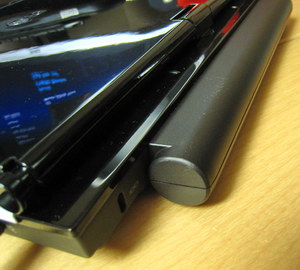
Figure 18: The 6-cell battery makes for a humpy C1.
So what about that high-capacity 6-cell battery then? I have a strong dislike for �hump� batteries � having anything protruding makes it hard to find form-fitting cases � so I wasn�t impressed when I saw how much the high-capacity battery stuck out from the C1. Worse still, I wasn�t able to properly test it because on several occasions the laptop simply wouldn�t boot with the bigger battery attached. I pulled the big battery off, connected the C1 to AC power, and it booted up fine. I knew the big battery was fully charged, but when it was connected the C1 wouldn�t boot. It was probably defective, but it was working for a while previously. Given that it has twice the number of cells as the normal battery, I can guess that the battery life would be just over three hours � but that's the minimum I'd expect from a laptop without a humped-out battery.
I have mixed feelings about LG including the big battery: it�s great that the customer doesn�t have to pay for it, but whenever I see two batteries included with an electronic device I think it�s an admission of how poor the battery life is with the main battery (Samsung does this with their Pocket PCs, which are known for having poor battery life) and I think they should have just made the laptop slightly bigger to allow for a larger battery. I can't imagine anyone who would be satisfied with 96 minutes of battery life, and the slender profile of the laptop is nullified when you have to bring the power brick with you everywhere.
And just for the record, I'd been hearing stories about how Vista's Aero Glass was chewing up battery life on laptops, so I repeated my first test (max brightness, WiFi and Bluetooth turned on, typing up this article) with Aero Glass turned off � and I got exactly the same 96 minutes of run time. One test doesn't definitively answer this question, but I think the concerns about Aero eating up battery life are mostly negative anti-Vista hype.
Benchmarking the LG C1
Many laptop reviews are theoretical in nature � they talk about performance and toss out benchmark numbers without a thought to context. I wanted to have a firm understanding how well the C1 stacked up compared to my other computer systems performing real-world tasks that I need my systems to perform, so I spent a few weeks coming up with a suitable benchmark. Using the demo version of DXO Optics Pro, I selected a test batch of 20 RAW images from my trip to Hawaii in late 2006. I used DXO Optics Pro to process the RAW images in batch mode using the DXO default settings: each image is processed for white balance levels, sharpness, color correction, contrast, noise reduction, optics distortion, and several other things.
This is a real-world test because DXO is set up to allow you to quickly adjust each RAW file with exactly the changes each image needs, then to process them all to JPEG, TIFF, or DNG in batch mode. This is a brutal test and it�s almost entirely CPU and RAM-based. I did some experiments with this test running at different clock speeds on the same system, and if I scaled the CPU and RAM speed back by 5%, I saw the benchmark take 5% longer to complete. Further, DXO Optics Pro is multi-threaded and runs beautifully on dual-core systems (I don�t have a quad-core CPU so I�m unable to test that scenario).
So how did my various systems measure up? Here�s how long each system took to process the same test on the same batch of 20 images, from slowest to fastest:
Fujitsu P7010D @ 1.2 Ghz (single core): 52 minutes
LG C1 @ 1.2 Ghz (two cores): 21 minutes
Fujitsu N6220 @ 1.86 Ghz (single core): 16 minutes
Core 2 Duo Extreme @ 3.44 Ghz (two cores): 4 minutes
As you can tell, this test exposes the raw CPU performance of each system: the Fujitsu P7010D with its single Pentium M CPU core running at 1.2 Ghz took a yawn-inducing 52 minutes to finish the task, but the LG C1 did quite well coming in at 21 minutes. I normally process my RAW images on the Fujitsu N6220 laptop if I�m at home, or on the Fujitsu 7010D if I�m mobile, so the C1 was much better for my mobile scenarios and nearly as good as the home scenario of 16 minutes. It's interesting to note, though, that the test results don't scale evenly based on the number of cores � with two cores running at 1.2 Ghz, 2.4 Ghz in total, you would have expected the C1 to beat the 1.86 ghz Fujitsu N6220. The raw (no pun intended) power of the Core 2 Duo Extreme CPU is apparent as it decimated every other system with a run time of only four minutes. I�m keen to get my hands on a quad-core CPU to see how the benchmark scales, and it DXO Optics Pro can utilize four cores.
I ran a few other benchmarks, including PC Mark 2005 and 3D Mark 2006. The C1 scored 2600 PCmarks - in comparison my Fujitsu P7010D scored 1096 PCmarks- and my Fujitsu N6220 (17" screen) scored 2157 PCmarks. That shows you what a high performer the C1 really is, beating out a much bigger and beefier laptop with double the RAM, a bigger and faster hard drive, etc. Just for fun I disabled one of the CPU cores on the C1, and after a Windows Vista blue screen of death, things were working fine so I ran the PC Mark 2005 test again and the C1 dished up 1658 PCmarks. Even as a single core machine, the C1 out-performs my P7010D at the same clock speed (different CPU generation though) by a healthy margin. On the 3D side of things, I was keen to see how the NVIDIA GeForce Go 7300 performed: the C1 clocked in at 1361 3Dmarks, and by comparison my N6220 with an ATI Mobility Radeon X600 could only manage 342 3Dmarks (makes me wonder if there's a driver problem there). With one core the C1 tested within three points of the dual core results, so the 3D Mark test definitely isn't multi-threaded.
The C1 is a fast laptop, there's no doubt about that � and that might explain the horrendous battery life. They clearly designed the C1 to deliver a punch, but perhaps more balance is in order to achieve a longer run-time. I should point out that the fan in the C1 is very quiet � even when it was running the benchmarks and maxing out the CPU, the fan was difficult to hear. That's very different from my P7010D, which is ridiculously loud when the fan is going full tilt (which happens far too often). The C1 is a very quiet laptop under all circumstances: LG hit an acoustic home run.
Conclusions
The LG C1 is a mixed bag: on one hand, it�s thin, light-weight, and packs a lot of features and performance into its small frame. The fact that it has a 10.6� screen and a Dual Core processor is quite rare, so LG has to be given engineering props for managing that feat. The 80 GB drive is spacious enough, and the WiFi and Bluetooth work well (though putting a 802.11n chipset in there would have been nice). With both CompactFlash and Secure Digital slots, it makes a good companion for the digital photographer (speed issues aside) � and the CPU and RAM is sufficient for most photo editing tasks, including crunching RAW files.
For me, the battery life is a show-stopper though. I like to travel as light as possible, only taking an AC adaptor with me when absolutely necessary, and the C1 wouldn't even last me through an afternoon of writing. If you can deal with only 96 minutes of battery life, the C1 is a fantastic laptop. Myself? I have to keep looking.
Jason Dunn owns and operates Thoughts Media Inc., a company dedicated to creating the best in online communities. He enjoys mobile devices, digital media content creation/editing, and pretty much all technology. He lives in Calgary, Alberta, Canada with his lovely wife, and his sometimes obedient dog. He's still on his quest for the ultimate ultra-portable laptop.









