


Friday, June 1, 2007
LG's C1 Express Dual Series Tablet PC: Small And Fast, But Doesn't Last Long Enough
Posted by Jason Dunn in "HARDWARE" @ 07:00 AM
Small Enough For You?
The LG C1 is truly a small laptop: holding it in your hands, it feels lighter than the 1.31 KG (2.9 pounds) that it really weighs. On the outside, it�s an attractive combination of a matte black over the body, and a glossy �piano black� on the lid (check out this high-res photo). As good as it looks, that glossy lid was a magnet for fingerprints: it�s no mystery why LG includes a micro-fibre cloth. As much as I like my laptops to look good, I don�t like having to polish them on a regular basis so I wish LG had chosen a more practical finish for the lid. Once you open it, it�s a very black and white experience � literally. The side with the keyboard is a nice glossy white (which doesn�t show fingerprints), and the bezel around the screen is a semi-matte black that�s different than the matte black on the rest of the unit.
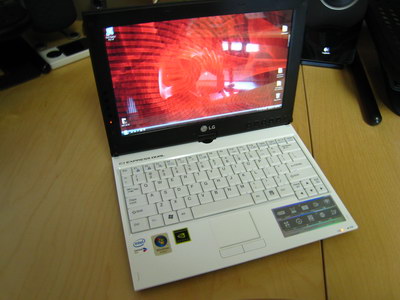
Figure 1: The LG C1 from the front.
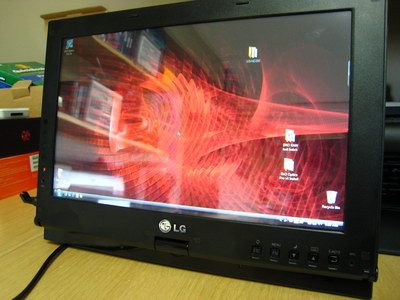
Figure 2: As a convertible Tablet PC, the LG C1's screen can rotate around.
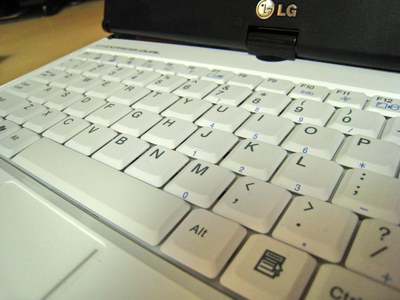
Figure 3: The keyboard is well laid out � I didn't have much trouble adapting to it.
The keyboard is about average: it has a nice snap to it, but isn�t too loud. Because I�m used to typing on the small keyboard of the Fujitsu P7010D, this keyboard wasn�t much of a stretch. There are subtle differences to be sure � I�m making typos now and then as I write this � but overall I�d say it�s a good keyboard. The Synaptics touch pad is superb � it�s just responsive enough to be useful, but not �twitchy� like some are. I don�t use an external mouse when I�m mobile, so it�s important that the touch pad be functional: I�ve found HP touchpads to be particularly poor, Fujitsu touchpads are excellent, and this LG is right up there.
Specification-wise the C1 is quite impressive for a laptop of its size. The CPU is an Intel Core Duo Processor U2500 (2MB L2 Cache, 1.2GHz speed) running on a 533MHz front-side bus. This is paired with the Intel 945PM chipset and Windows Vista Business edition. I would have preferred Windows Vista Home Premium, but Windows Vista Business only lacks the Media Center functionality and adds in some better backup tools (which, unfortunately, still aren't all that great). LG put 1 GB of RAM in this unit in the form of two 512 MB DDR2 chips running in dual channel mode at 667mhz. The C1 supports up to 4 GB of RAM, which is excellent, but I'm disappointed with LG for only putting in 1 GB of RAM � in the Vista era, 2 GB of RAM should be standard. If the C1 were priced at $1500, the 1 GB of RAM might be forgivable, but at the $2500 and up price point, 2 GB of RAM should be the norm. And because there are only two RAM slots, the first thing I'd have to do if I wanted to go to 2 GB of RAM is remove the two 512 MB chips � that's a waste.
Looking Closer
The wide aspect-ratio screen is 10.6" in size from corner to corner, and runs at 1280 x 768 resolution (WXGA). This resolution is about as high as you'd want to go on a screen of this size � it's big enough to be easily visible from two feet away (about average working distance for laptops), but still high-resolution enough to work well for nearly any type of task. Because there's a touch-screen layer, the screen has a very slight "speckled" effect that makes the display less crisp than my Fujitsu screen. Brightness isn't as bright as I'd want it to be: at maximum brightness, it's adequate for use in non-direct sunlight. At anything less than maximum brightness, I found the screen to be lacking if the room was awash in non-direct sunlight. Graphics are driven by an NVIDIA GeForce Go 7300 (64 MB VRAM), a great departure from the sluggish Intel-based embedded graphics you'd normally see in a laptop of this type. As you'll see later on, the NVIDIA solution means much better 3D performance, though I doubt you'd do to any serious gaming on a laptop with a screen this small. Still, it�s nice to see a nod to gamers who want to play anywhere.
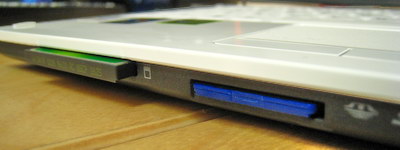
Figure 4: The front-loading memory card slots.
Cards slots are handled in the front: there's a Type 1 CompactFlash card slot, which I was happy to see. The slot looked so slim that at first I thought it was an ExpressCard slot, but I quickly realized it was meant for a CompactFlash card. Unfortunately, this memory card slot is no different than most others: when copying files off the CF card, it grinds the system to a halt. Everything gets jerky, and it's brutally slow: I was seeing speeds of only around 800 KB/s when copying files from the card to the hard drive. I have an 8 GB CF card, and routinely shoot two or three GB of photos in a shoot, so you can imagine how long it would take to transfer. My Fujitsu P7010D is the same way. It often takes the laptop 45 minutes to transfer a few days of photos off the card. So, while I applaud LG for putting a CF card slot on the laptop � I won't buy a small and light laptop without a CF slot � I really wish they would have upped the performance to more acceptable levels. The other slot is a combination Secure Digital/xD/Memory Stick slot � I didn't test the speed on it, but I suspect it's similar to the CF card slot.









