


Friday, June 1, 2007
LG's C1 Express Dual Series Tablet PC: Small And Fast, But Doesn't Last Long Enough
Posted by Jason Dunn in "HARDWARE" @ 07:00 AM
Odds and Ends
The integrated wireless works well, though the impressively named �Hexa-Band Antenna� was no more sensitive at picking up WiFi signals than my Fujitsu P7010D. Performance over 802.11g was normal, as was overall range. There's an indicator for WiFi and hard drive status on the left side of the screen. I found it a bit distracting to see the blinking, but ultimately that's the kind of thing you'd tune out if you saw it on a regular basis.
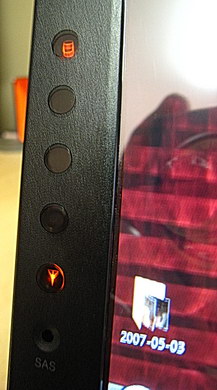
Figure 11: The hard drive light indicator (top) and WiFi indicator (bottom).
The included Bluetooth gave me my first taste of using Bluetooth with Windows Vista, and I have to admit, I was impressed! Things have certainly evolved. I used the wizard to search for Bluetooth devices, and it immediately found my T-Mobile Dash. I partnered with the Dash, then turned on the Windows Mobile Internet Sharing software (new in Windows Mobile 6), and on the laptop I selected Join a Personal Area Network (that part wasn�t overly intuitive). A few seconds later I was browsing the Web using the GRPS connection on my Dash. I quickly stopped though, because my blood-thirsty price-gouging cell phone carrier (Fido) makes me pay $25 CAD ($23 USD) for a pathetic 3 MB of data transfers per month. That�s a rant for another day...
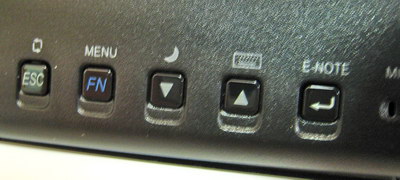
Figure 12: These buttons work in laptop or slate mode, and they control things such as screen rotation, sleep, bringing up the on-screen keyboard, starting up the E-Note application, and scrolling up and down � but a real scroll wheel would have been nice.
Don�t Forget It�s a Tablet PC
The LG C1 is the first Tablet PC I�ve ever reviewed: I�ve always been interested in the concept, but I could never find a Tablet PC that could live up to my demands, with most of them having poor battery life in the goal to be as thin and light as possible. The LG C1 isn�t much different in that regard (more on that below). Not being a Tablet PC expert, I�m probably going to explain this incorrectly, but the LG C1 doesn�t use the Wacom technology that requires the use of a special pen � you can touch the screen of the C1 with your finger and it will respond. I thought this would make it very hard to use the C1, with my resting hand causing all sorts of problems with the screen, but that didn�t turn out to be an issue at all.
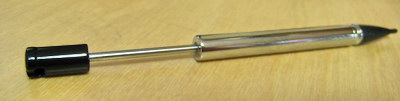
Figure 13: The telescoping stylus. It's not very comfortable to use � I wish LG would have used a full-length stylus, more like a Wacom pen, but perhaps they didn't have space. It felt like a bad PDA stylus in my hand.
The pen is stored in the lower-left corner of the screen, and it�s not an impressive writing device: the end is telescoping, so you end up with a pen that is solid on the lower 2/3rds and not really there on the upper third. It�s also a bit frustrating to get in and out: most of the time it doesn�t catch properly when you try to click it back into the holder. Just now I tried and after over 40 tries, rotating and pressing at different angles, I couldn�t get it to connect so it�s sitting on the table beside the laptop. Getting it out isn�t much better, taking several presses to get the spring mechanism to release. I understand the size constraints LG must have had, but this isn�t a great solution because it caused me a fair amount of frustration. I don't know if the review laptop was defective, but it was so frustrating I'd probably avoid taking it out unless I had no choice. The good news here is that since you can use any pen you want, you can leave the telescoping pen inside the C1 and use your own stylus and not have to deal with the hassle. That�s not much of a solution though, is it?
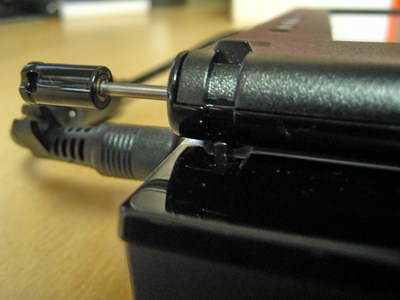
Figure 14: The worst thing about the stylus isn't how uncomfortable it is to hold over a long period of time, it's how hard it is to get it back into the holder.
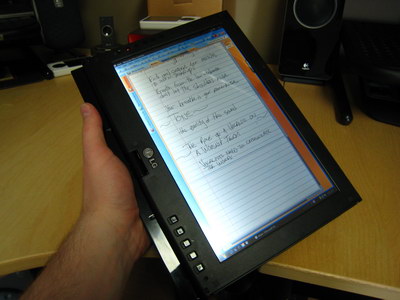
Figure 15: The C1 in slate mode. It's light enough to hold comfortably, but not for extended periods of time. I wish the bezel around the screen was thinner so it would be "all screen" when in slate mode.
Stylus issues aside, what did I think of using the C1 as a Tablet PC? It was pretty cool to be able to rotate the screen around for a slide show and still retain control of the keyboard, and browsing the Web in slate mode was a nice change of pace. I spent a day at a vocal training clinic, and I used the C1 in slate mode with OneNote (which I installed myself) to take all my session notes. That was an interesting experience, because like many keyboard-jockies, I don�t write very much. The screen was easy to write on, and the stylus was adequate for the task. I don't know if it was the pen, or the screen, but I felt like the input resolution wasn't quite up to par � I felt like I had to write bigger than normal for it to pick up detail properly.
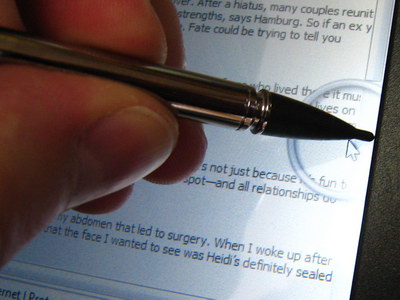
Figure 16: I ran into an alignment issue where I was unable to use the stylus to drag the vertical scroll bar in Internet Explorer up and down � this photo shows where I'm pressing, and where the actual cursor is. Thankfully, this was easy to correct by running the alignment tool.
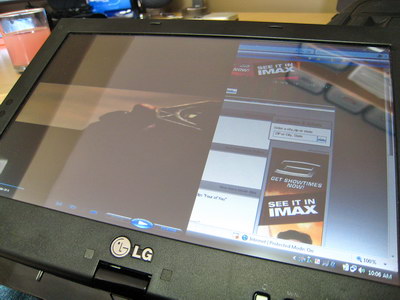
Figure 17: I was curious to see how robust the screen rotation drivers and software were, so I did a screen rotation while a full-screen video was playing. As you can see, it went funky � not impressive. I had to exit the video, rotate the screen, and start it again. Come on Microsoft, you can do better than that.









