


Thursday, May 5, 2011
Verbatim Store 'n' Go SuperSpeed USB 3.0 Portable Hard Drive
Posted by Chris Sacksteder in "Digital Home Hardware & Accessories" @ 09:00 AM
Results
ATTO Disk Benchmark
Figure 4 shows the results from the ATTO Disk Benchmarks, where I wanted to see if there was any difference between the two PCIx cards and between FAT32 and NTFS formatting. There was no performance difference between the StarTech and Syba card, so in further tests the Syba was always used. I then formatted the Verbatim disk as an NTFS file system (unchecking the “Quick Format” option); this took a long time, but that’s not surprising for 500GB.
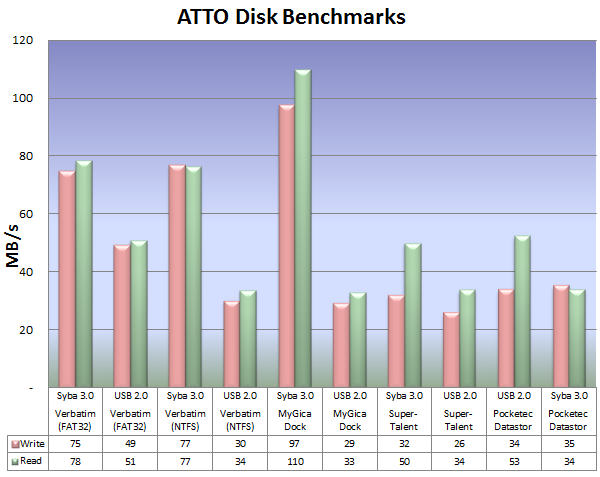
Figure 4. ATTO Disk Benchmark Results comparing FAT32 vs. NTFS formats, and some USB 2.0 devices.
There were some interesting things from this first round of benchmarks:
- The Verbatim disk drive did better when connected to a USB 2.0 port when formatted as FAT32 than NTFS, so maybe you should leave it formatted as FAT32 if you will use it with 2.0 ports often.
- USB 3.0 sure doesn't look like it is going to 10x faster than 2.0.
- The MyGica SATA dock really took a hit when connected to a 2.0 port; the Verbatim faired better in that it ran the same as the dock whereas it wasn't as fast on the 3.0 port.
- A USB 3.0 flash drive, like that Super-Talent, can be very slow to write to.
So there are some puzzling things there. Let's move on.
CrystalDiskMark Benchmarks
This program does 4 kinds of tests:
- Seq : Sequential Read/Write Test (Block Size = 1024KB)
- 512K : Random Read/Write Test (Block Size = 512KB)
- 4K : Random Read/Write Test (Block Size = 4KB)
- 4K QD32 : Random Read/Write Test (Block Size = 4KB, Queue Depth = 32)
I, frankly, don't quite understand the implications of the 3 different random tests, which are labeled R1, R2, and R3 in the chart in Figure 5, but the numbers sure came out differently.
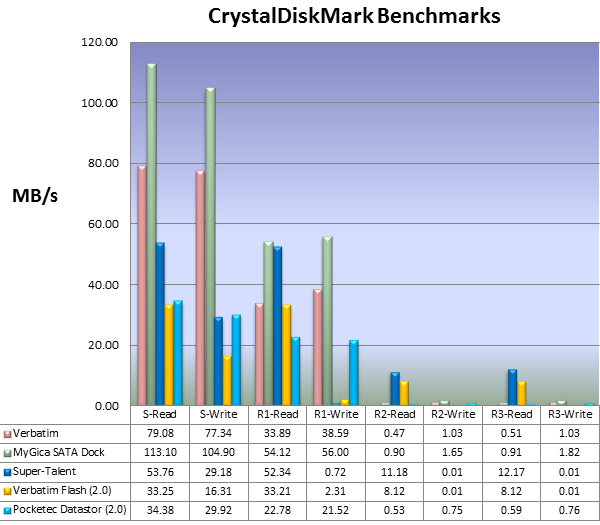
Figure 5. CrystalDiskMark results for the test devices.
Now things are getting interesting.
The SATA dock does much better than the Verbatim disk for all the tests, but both are "off the chart" for most of the random tests. Why the R1 write was OK I don't know, but I checked the results and re-ran the tests. Because the Super-Talent 3.0 flash drive behaved so much differently in the ATTO benchmark, I added a Verbatim 16GB flash drive to the mix. Note how slow the R2 Write and R3 Write test were for both flash drives.
I'm still not seeing anything close to 10X USB 2.0 but, enough benchmarks, let's move on to some real-world tests.
Small File Copy Tests
In this test, the files were first copied to the target disk to have a set for the read test, then copied again to a different directory. The first set was then read back to a different disk on the test computer. So there would be some effect from the OS file cache as well as hardware cache, but each run was repeated 3 times and done exactly the same way for each device. The numbers were close across each run. This took hours and hours, by the way. Let's take a look at Figure 6. The "S-Write" and "S-Read" columns are where two process were started at the same time, one writing to the device and one reading from it (both to and from different directories).
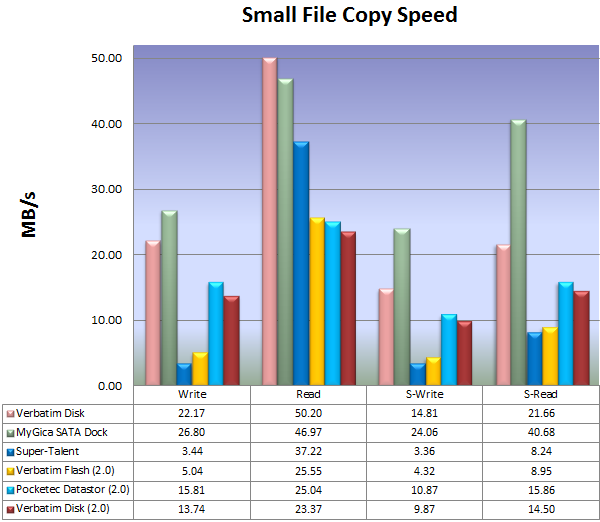
Figure 6. Small File Copy results for writing and reading 6,000 photos, and doing the write and read at the same times (S-Write and S-Read).
Now the Verbatim disk is looking better against the SATA dock, and it is even a little faster when reading. But it falls short in the simultaneous read and write, where the read speed falls to nearly half the speed of the SATA dock. I suspect this is due to the nature of the disk hardware. The SATA dock had a relatively large and heavy 2.5" disk drive with an external power supply and running at 10,000 rpm. It probably has much better seek times and internal transfer rates that the low power and light-weight drive inside the Verbatim.
Some more interesting things:
- Write is 10 times slower to the Super-Talent than reading, but "only" 5 times slower with the Verbatim 2.0 flash drive. Reading during the slow writing doesn't seem to make the writing much worse.
- The Verbatim disk, when plugged into a 2.0 port, does as well as the Pocketec Datastor, so if some of your computers still have 2.0 ports, you won't be penalized for using this 3.0 disk.
- The full-duplex ability of the USB 3.0 connection seems only useful if the disk hardware can keep up.
But it still doesn't look like USB 3.0 is going to be 10 times as fast as 2.0. Maybe twice as fast for reading, on a good day. But a couple more tests are in order, even though I promised the review would be done last week.
Large File Copy and Image Backup
The results from copying the two large HDTV files (3.9GB and 7.94GB) and the Macrium image backup are combined in the chart in Figure 7. The file copies were done in a way similar to the small file copy, repeated 3 times, etc., but the image backup was done only once per device because it was time consuming.
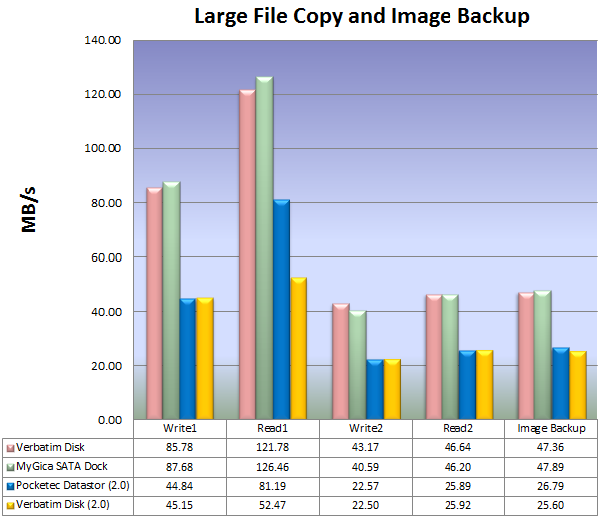
Figure 7. Large file (1=3.9GB, 2=7.94GB) and Image Backup results.
Here the MyGica SATA Dock edges out the Verbatim disk drive a little bit, but now we really see some fast speeds, with the reads of the 3.9GB file exceeding 120MB/s. I didn't believe the "Read 1" numbers so I repeated the tests the next day and in a different order and the times came out identical, and I don't know why the Pocketec on the 2.0 port did better in "Read 1" than the Verbatim on the same port when their write speeds were identical.
Still nothing close to the advertised transfer rate of 480MB/s, but "transfer rate" doesn't necessarily mean "how fast it will actually backup or copy data".
What we can say is the Verbatim SuperSpeed USB 3.0 Store'n'Go disk keeps up with a much larger, bulkier, and uglier SATA disk in a dock and, on average, is going to move your data about twice as fast as a USB 2.0 disk drive.









