


Tuesday, September 7, 2010
The Seagate FreeAgent GoFlex Ultraportable Family of Products
Posted by Chris Baxter in "Digital Home Hardware & Accessories" @ 07:00 AM
Putting Media in its Place: The TV (cont.)
The video display options leave a lot to be desired in my opinion. You pretty much just see every video that is on the drive sorted A-Z or Z-A; there is a thumbnail or list view and you can specify that you only want to look at DVDs. Basically if you directly rip the Video_TS folder from a DVD to the drive, the GoFlex TV HD will recognize it as being a DVD. If you rip a DVD to an .ISO file, which is pretty much the same thing, the device will no longer recognize it as a DVD. So the only two views you have are all your videos or just DVDs. This kind of sucks if you have videos for a season of a television show or a series of movies that are related to each other, such as a trilogy, because you have no way to group them easily together unless their titles are alphabetically next to each other. It would be nice to organize all those in one folder and access them through that folder. There is nothing stopping you from doing all of that organization on the drive itself, but when you look at them on the movies screen, all you will see is every single video file because the video screen ignores directory structure.
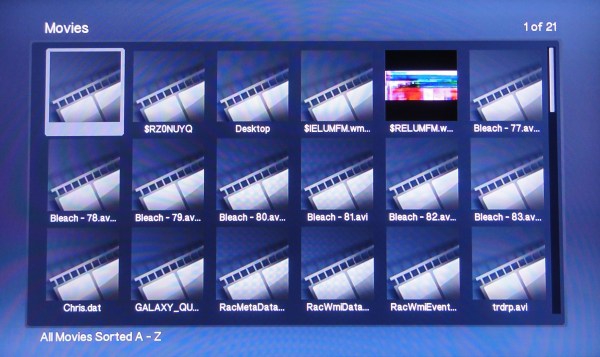
Figure 9: Thumbnail view for the Movies screen.
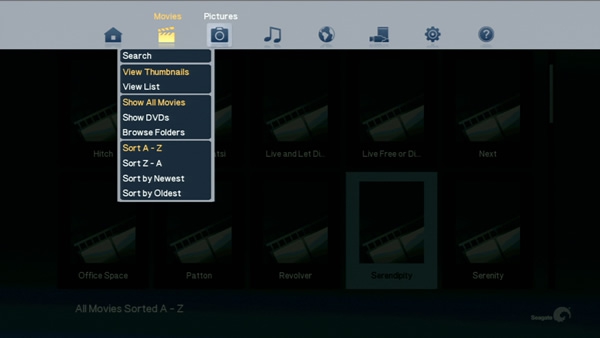
Figure 10: The limited sorting options for the Movies screen.
I find this very annoying; I should be able to group like video files together so that when I am trying to find a particular file, I don't have to hunt through all of them to find it. There is a browse folders option, but it takes you to the root of the drive and then makes tunnel through whatever directory structure you have set up just to find your files which can be just as time consuming as hunting for them on the video screen. The pictures screen includes a show folders option which show all the folders containing pictures without you having to navigate the whole drive to find them. Why couldn't they have done something similar with the Movies screen.
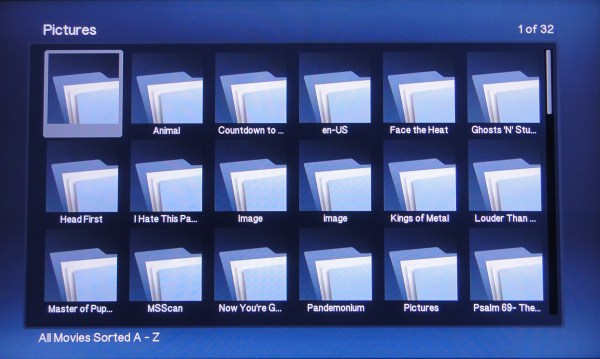
Figure 11: The Picture screen using the Show Folders option. A feature that I think is needed for the Movie screen.
The GoFlex TV HD also offers a variety of choices if the devices hooked up to the internet; my favorite is Netflix. With it I can stream movies from my Netflix account to my TV. This feature, however, is becoming fairly standard with media players. I mean I can stream Netflix from my Xbox 360, my Playstation 3, my Nintendo Wii, and even my HD Television. So while it's a nice feature; to me it's not that big of a deal. One thing that I did note while testing, was that it had a hard time getting full bandwidth on the movies I tried to watch, where I never have that issue when using my default Netflix player, the Xbox 360. I am really not sure what the issue could be because they are both plugged into the same router. The YouTube feature is nice; the interface is simple to use and the video playback quality is good. There are also options to connect to other internet video, audio, and music streaming sites, such as Mediafly, Picasa, and vTuner. Also with a network connection you can stream the media that is shared on any other PCs attached to your network. When everything considered, it is a solid media player, and I think it could be a great media player if the user interface was tweaked some. I mean both Tivo and Windows Media Center have great looking yet simple to use interfaces, so why can't this?
Conclusion
Overall, I was impressed by all the products that I tested for this review. I found the pricing to be fairly competitive and not overpriced. There is definitely value in the concept that you can upgrade the interface that your drive uses, in order to keep up with current technologies. The drive itself seems to be a solid piece of hardware and its small size makes it easy to take with you. I have absolutely nothing negative to say about the Net Media Sharing device. Once I got over my reservations of letting a website manage the drive, I found it a real joy to use. Its ability to easily connect to the GoFlex TV HD just further shows how nice an integrated family of products can be.
If there is a weak point here it has to be the GoFlex TV HD. It does everything it's supposed to do and does it well enough, but the user interface detracts a lot from the experience. I really hope that this is somehow addressed in the future through a firmware update. With the right user interface I think it would be a great product and not just a good one.
Chris Baxter is an IT Professional and part time Web Designer who resides in North Aurora, Illinois. Playing video games, watching movies, or reading a good book are what occupies his time when he is not fixing computers or trying to get his hands on the latest gadgets.

Do you enjoy using new hardware, software and accessories, then sharing your experience with others? Then join us on the Thoughts Media Review Team! We're looking for individuals who find it fun to test new gear and give their honest opinions about the experience. It's a volunteer role with some great perks. Interested? Then click here for more information.









