


Digital Home Thoughts - News & Reviews for the Digital Home

Be sure to register in our forums and post your comments - we want to hear from you!


Zune Thoughts

Loading feed...

Apple Thoughts

Loading feed...

Laptop Thoughts

Loading feed...


All posts tagged "network"


Wednesday, April 13, 2011

How To Run Your Wireless Network Like a Coffee Shop Does

Posted by Jason Dunn in "Digital Home Articles & Resources" @ 02:00 PM

http://lifehacker.com/#!5791208/run...e-a-coffee-shop

"Want to open up your Wi-Fi network to easier access for visitors, block the web's nasty stuff from young eyes, and maybe regain some bandwidth, too? Go ahead and unleash your inner coffee shop owner. With free software and no extra hardware, you can manage content and bandwidth on your home network, or even manage a semi-public "hotspot," without feeling like a despot."
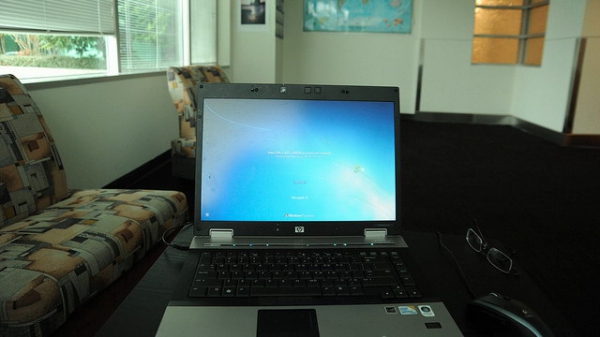
If you have a WiFi network - or, really, a home network at all - that others use, be they family or friends, this is worth reading if you want to help keep your sanity. From the basics of using the free OpenDNS service to apply family-friendly Web filtering to using a Hotspot system to create a system whereby WiFi access is handed out on a controlled basis. The Hotspot system in particular is slick; I'd never heard of it before this article, and it's very clever!
Tuesday, September 7, 2010

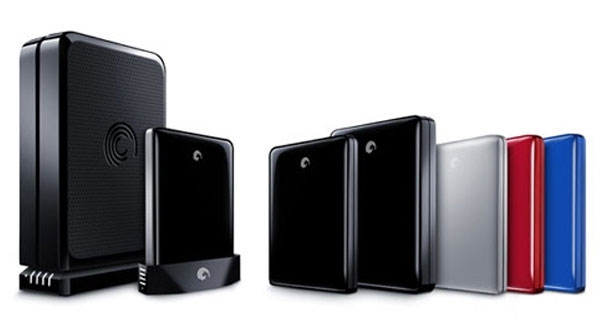
The Seagate FreeAgent GoFlex Ultraportable Family of Products

Posted by Chris Baxter in "Digital Home Hardware & Accessories" @ 07:00 AM

Product Category: Portable storage device
Manufacturer: Seagate
Where to Buy: Amazon.com (affiliate)
Price: $90 to $170 USD depending on storage size of hard drive, $99 for the Net Media device, $130 for the GoFlex TV HD, and $20 to $40 for the different cable options
System Requirements: Windows® 7, Windows Vista®, Windows® XP (32-bit & 64-bit) operating system or Mac® OS X operating system 10.4.9 or higher and a USB 2.0, USB 3.0, FireWire 800, or eSATA port.
Specifications: The GoFlex Ultraportable drive: Height - 111mm (4.39 in), width - 83mm (3.19 in), length - 14mm (.57 in), and weight - 150g (.33 lb).

Pros:

  • Wide variety of attachments and accessories that actually extend the capabilites of the drive;
  • The GoFlex Net Media Sharing Device is an easy and fun way to share your files on the network;
  • Using the optional cable attachments can greatly increase the performance of the drive.

Cons:

  • User Interface for the GoFlex TV HD Media Player needs work;
  • Taking advantage of all the accessories the product has to offer can get expensive.

Summary: Seagate has a family of portable storage devices and accessories that are aimed at keeping up with technology, making networking your storage devices easy, and delivering the media content on that storage to the place it is most useful, your TV. I got the chance to test and review these products to see if they can deliver what they promise. Was I disappointed or did they succeed at what they were designed for? Read on to find out. Read more...


Thursday, February 12, 2009

Linksys Wants You to Love The Media Hub

Posted by Hooch Tan in "Digital Home News" @ 03:30 PM

http://www.linksysbycisco.com/US/en...products/NMH410

"You love your media, so treat it well. The Media Hub makes it easy to organize, access, and share your digital video, photos, and music -- around your home and around the world. With massive capacity, intelligent aggregation, and media optimized file-serving capabilities, it’s an ideal way to manage your material, enjoy your entertainment and share your memories. Show your media how much you love it – give it a Hub."

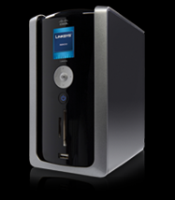
I can't say I understand or am thrilled by Linksys' attempt to make me love my media, but the Media Hub does look like a decent upgrade from the standard UPnP capable NAS. The Media Hub comes with a lot of services that one would expect from current generation NAS like devices of something with Windows Home Server such as file aggregation, the ability to share your media with friends on the net, automated backups, but what makes the Media Hub stand out from more other devices is the pretty LCD screen that helps you interact with your precious media files via a five way navigation pad. While this certainly is a nice idea on paper, I can't help but wonder if they've done any practical tests. Any computing appliance I have, from a router, to NAS to a wireless webcam is configured and managed through a web interface. I don't think it's necessary to physically be there to change a setting, and the premium that a physical "control panel" usually commands is not worth it to me. Did I mention that it currently retails at Amazon for $429.99 for 1TB? Are you feeling the love?


Friday, June 6, 2008

Inspect Your Home Network with Speed Meter Pro

Posted by Suhit Gupta in "Digital Home Software" @ 09:00 AM

http://www.purenetworks.com/product/speedmeterpro/

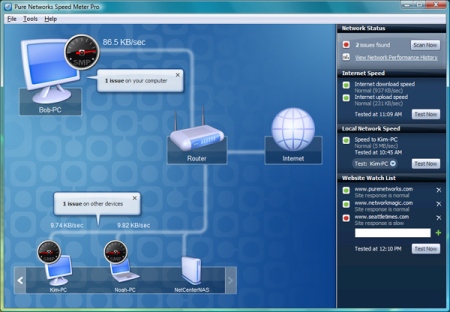
"Is someone downloading a large file or streaming video? Is your cordless phone interfering with your wireless connection? Or, is an application or neighbor stealing bandwidth? With Speed Meter Pro, take the guesswork out of trying to figure out what is causing slowdowns. This powerful software utility helps you diagnose and manage your wireless, network and Internet connection so you can optimize your connected experience. Scans across your entire network including connected computers, wired and wireless networks and Internet connection. Identifies the source of network slowdowns, saving you troubleshooting time. Enables you to address problems quickly and optimize your network for maximum speed and productivity. Proactively monitors your network to detect issues that need immediate attention."

I can see this tool being quite useful in detecting if anyone is siphoning off some of your bandwidth through some vulnerability in your wireless router or some such, or if you chose not to lock it down (I can't imagine why one would do that but that's a different story). Plus, this could also be a nice piece of software to help diagnoze if any of your machines have been owned because it would then be chatting away on the net without you having done anything. And you can use a full version for free for 7 days before making a decision to buy or not.

Tags: network

Featured Product

The Canon PowerShot S100 - The incredibly fun and small camera that offers you 12.1 megapixels with a bright f/2.0 lens and full 1080p video recording . MORE INFO

News Tip or Feedback?

Contact us

Thoughts Media Sites

Windows Phone Thoughts

Digital Home Thoughts

Zune Thoughts

Apple Thoughts

Laptop Thoughts

Android Thoughts

Reviews & Articles

Loading feed...

News

Loading feed...

Reviews & Articles

Loading feed...

News

Loading feed...

Reviews & Articles

Loading feed...

News

Loading feed...

Reviews & Articles

Loading feed...

News

Loading feed...

Reviews & Articles

Loading feed...

News

Loading feed...


Local Guides

Sponsored links







