Digital Home Thoughts - News & Reviews for the Digital Home

Be sure to register in our forums and post your comments - we want to hear from you!


Zune Thoughts

Loading feed...

Windows Phone Thoughts

Loading feed...

Apple Thoughts

Loading feed...


All posts tagged "power"


Tuesday, June 1, 2010

Boston Power Batteries Broadly Available...via Generic Third-Party Batteries?

Posted by Jason Dunn in "Digital Home Talk" @ 02:00 PM

http://www.drbattery.com/boston-pow...es-battery.aspx

It seems like an eternity ago when I was at the first - and so far, only CNTRSTG event - and I heard Dr. Christine Lampe-Önnerud talk about Boston Power's battery technology. Go check out that article for details on why Boston Power's battery technology sounded so promising; I've been waiting since then to see Boston Power batteries show up from Dell, HP, or pretty much anyone else...and for the most part, I've seen nothing. So imagine my surprise when I was looking for a battery for an old Toshiba Satellite M50 and saw that the Dr. Battery site had Boston Power's Sonata batteries available for hundreds of laptops! The basic benefits are 1000+ charging cycles before a reduction in performance is seen, a three year warranty, and a performance cycle of 3-5 years. The latter is important for those laptops that stay plugged in most of the time and don't get a lot of charging cycles.

I'd absolutely pay more for Sonata batteries on my next Dell or HP laptop - so why aren't the big guys giving me this option? Is the only way to get this technology from Dr. Battery? Something seems quite wrong about that...


Friday, November 6, 2009

Sniff Out The Energy Hogs in Windows 7

Posted by Jason Dunn in "Digital Home Software" @ 09:30 AM

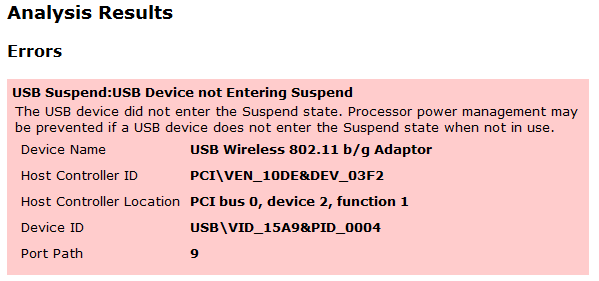
I read about this tip in Maximum PC, tried it myself, and thought I'd share it with Digital Home Thoughts readers. It's pretty cool! This tip will tell Windows 7 to generate a power report, telling you which devices are mis-configured for optimal power savings.

To generate this report, here's what you do: first, click on the Start button, then type CMD. Right-click on the CMD program that will appear in the filtered list, and select Run As Administrator. A command-line box will appear. At the prompt, type in powercfg -energy. Wait 60 seconds, and Windows 7 will generate an HTML file called energy-report in the Systerm32 directory. Go find it and check out the results. Read more...


Featured Product

Panasonic Lumix GF-1 + 20mm f/1.7 Lens - The 12.1 megapixel, 720p HD video, incredibly fun to use camera that breaks all the rules and gives you an amazing photo taking experience in a small package. MORE INFO

News Tip or Feedback?

Contact us

Thoughts Media Sites

Windows Phone Thoughts

Digital Home Thoughts

Zune Thoughts

Apple Thoughts

Laptop Thoughts

Android Thoughts

Skooba
Reviews & Articles

Loading feed...

News

Loading feed...

Reviews & Articles

Loading feed...

News

Loading feed...

Reviews & Articles

Loading feed...

News

Loading feed...

Reviews & Articles

Loading feed...

News

Loading feed...

Reviews & Articles

Loading feed...

News

Loading feed...

Sponsored links