Digital Home Thoughts - News & Reviews for the Digital Home

Be sure to register in our forums and post your comments - we want to hear from you!


Zune Thoughts

Loading feed...

Apple Thoughts

Loading feed...

Laptop Thoughts

Loading feed...


All posts tagged "ethernet"


Monday, September 12, 2011

Creating A Home Network Using Your Existing A/C Power Lines

Posted by Brad Wasson in "Digital Home Talk" @ 05:00 PM

http://www.anandtech.com/show/4695/...vices-working/1

"I've been daily using as well as periodically evaluating various powerline networking technologies since the early portion of the last decade, back in the '14 Mbps' HomePlug 1.0 days (say hi if you ever see me at a show, and I'll show you my scars ;-) ). Given recent trends, I figured it was high time for an evaluation revisit. How well do latest generation adapters fulfill their marketing promises? Is it finally time to dispense with burrowing through dirty, spider- and snake-infested crawlspaces and drilling holes in walls and floors in order to route Cat5e cable around?"
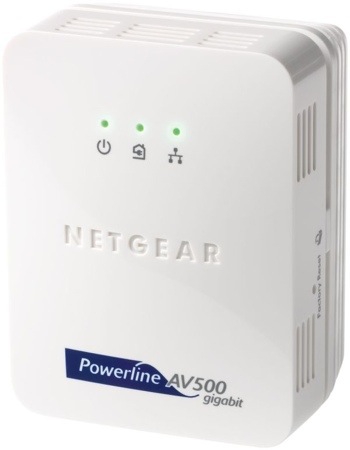
If you've ever read about and considered powerline networking technology, then you are familiar with the feeling "wow, if that works it would be fantastic". The potential benefits are very enticing. Connect your home PCs and laptops to a wired network using the power cables you already have throughout your house. In fact, these sorts of networks are indeed possible, although users have had a mixed bag of success with them. Vendors and manufacturers have been pursuing the technology for some time, and recent developments (and market offerings) suggest that nebulous "potential" we have hoped for is getting closer to being realized. AnandTech has done a very thorough job looking at the state of this technology, and determining how well it works. Our Read link takes you the source article, which is well worth reviewing if you think powerline networking might have a place in your home.

Thursday, March 17, 2011

Once You Go Wired, You Will Never Look Back

Posted by Hooch Tan in "Digital Home News" @ 02:00 PM

http://lifehacker.com/#!5782479/how...-why-you-should

"We've shown you how to go completely wireless in your home, but as we mentioned recently, wireless is a good deal slower than a hard wired connection. Wi-Fi is undoubtedly useful and convenient for a lot of networking needs, but it can also cause a lot of frustration: interference, dropped connections, lag, and worst of all, slow speeds when it really counts."

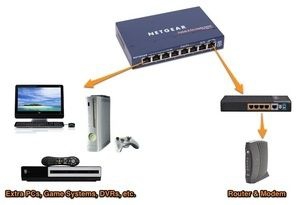
Lifehacker has an excellent primer on how to turn your home into a networking wonder. While most people usually opt for a wireless solution, going wired can make a huge difference in how your network performs. Wired has always been the default preference for me; the performance and reliaibility of cables over radio waves more than makes up for the effort required to lay cable around the household.

While wired will offer superior performance, there is a right and wrong way to go about setting up your home network. Lifehacker does cover some of these points, like avoiding hubs in favour of switches. Another consideration should be things like the quality of cable you use, especially if you are going with long distances. I would also recommend that if you have the opportunity, get networking built into the house while it is being built, instead of doing it afterwards. It will save you money, unless you want to have cables snaking along your floors all over the place.

Do you have any tips from your experience in networking your household? What to avoid? What to use?


Monday, March 14, 2011

Your WiFi Connection Could Be Slowing You Down

Posted by Richard Chao in "Digital Home Talk" @ 09:58 AM

http://lifehacker.com/#!5781497/use...everything-else

"It's a pain, but the reason is plain: Wi-Fi is, according to a study of 14,000 connections, 30 percent slower than cables in most homes and offices."

Image via PC World

Epitiro, a research company, recently published their findings from a study in which they conducted a million tests on 14,000 WiFi connection points in U.K., Spain, Italy and U.S. They found that users on average experienced 30% slower speeds when connected to WiFi points versus hard connections via Ethernet lines.

This is useful statistical data for those of us who game, video chat and run applications where consistent speed is a must. What has your experiences been in your network? Have you experienced similar speed drops?


Thursday, October 14, 2010

Best Ways to Share Files With a Nearby Computer

Posted by Reid Kistler in "Digital Home Articles & Resources" @ 01:30 PM

http://lifehacker.com/5658090/whats...nearby-computer

"[W]hen you're trying to share files with someone in the same physical space as you, it hardly seems necessary to go through the slow process of uploading files to and downloading files from the internet, especially if they're rather large files. There's always the tried-and-true method of dumping your file(s) on a USB thumb drive, but if you don't have one handy (or you don't have a big enough drive), you've still got options...."

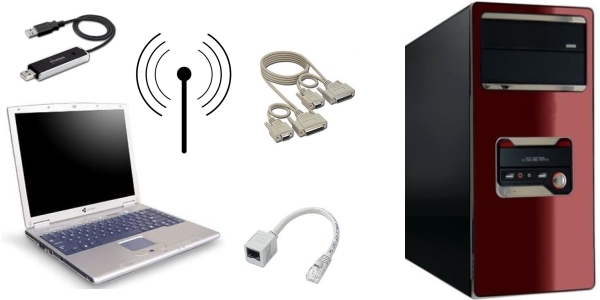
The article touches upon setting up file sharing under MAC and Windows 7, and then discusses transferring via Wifi (including using an Ad Hoc wireless connection), FireWire, and Ethernet (for which you may or may not need either a cross-over cable or adapter. The latter is pictured above, lower center). Of course, there are other alternatives available, including a USB Transfer Cable (upper left above), or via a "LapLink" transfer cable (upper center), although you might have trouble finding serial or parallel ports on many modern computers. Was amused at the thought that the "tried-and-true method" of local file transfers has become via a USB drive, whereas the "sneakernet" that many of us remember involved floppies (and 5 1/4" floppies, at that!). USB has the advantage of being nearly ubiquitous: does that make it the best choice? What is your favorite method of transferring files from one system to another (especially if away from your home or business network)?


Tuesday, December 1, 2009

These Technologies Tread Where Network Cables Cannot

Posted by Hooch Tan in "Digital Home News" @ 02:00 PM

http://www.tomshardware.com/reviews...rking,2470.html

"When it comes to home networks, one size does not fit all. I had my home built five years ago and spread Gigabit Ethernet-ready CAT5e drops all over the house. I was lucky (or perhaps foolish, considering the present housing market). Most people don’t have this sort of structured wiring in their homes. But most have coax cabling in the walls, and just about everyone who doesn’t live in a tent has power to every room. If all else fails and you’re just not within reach of any plug, there’s WiFi (usually)."

While home networking has become as common-place as stimulus packages, most homes just are not wired to handle the increasing amount of traffic that is fluttering amongst our electronic minions. Sure, you could spend hundreds, likely thousands of dollars outfitting each room with a Gigabit jack, or you could try out some alternatives. Tom's Hardware has done all the hard work for you though, trying out what each technology is generally capable of, including the less frequented Powerline and Coaxial options. Overall, it looks like you get what you pay for, though all options deserve consideration. When it comes down to it though, I am quite certain most people will just end up using a combination of Ethernet where possible, and WiFi everywhere else.


Tuesday, June 24, 2008

Denon's $499 Ethernet Cable Vs. Walmart's $0.49 Coat Hangar

Posted by Tim Williamson in "Digital Home Hardware & Accessories" @ 06:00 AM

http://www.ubergizmo.com/15/archive...sts_a_bomb.html

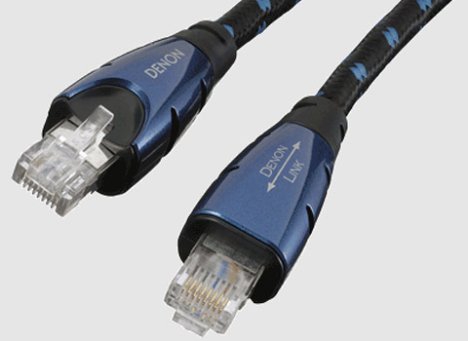
"High-end audio company Denon will be offering an Ethernet cable that will break the bank as it costs a whopping $499. What makes this 1.5 meter ultra-premium link cable so special? It was apparently designed for the audio enthusiast, constructed from high purity copper wire and high performance connection parts to form the AK-DL1."


Okay, so they didn't really test Denon's top of the line, 1.5 meter, $499 dollar Ethernet cable against a Walmart $0.49 coat hangar, but it would really be interesting to see how they compare! I guess I'm not clear on the purpose of super high quality Ethernet cable (either the bits get from one place to the other, or they don't, right?), so this seems slightly redunkulous to me, but maybe some of you audiophiles out there could clue me in on the practicality of cabling made to this standard.


Featured Product

The Canon PowerShot S100 - The incredibly fun and small camera that offers you 12.1 megapixels with a bright f/2.0 lens and full 1080p video recording . MORE INFO

News Tip or Feedback?

Contact us

Thoughts Media Sites

Windows Phone Thoughts

Digital Home Thoughts

Zune Thoughts

Apple Thoughts

Laptop Thoughts

Android Thoughts

Reviews & Articles

Loading feed...

News

Loading feed...

Reviews & Articles

Loading feed...

News

Loading feed...

Reviews & Articles

Loading feed...

News

Loading feed...

Reviews & Articles

Loading feed...

News

Loading feed...

Reviews & Articles

Loading feed...

News

Loading feed...