


Tuesday, July 1, 2008
AMD Tech Day: Morning Sessions
Posted by Jason Dunn in "Digital Home Events" @ 07:00 AM
Diving Deep on Puma
David Rooney, Product Marketing Manager for AMD Notebook Product Marketing, took us through Puma, which is the platform that AMD launched a few weeks back. Puma is a notebook platform, and notebooks are where there's still a huge amount of growth – notebooks sales are projected to eclipse desktop sales this year. AMD's research over the past few years revealed significant growth in consumer use of notebooks for entertainment and gaming. The top three user scenarios amongst consumers are still Web browsing, email, and word processing – but entertainment-focused scenarios are becoming increasingly common. Puma is a platform designed to address the needs of modern consumers, allowing them to get the most out of their notebooks.
As a platform, Puma has several important pieces: the AMD Turion CPU, a graphics processor (GPU), a wireless solution, and a few other pieces. ATI's Radeon HD 3200, which is part of the Puma platform, offers a 3x performance boost over a comparable Intel GMA-based system – both chips are integrated, not discrete, which makes this performance boost quite impressive. I've always known that Intel delivered under-powered graphics solutions, but this really cemented it. You won't see integrated GPUs in hardcore gaming laptops, but by raising the bar on the lower end, it enables more gaming scenarios for everyone.
Beyond a gaming-graphics boost, HD video was also core focus for the Puma platform – we were shown a slide that outlined the performance improvements that Puma brings to HD playback, and the numbers were impressive. Measured by HQV (an industry-standard visual benchmarking tool), playback of HD video on the Puma platform is sharper and looks better than competing solutions. There's a certain amount of subjectivity involved in saying that something looks better on the Puma platform, but it was pointed out that third-party Web sites have come up with similar results when using HQV on the same AMD chipset found in desktop computers, so the results should stand. ATI has always been known for higher visual fidelity, whereas NVIDIA has typically held the gaming performance crown. CPU usage is much lower with video playback on the Puma platform, which means increased battery life when you're mobile. h.264, MPEG2, and VC1 decoding is supported at the chipset level, which means playback of HD content is smooth.
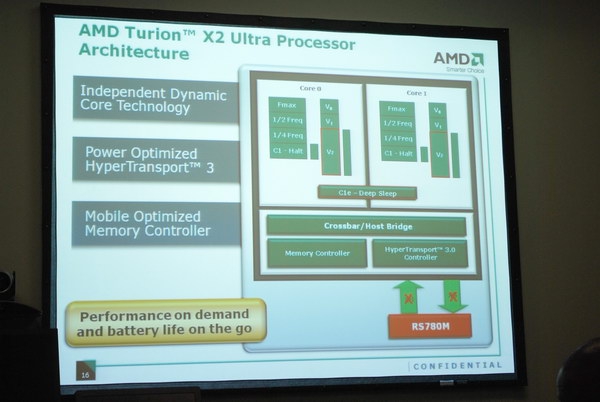
Figure 5: A breakdown of the Turion X2 Ultra processor, which ships as part of the Puma platform.
ATI's Hybrid CrossFireX technology is pretty interesting – it's the combination of an integrated graphics chip and a discrete graphics chip working together to render 3D frames. With most notebooks you either get a relatively poorly-performing but battery-friendly integrated GPU, or a high-performance battery-sucking dedicated GPU. CrossFireX is a way to get the best of both worlds: AMD's benchmarks show a 1.7x performance boost when comparing a CrossFireX system (which has both integrated and discrete GPUs) to a discrete NVIDIA 8400M GS. That's no small feat, and means much better 3D performance for gaming. I happen to have an 8400M GS in my Dell XPS M1330 laptop, and knowing what it's capable of, the thought of getting 1.7x more GPU performance is rather compelling!
Greater graphics performance usually means less battery life, and ATI PowerXpress Technology handles the power consumption in a smart way: when you're on AC power, it uses the discrete graphics card to give you maximum performance. When you're on battery, it defaults to the integrated graphics. What's interesting to me is that they completely power down the dedicated GPU to the point where it uses zero power, and a CrossFireX laptop would have the same battery life as an identical laptop with integrated graphics. That's impressive because it means choosing a more powerful laptop with discrete graphics puts you on the same battery-life footing as the lower-end laptop – and that's something that no other platform can offer at the moment. Want to override this setting and run the discrete GPU at full-bore while on battery life? Most Puma-based laptops will have a hardware toggle button to allow exactly that. Slick. NVIDIA-based solutions implemented by Sony typically require a reboot to accomplish the same thing (though Xavier from Notebooks.com tells me that's going to change next month).
What's Up Next: Shrike
Matt Mazzantini , Senior Product Marketing Manager - AMD Notebook Product Marketing, took us through Shrike. Shrike is the first implementation of the AMD Fusion processor that I was told about in January 2007 – and if memory serves, they're pretty much on schedule. Creating a fusion processor, which involves putting multiple CPU cores and a single GPU core on the same piece of silicon is a feat that AMD is uniquely suited to deliver since their acquisition of ATI a few years back. Shrike will put the DDR3 memory controller, two CPU cores, a GPU core, a PCIe controller, a display controller, and the northbridge chipset all on the same piece of silicon. Collectively, the CPU + GPU is called "Swift", an accelerated processing unit (APU). I was a bit confused when they first tossed out this term, because I thought they were saying there was an additional chip on the board to accelerate certain functions (h.2.64 encoding anyone?) but it turns out APU is just a marketing term to indicate the multi-chip silicon.
So what improvements will a Fusion processor bring to the table? Up to 20% CPU performance improvement (presumably at the same clock speed), up to 35% GPU performance improvement, and six-plus hours of battery life. Shrike will be AMD's first step into the ultra-portable, ultra-thin notebooks (sub one inch thick devices) and UMPCs. I believe the CPU and GPU improvements, but I'll believe the battery life numbers when I see them myself – AMD mobile CPUs use up about a third of the total power consumption on a laptop, and I doubt integrated graphics uses anywhere near that much, so I'm not sure if combining everything into one piece of silicon will save enough power to take the average 2-3 hour notebook to six hours. It could be that AMD is betting on being able to implement other technologies on their reference designs for Shrike-based notebooks – if the prices on solid state drives drop dramatically in the next 18 months, and OLED screens finally become a reality on notebooks, we might see middle of the road laptops ($1000 and under) getting six hours of battery life. Call me a pessimist, but I never believe battery life claims until I see proof.
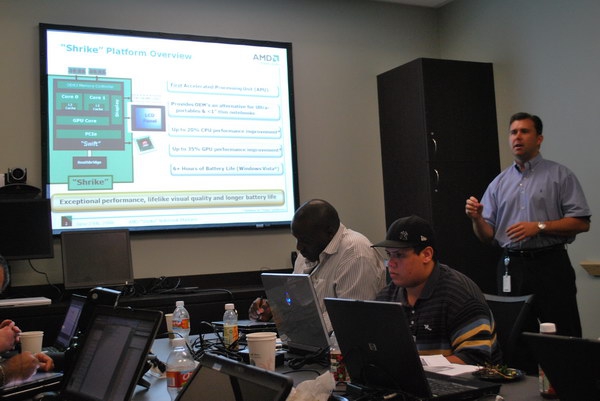
Figure 6: Walking through Shrike with Matt Mazzantini.
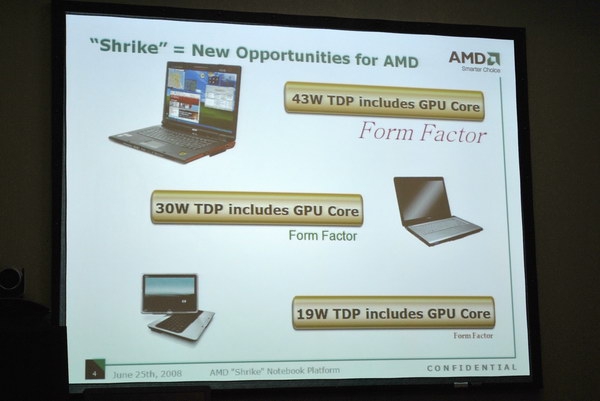
Figure 7: The new markets that Shrike will open up for AMD.
Today, most AMD-based notebooks are in the 35 watt power range, meaning middle of the market – they don't really have anything in the super-thin or super-performance type of products. They're clearly behind Intel in this area. Shrike will expand the product reach by reaching upward in performance (43 watt TDP) and downward into the ultra-portable realm with 19 watt TDP products. The mid-range will be in the 30 watt TDP. Shrike is not a VIA or Atom competitor – AMD representatives were quick to point that out. Given the number of ultra-small notebooks I'm seeing come to market with Intel Atom and VIA, that would seem to be a problem for AMD if they have nothing to compete in this space. If the best AMD can do is a 19 watt CPU, I don't know how many UMPCs and netbook-style devices will be running AMD. On the other hand, a high-performance 19 watt CPU could work well in a super-thin notebook.
How long do we have to wait for Shrike? We should see Shrike-based notebooks in the latter half of 2009 – which doesn't seem that far away.









