Digital Home Thoughts - News & Reviews for the Digital Home

Be sure to register in our forums and post your comments - we want to hear from you!


Zune Thoughts

Loading feed...

Apple Thoughts

Loading feed...

Laptop Thoughts

Loading feed...


All posts tagged "Backup"


Wednesday, January 7, 2009

SanDisk Introduces One Touch Backup Flash Drive

Posted by Timothy Huber in "Digital Home Hardware & Accessories" @ 02:30 PM

http://www.sandisk.com/Corporate/Pr...se.aspx?ID=4457

"SanDisk Corporation (NASDAQ:SNDK) today introduced an innovative new family of SanDisk® USB flash drives, including the world's first backup USB flash drive with simple backup software activation at the touch of a button. The SanDisk Ultra® Backup USB portable flash drive is the first offering of the company's new SanDisk Ultra USB product line. With capacities up to 64 gigabytes1 (GB), the SanDisk Ultra Backup USB flash drive is designed to protect computer users' photos, music, videos, personal and business documents, and other types of digital files, with the simple touch of a button. No software installation is needed. The drive protects onboard digital content with a dual layer of security, including password-protected access control and ultra-secure AES hardware-based encryption."
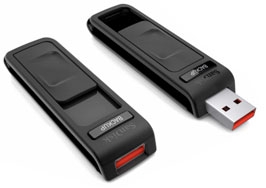
The new SanDisk Ultra USB product line includes new encrypted flash drives designed for easy backup. It looks like an interesting solution with capacities up to 64GB. Personally, I backup to a Windows Home Server and online with Mozy, but if you want to keep your data with you at all times this might be a good option. It will be interesting to see how the release product actually performs.
Tags: USB, Backup, SanDisk

Wednesday, December 17, 2008

Nexto ND-2725: Fastest Portable Storage Device?

Posted by John Lane in "Digital Home Hardware & Accessories" @ 11:00 PM

http://www.engadget.com/2008/12/10/...-met-his-match/

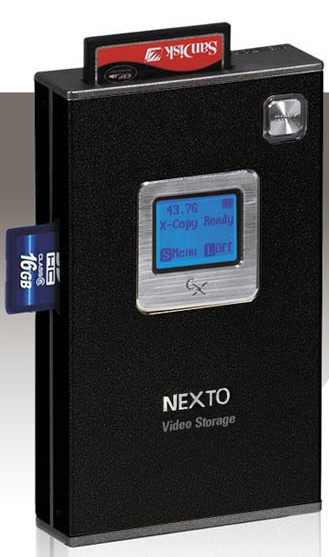
"The ND-2725 sports a 2.5-inch SATA hard drive (up to 200GB) and supports just about every other memory card out there. Additionally, data can be backed up via USB and FireWire, including SxS and P2 cards from Sony and Panasonic camcorders, respectively. The company bills this guy as the "world's fastest backup device"."

The Nexto ND-2725 is a portable storage device that is used to backup memory cards using an internal 2.5" hard drive. It can also connect directly to some Sony and Panasonic camcorders and backup your videos. It claims to have error checking capability to ensure the accuracy of your data. Engadget is slightly off - it uses USB 2.0 and eSATA, not firewire, but it does let you connect just about every memory card made. It is pricey: the 200GB model goes for $539.


Wednesday, September 17, 2008

CrashPlan Offers Off-site Backup with No Monthly Fees

Posted by Chris Gohlke in "Digital Home Software" @ 12:00 PM

http://www.crashplan.com/home.vtl

"Easy and Automatic - No buttons to push or CDs to burn. Simply install CrashPlan and it quietly runs in the background protecting your files without slowing you down. No Monthly Fees - With CrashPlan and your own destination, there are no fees or extra charges like other off-site backup products and no limits on how much you can back up. Off-site Security - Your files are encrypted, off-site and at multiple destinations of your choosing. Only off-site backup protects your files from theft, fire, and other local disasters. CrashPlan insures your privacy by encrypting your files before they are sent, keeping personal files personal. Cross Platform (Mac, PC, Linux) - CrashPlan gives you freedom in choosing your backup destinations. Back up your new Mac to your old PC, your laptop to a friend's desktop, whichever you want. Worried about using too much space on a friend's computer? No problem! CrashPlan will use an attached USB drive to hold your files."

Even the best laid backup plans often leave out the off-site backup component. This is especially true for home users. The off-site options out there have often had certain limitations. Most involve a monthly fee and require you to actually trust the company you are backing up to. My off-site plan has been to rotate USB drives to an off-site location once every few weeks along with daily at home backups within my network. For the importance I place on my data, I think this is adequate, but if your needs require something a little more robust and you have a friend you can backup to, a $24.99 one-time fee is all it takes.

Tags: Backup, CrashPlan

Wednesday, August 27, 2008

Microsoft SyncToy v2.0

Posted by Chris Gohlke in "Digital Home Software" @ 06:30 PM

http://www.microsoft.com/downloads/...&displaylang=en

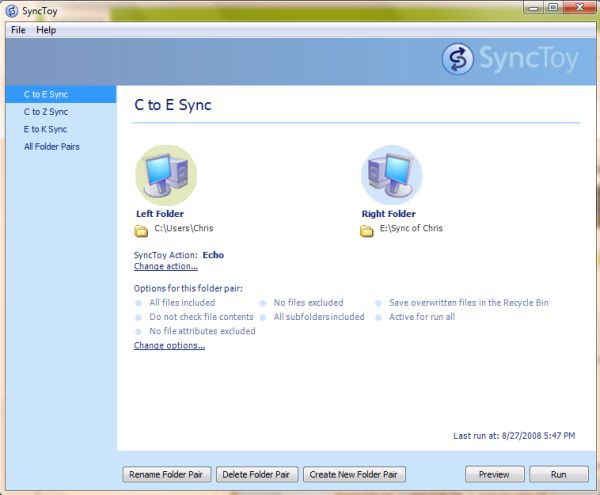
"There are files from all kinds of sources that we want to store and manage. Files are created by our digital cameras, e-mail, cell phones, portable media players, camcorders, PDAs, and laptops. Increasingly, computer users are using different folders, drives, and even different computers (such as a laptop and a desktop) to store, manage, retrieve and view files. Yet managing hundreds or thousands of files is still largely a manual operation. In some cases it is necessary to regularly get copies of files from another location to add to primary location; in other cases there is a need to keep two storage locations exactly in sync. Some users manage files manually, dragging and dropping from one place to another and keeping track of whether the locations are synchronized in their heads. Other users may use two or more applications to provide this functionality. Now there is an easier way. SyncToy, a free PowerToy for Microsoft Windows, is an easy to use, highly customizable program that helps users to do the heavy lifting involved with the copying, moving, and synchronization of different directories. Most common operations can be performed with just a few clicks of the mouse, and additional customization is available without additional complexity. SyncToy can manage multiple sets of folders at the same time; it can combine files from two folders in one case, and mimic renames and deletes in another case. Unlike other applications, SyncToy actually keeps track of renames to files and will make sure those changes get carried over to the synchronized folder."

I installed this yesterday and I really like it. It has finally let me set up backups the way they should be done and should be much speedier. I've actually set it up to do three separate synchs of my user data (which totals 82 GB). The first synch goes to a second hard drive installed in my PC. I set a Windows task to automatically perform this synch ever time I boot up. A second synch occurs weekly to network storage. Finally I set up an on-demand synch with a USB drive to let me quickly update my off-site backups. Now that they are all set up, synching the changes will be MUCH quicker than the full backups I was previously doing. Plus, having a fully automated synch will protect me from my own laziness!


Thursday, January 10, 2008

Maxtor OneTouch

Posted by Chris Gohlke in "Digital Home Hardware & Accessories" @ 08:00 PM

http://reviews.digitaltrends.com/review4891_intro24462.html

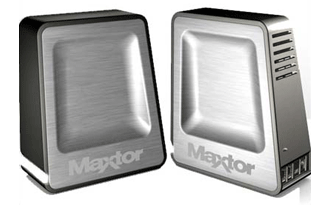
"The fourth iteration of Maxtor’s popular OneTouch external backup drives has arrived in a sexy new shell and a brand-new software package. It’s a kitchen sink drive that does everything under the sun, from backing up files to syncing folders to total system recovery in the case of drive failure and more. It’s easily the most full-featured backup drive we’ve ever tested, and though it has a few flaws it is still one of the best backup drives available."


This is one sexy looking drive. If the Terminator had a backup drive, this is what it would look like. Based on the full review, it has more than looks going for it though as they rate it highly as one of the better drives they have tested.


Featured Product

The Canon PowerShot S100 - The incredibly fun and small camera that offers you 12.1 megapixels with a bright f/2.0 lens and full 1080p video recording . MORE INFO

News Tip or Feedback?

Contact us

Thoughts Media Sites

Windows Phone Thoughts

Digital Home Thoughts

Zune Thoughts

Apple Thoughts

Laptop Thoughts

Android Thoughts

Reviews & Articles

Loading feed...

News

Loading feed...

Reviews & Articles

Loading feed...

News

Loading feed...

Reviews & Articles

Loading feed...

News

Loading feed...

Reviews & Articles

Loading feed...

News

Loading feed...

Reviews & Articles

Loading feed...

News

Loading feed...