


Wednesday, March 10, 2010
The Logitech Squeezebox Duet: A Powerful But Quirky Network Audio Player
Posted by Jason Dunn in "Digital Home Hardware & Accessories" @ 08:00 AM
Using the Squeezebox Duet
Like I mentioned earlier, the Squeezebox Duet is a powerful system capable of some pretty impressive things. After your music has been indexed, you can access every album and song from the remote. If you want to add something to the queue, pressing the plus sign on the remote will add it. This means you can build a playlist as you listen to music, which is great. The screen on the remote shows you the album art of the song that's playing, though I noticed the album art sometimes looked pretty bad - whether this was a result of the screen being limited to 256 colours or compression artifacts of the album art being re-saved, I can't tell.
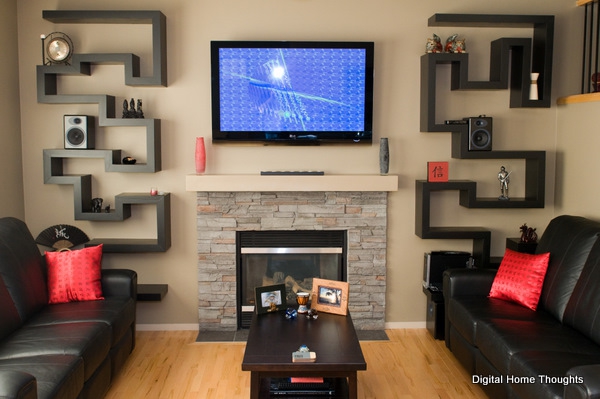
Figure 5: The Squeezebox receiver is on the shelf on the right, just to the left of the Audioengine A5 speaker. It's nice and small and blends in easily.
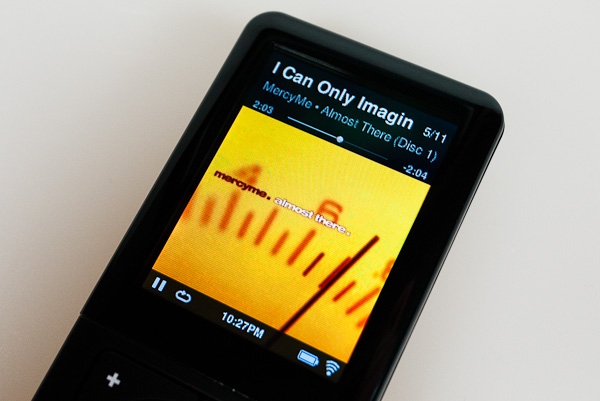
Figure 6: The Now Playing view; album art, album name, track number, song name, song progress, time, battery life, WiFi connection, play/pause status, and repeat on/off...a lot of information at a glance!
On the remote, you can browse to Internet Radio > Local and, impressively, it will present you a list of local radio stations that are streaming their signal. They must do an IP address lookup and pull from a database. Unfortunately for me all the radio stations in my city seem to broadcast at between 24kbps and 32kbps, so the quality is atrocious, but the feature is still impressive. The remote also has a number of applications, some of which are useful and some of which seem to be there because it's technically possible. On the useful side of things, there's a Napster app that allows you to access your Napster subscription music account, and a Podcast Player app that allows you to directly play back your favourite podcasts after you've added them via www.mysqueezebox.com. There's an Amazon app that will let you tag music and have it add it to your shopping cart via a Squeezebox Web service. Useful? Perhaps for some.
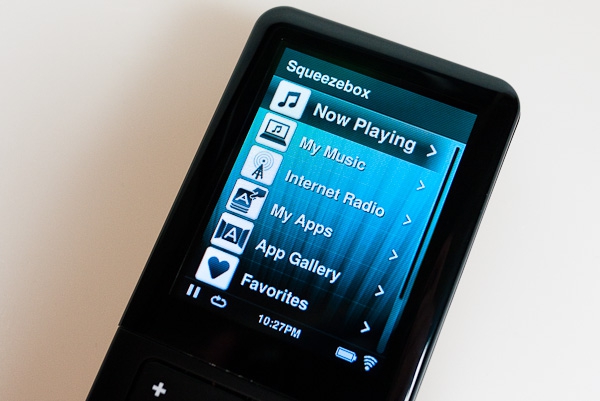
Figure 7: The menu options from the home screen. This can be completely customized; items can be added or removed.
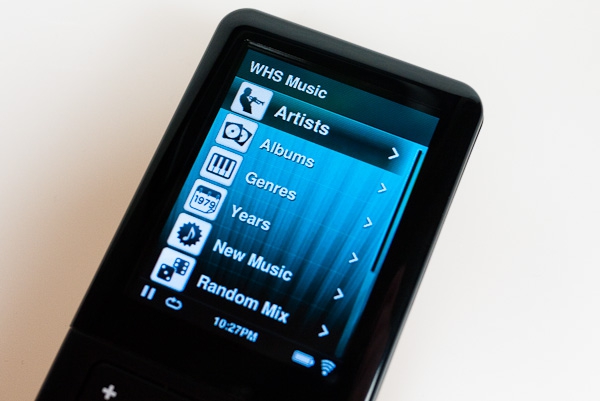
Figure 8: Browsing into the My Music menu item. There are many ways to access your music.
From the remote you can select Turn Off Squeezebox, and the logo on the Squeezebox will fade to black. I was able to turn the Squeezebox back on and be listening to a streaming music station within only a few seconds, so the Squeezebox has a very rapid resume sequence and also re-establishes its WiFi connection very quickly. The remote itself can be turned off as well by pressing and holding on the Home button. Turning the remote back on takes about 45 seconds, so this isn't something you'll likely be doing very often. The remote is designed to be left on. It has two suspend states: the first is when the screen turns off, which happens in about one minute. When you pick up the remote from this state, the motion sensor kicks in and the screen will come back on immediately. You'll have instant control over your music. The second state is when the remote goes into a deeper suspend state, which seems to be after about 30 minutes or so of not using it. It takes a good 20 seconds or so to come out of this state and re-connect to the WiFi network, which presents a host of problems I'll dig into below.
Pressing pause fades the music out, pressing pause again fades the music back in. There's a slight warble when this happens, but it's still a nice touch. When you pause the music playback, and leave it paused for perhaps 15 minutes, it will cause a speaker crackle as it powers down the amp on the receiver - at least it did with my AudioEngine A5 speakers. This is a conversation stopper every time it happens and is quite irritating.
How does the Squeezebox sound? I'm not audiophile, but to my ears, it sounds great. When I connected the Squeezebox to my AudioEngine A5 speakers and S8 sub-woofer, I spent some time tuning the subwoofer volume and frequency cross-over. I listened to a lot of different music at high volumes, and the Squeezebox delivered great-sounding audio.









