


Wednesday, March 10, 2010
The Logitech Squeezebox Duet: A Powerful But Quirky Network Audio Player
Posted by Jason Dunn in "Digital Home Hardware & Accessories" @ 08:00 AM
Getting It Set Up
Logitech really went the extra mile with this product from a packaging perspective. The unboxing experience was great; it had high-quality packaging, with nice presentation of the hardware. I unpacked it, then connected the Squeezebox receiver to power, and saw a red light blinking on the front of it. Now's a good time to explain that the product consists of two parts: the Squeezebox controller, and the Squeezebox receiver. The controller has a 2.4-inch color LCD TFT display with backlight, a rechargeable Li-ion battery, and built-in 802.11b/g wireless. It has several front buttons, including volume up, volume down, next, previous, and pause.
There's also an iPod-style scroll wheel surrounded by four buttons; home, back, play, and add. The scroll wheel is every bit as twitchy as it is on an iPod - it's easy to move quickly through a long list of items, but it takes effort to precisely select an item as it's easy to overshoot. I'd have preferred a Zune 120-style control pad. The back of the remote is a high-gloss black material that's unfortunately prone to scratching - between the scroll wheel and the easily-scratched back, it's like Logitech tried to make it as iPod-like as possible. The back of my remote looked pretty beat up after only a week, and I was gentle with it.
On the top next to the headphone jack there's an infrared port - unfortunately there's nothing about the software that uses it, which is a shame. It does give me hope that at some point they'll start using it, which might fix the biggest problem with this product (see below). The remote also has a built-in speaker on the back. For the most part, it's only used for sound effects from the remote - thankfully the sound effects can be toggled off and on individually.
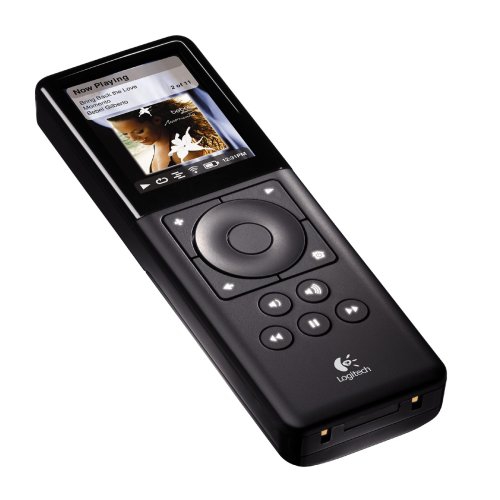
Figure 2: The Squeezebox Remote.
The receiver has digital optical, digital SPDIF, and analog connectors for audio output. It uses a high-fidelity 24-bit Wolfson DAC to play MP3, AAC, WMA, Ogg, FLAC, Apple Lossless, WMA Lossless, and WAV music files - as long as there's no DRM involved. It also has built-in 802.11b/g wireless and a 10/100 Mbps Ethernet port on the back. And somewhere on the front of the receiver is an infrared receiver...I think. The remote has an infrared port, so it stands to reason that the receiver would as well.
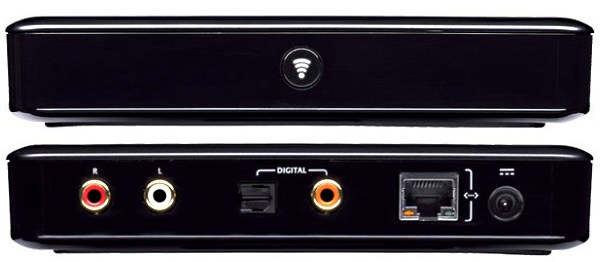
Figure 3: The front and back of the Squeezebox Receiver.
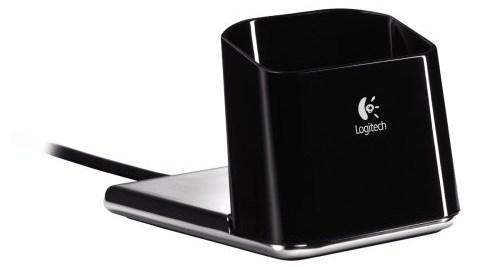
Figure 4: The charging cradle for the Squeezebox Remote.
Getting the whole thing set up took a bit of effort. First I put the battery in, and the remote powered up and started a start up wizard - it was easy to follow the steps required. The remote found my 802.11n network, so I entered my WPA key, and it logged on successfully. It then tried to find the receiver, but was unable to. I fought with it for a while, and then switched my Linksys WRT310N (with the latest firmware) from 802.11n mixed mode to forced 802.11b/g mode. Surprisingly, it worked. Once the remote found the network, it gave me a PIN number and directed me to go to www.squeezenetwork.com where I registered a free account on my desktop PC. Now that both pieces of the Squeezebox hardware were connected to WiFi, I could use it for streaming radio, etc. But what about my music?
Unfortunately, the Squeezebox system doesn't work any of the music sharing protocols that modern Windows computers or Windows Home Servers use. This means there's an additional software install required, and if you've got your music on a NAS drive, you're out of luck (unless the Squeezebox Server software happens to support it). Initially when I first set this product up months ago, they didn't have a version of the software for Windows Home Server, so I found a 30-step tutorial that walked me through the process. It was frustrating and hard to get it working. Thankfully, Logitech now has a version of the Squeezebox Server software that installs easily and quickly onto Windows Home Server. Unfortunately the version I'm currently using has a bug where, if the Windows Home Server is rebooted, the Squeezebox Server software will not automatically re-start, even if the check-box for that feature is checked. And since my Windows Home Server reboots itself after patches after week or two, the Squeezebox setup will stop working until I log into my Windows Home Server and start up the service. That's as frustrating as it sounds, especially with the wife factor. "Honey, why won't the music work?" "Hold on, I need to log into my Windows Home Server and re-start the Squeezebox service." I've recently (as of last week) installed a Squeezebox software update on the Windows Home Server that might fix this problem - only time will tell.
Once I had the software installed and working, it kicked off a scan of all my music. The initial scan took 26 minutes, which was followed by an "artwork scan" that took another 12 minutes. Total time for it to scan my 13,016 tracks was about 39 minutes. Not bad, but while the scan is happening you can't play any of your music via the remote control.
So now that I had it all set up, how did the Squeezebox Duet work? Quite well - but not without some glitches here and there.









