

Tuesday, January 29, 2008
The Nikon Coolpix S700: Small with Plenty of Options
Posted by Jason Dunn in "Digital Home Hardware & Accessories" @ 08:00 AM
The Meat and Potatoes: How Do the Photos Look?
So what about the photo quality? I selected some sample photos that show some of what the camera is capable of.

Ultra-Close Macro Shot (1.79 MB): This photo is of the keyboard on my Dell XPS M1330. At 100% you can clearly see the sweet focus spot on the G/H, and nice fall-off as it moves outward. Very strong detail overall.
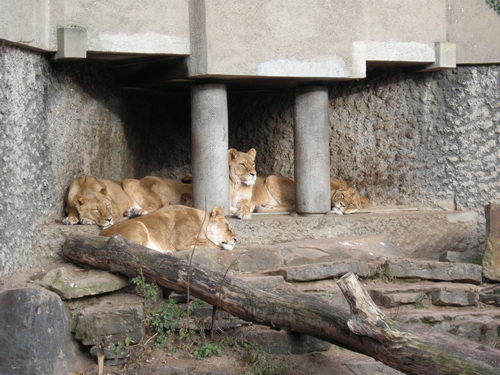
Lions at the Amsterdam Zoo (2.2 MB): This photo was taken on an overcast day but the colour is quite good. At 100% the image is a touch soft, but not overly so for a P&S and the resolution holds up well.

Portrait Photo at Amsterdam Zoo (1.4 MB): An outdoor, no-flash (ISO 64) posed shot shows good overall colour and resolution. At 100% fine facial details are evident, though so is the softness of the image. What impressed me here is that the details on the cream-coloured jacket were maintained. I find quite often, even with my Canon SD870, anything white (or nearly white) gets a bit lost in terms of exposure. So the S700 wins big points from me here.

A Very Expensive Car (1.8 MB): No flash, taken at ISO 288, this image shows that Nikon's default JPEG image doesn't kill the reds with saturation like some cameras do. At 100% you can see some noise, but nothing horrible.
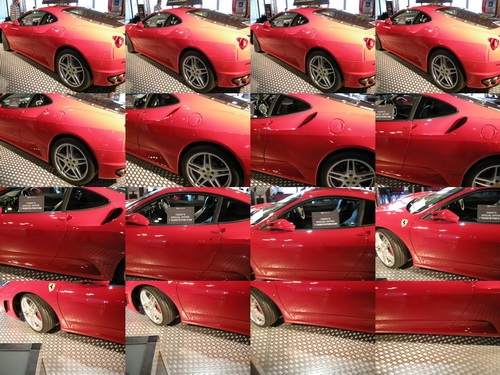
Nikon's Multi-Shot 16 (936 KB): When you take a photo in this mode, the camera takes 16 photos back to back and puts them together into a single 5 megapixel image. Why would you want that you might ask? I can see it being fun for group photos, sort of a 16 frame video. Not something you'd use often, but I appreciate Nikon offering a creative option I haven't seen on other cameras.
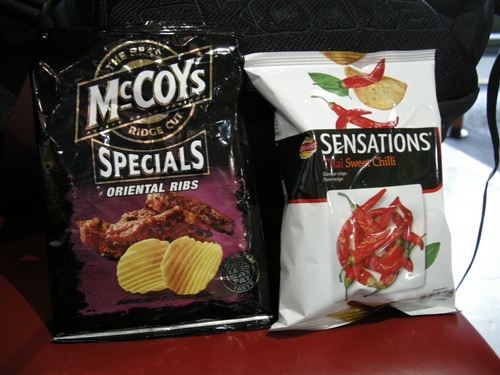
Random Sample Photo (1.6 MB): A slightly blurry ISO 400 photo where the image stabilization didn't quite work. But I took this for a reason...
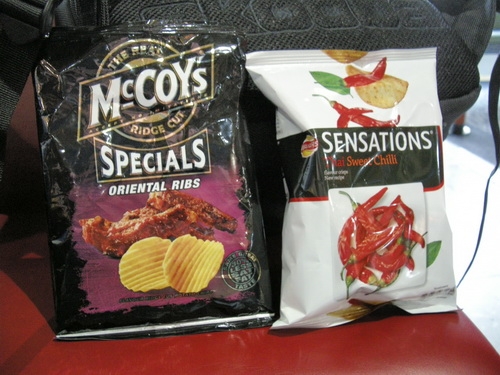
Random Sample Photo with "D-Lighting" Applied (1.8 MB): Here's a second photo I took immediately after the one above. On the camera, you can take an image stored on the memory card and apply Nikon's dynamic lighting fix to your image. It gives you a small preview of what will happen, but it's not sufficient to really let you see what's going to happen. D-Lighting is a brute force approach to boosting the mid-range lighting in an image. It also overwrites the original file, which I think is a mistake - it should save it as a copy. I appreciate Nikon's attempt to offer on-camera fixing, but using a computer to fix images will always result in a better outcome.

Dimly Light Shot, ISO Auto (1.8 MB): This is an image I purposefully shot without the flash on to demonstrate the ISO noise that is sadly typical of P&S cameras. This image is ISO 772, 1/8th second exposure. You can see the noise clearly at 100%, although if this were a 4x6 print, it wouldn't be overly noticeable. More of a concern is the slight blur - the vibration reduction wasn't able to compensate for my unsteady hands.
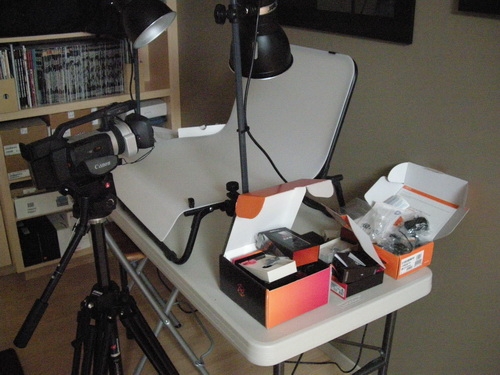
Dimly Light Shot, ISO High (2.3 MB): Here we have a sharp, but incredibly noisy image. ISO does the best it can to give you a sharp image, but at the cost of adding a lot of noise. Like most P&S cameras, the S700 works best when it can trigger the flash.