


Tuesday, August 7, 2007
Canon's HV20: A High-Definition, Vista-Certified Delight
Posted by Jason Dunn in "HARDWARE" @ 07:00 AM
Using the HV20 with Windows Vista
When I test a new product, I try to approach it as an average user would. So I charged up the battery on the HV20, captured some video on it, then connected it to my Shuttle SD39P2 running Windows Vista Ultimate. I didn't read the instruction manual, I didn't install any drivers. Here's what happened, step by step...
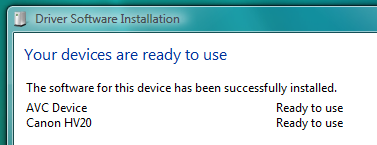
Figure 15: Vista immediately identified the connected hardware properly, taking around 5 seconds to complete the process. I was then presented with several options (not shown above) - I chose to capture the video off the camera using Windows Movie Maker.
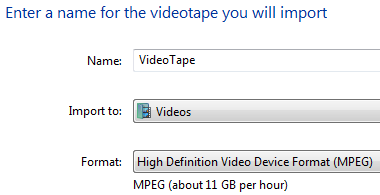
Figure 16: Windows Movie Maker presented me with a simple screen, asking me to give my video project a name, and it correctly selected the High Definition Video Device Format (MPEG).
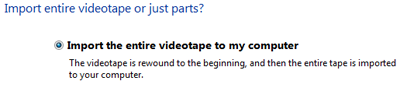
Figure 17: This is where the experience failed a bit - I didn't want to capture the entire tape, but that was the only option it gave me.
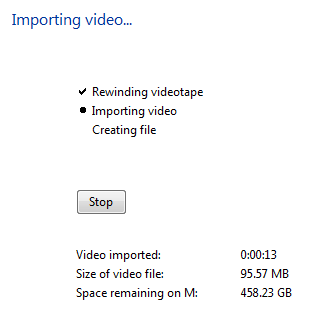
Figure 18: After starting the import, it rewound the tape in the camera (nice touch!) then started to import the video. The one main disadvantage of tape-based media is that you have to capture in real-time. If you've got 45 minutes of video footage, come back in 45 minutes - it doesn't matter how fast your computer is. Windows Movie Maker helpfully reported the length of the video it had captured so far, the size of the file so far, and how much space I have left over. I was capturing to two 500 GB Western Digital Caviar RE2 drives in RAID 1 - meaning as I capture the video it was copied to both drives, protecting me from losing my video if one of the hard drives failed. Gotta' love that!

Figure 19: Eventually the preview of my video stopped and I was staring at a black preview window, but it kept capturing. It would have been nice if Windows Movie Maker recognized that it was capturing blank tape and stopped automatically.

Figure 20: This ominous warning is silly, because I don't need to capture a blank tape with no video.
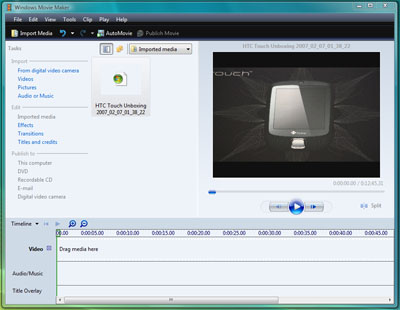
Figure 21: My video, captured and imported into Windows Movie Maker - ready for editing.
The entire process was remarkably painless and easy - the Canon HV20 did everything it was supposed to do, and Windows Vista likewise made the process fast and simple. I wish Windows Movie Maker was smarter about the tape capturing process, only capturing what was on the tape, but it's basic, free software, so perhaps I shouldn't expect so much. Then again, I bet a Mac user using iMovie doesn't have to deal with that - I think Microsoft can do better with Windows Movie Maker.
I tried the Canon HV20 with other software applications, and the experience was a bit more...bumpy. Even if the hardware is Certified for Windows Vista, you still need the right kind of software: I tried capturing video with Adobe Premiere Elements 3.02, my main video editing application, and it was anything but intuitive. The HD portion of what I recorded on on the tape only showed up as black footage. I had to manually switch the capture mode to HDV Capture before anything would show up, and there was no indication for me to do so. When the Canon HV20 is in camera record mode, it can be used to capture live HD footage right to the hard drive - but there's no preview, it shows only a black screen. It wasn't until I clicked stop that I saw the video had been captured. I don't know if this is Adobe Premiere Elements not recognizing that an HD camera has been connected and making the capture switch automatically, or the Canon HV20 not identifying itself as an HD camera. Adobe Premiere Elements is not Certified for Windows Vista, so perhaps once it is, this scenario will get better.
Conclusions
Canon's HV20 video camera is an impressive piece of hardware - getting true 1080i video in a small package, all for under $1000 USD, is an impressive feat. When paired with Windows Vista Home Premium or Windows Vista Ultimate, the Canon HV20 really shines, giving consumers the ability to capture HD video, easily edit it, and burn DVDs to share with their friends and family. If you're looking for a video camera, you owe it to yourself to give the HV20 a try.
Jason Dunn owns and operates Thoughts Media Inc., a company dedicated to creating the best in online communities. He enjoys mobile devices, digital media content creation/editing, and pretty much all technology. He lives in Calgary, Alberta, Canada with his lovely wife, and his sometimes obedient dog. He's loving the HD!









