


Thursday, January 20, 2011
In The Zone - The Sonos ZonePlayer S5 System
Posted by Matthew Shanks in "Digital Home Hardware & Accessories" @ 10:00 AM
Sonos Controller App & Desktop Controller
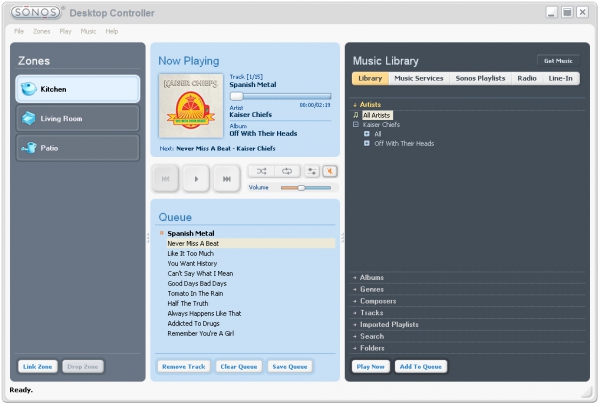
Figure 3: Desktop Controller - Now Playing View
The Sonos Controller App or Desktop Controller work seamlessly to allow your music collection, line-in device and other music services to be accessed and controlled. The controllers show any ZonePlayers in the system, and can be used to control each zone individually, or synchronize them. Either controller allows you to browse your music collection by artist, album, genre, tracks, folders and imported playlists. Albums or individual tracks can be selected for play in a list, or queue. The queue can be edited, cleared, or replaced by new albums or tracks at any time. It can also be saved as a Sonos Playlist for future access, without having to set-up new playlists in iTunes. I found this to be a useful feature, further reducing my reliance on iTunes for playlist building or browsing.
The controllers have several options to allow users to choose a song or album to play, but all of them involve the queue system. The options include playing immediately, playing next, replacing the queue, or adding to the queue. If users don't understand that the queue is involved with all options, it can create confusion, especially with the play immediately option. The intuitive outcome of this option would be to immediately play the song or album you selected, as is the case with iPods or other music players. The controller does play the chosen music immediately, but only after adding it to the queue anyways. If the queue is already populated and shuffle is turned on, an album selected to play immediately will play only the first track and then play another random track in the queue. The only way to avoid this issue is to choose the replace queue option when you want to play only the selected song or album. Both controllers offer the same options, but the Desktop Controller offers a better title for the replace queue option - Play Now and Replace Queue. It would be an easy fix for Sonos to re-title the option in the Controller App and prevent confusion, as the app does not have any built-in help feature to explain the options, and the Desktop Controller help file does not explain at all the options for adding music to the queue.
The controllers also allow access to thousands of internet radio stations, as well as music services you may subscribe to, such as Last.fm, iheartradio, Napster, Rhapsody, Sirius, and Wolfgang's Vault. One caveat is that some of the services are not available outside of the United States. I used the radio feature extensively to access all my local radio stations, as well as adding international stations. Radio stations or shows can be searched for or browsed by categories such as music, talk, sports, or location. Once you have found a station you like, you can save the station or show to your Favorites for future access.









