


Wednesday, December 1, 2010
Roxio Creator 2011: A Suite 3D Solution
Posted by Eric Juillerat in "Digital Home Software" @ 02:00 PM
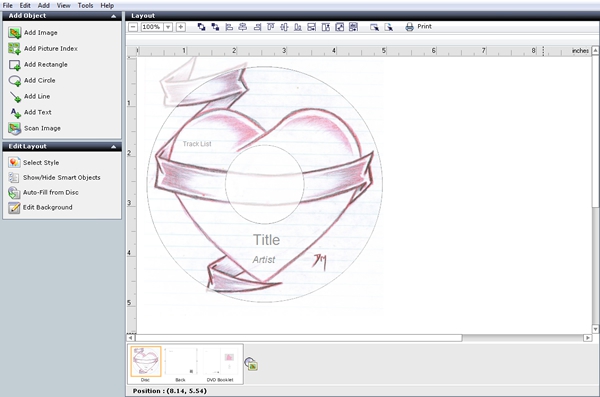
Figure 6: Creator 2011 puts you in control of your message; even when it shouldn't.
Labeling: When Your Heart's In The Right Place
As with previous versions, when you are done burning your period anthem to CD, you are presented the option to create labels for the disc, case tray, and booklet. This is important because if she doesn't listen to the mix CD, she can still get the message from that less-than-subtle heart image right on the CD! The Labeling application is great for the novice, but just ok for the advanced user. I was hoping to see some improvements over the Creator 10 Suite here, but there weren't any that I could find. It is still somewhat clunky and rigid in its formatting capabilities and can really cramp an advanced user's creative license. Don't get me wrong, this app is good, just not great, and lacks the freedom I need to fully to get my message across. The application will allow you to print to a myriad of manufacturer stock templates, and gives you the option of using Lightscribe to label your disc. In the end you'll heart your finished product and be proud to leave it under anyone's doormat.
More Cool Features!
Speaking of burning things, Creator 2011 also includes a drag-to-disc burning feature. This app places an icon of a CD on your desktop and automates the task of burning a data disc. Just drag files from anywhere onto the icon and Creator 2011 does the rest.
What You Hear and What You Get is another really cool feature is Roxio's Easy Audio Capture. It allows you to record anything you are hearing on your PC. This means anything that is currently being sent to your speakers is now recordable. You are also given options when importing these sound bites including sound quality, format, and track separation - useful for recording that personalized radio station.
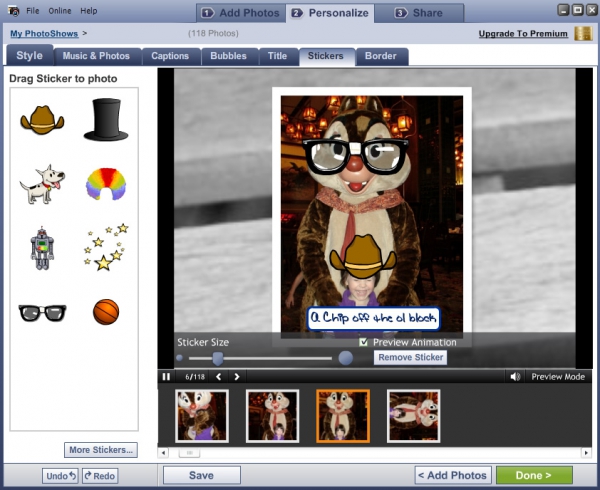
Figure 7: Wait until Dale see this!
PhotoShow And The Electric Slide...Show
Roxio's Photo Show is another application that allows people with great ambitions and little time, like me, to shine. Without instruction of any kind, I followed a 1 - 2 - 3 step process that within just minutes had a slide show running on my PC complete with music, and animated slide transitions. Within the application you can rotate your images, delete them, or personalize them with text and titles, speech bubbles and animated stickers. All I had to do was select a folder where my images were located, and hit next a couple of times. Once completed, there are options to post it to Photoshow.com, create a Facebook link, Export it to Video, Burn to a Photoshow disc, or lastly, to order a finished DVD from PhotoShow. If you want to make Grandma happy, and she doesn't have a CD player to listen to all those mix CDs you can't give away, then this is the app you'll want to use.
Conclusions
There is just too much in Roxio's latest Suite to cover with proper justification. In my opinion, Creator 2011 is Roxio's best Windows offering to date. I just felt like I could do more, and get more out of this Suite than in the previous versions I have used. The Suite is skillfully constructed and shows great effort to portray an improved, consistent, and integrated user experience. In most cases the applications made difficult and time-consuming tasks, simple and fast. Roxio's integrated Learning Center was very well done. Useful information was always available at your fingertips. While the Suite may leave some advanced user wanting more, overall it really packs a lot of power into one software package. (And there is a Pro version for those looking for more.) New features, like 3D, lets Creator 2011 stand-alone. It combines unique features with welcomed incremental product improvements, and demands serious consideration for those looking to create Christmas Family Calendars and Cards by New Years Day. Overall, Creator 2011's performance was stellar and the new user interface comfortable. I can sum up Creator 2011 with two words, Easy & Fun.
Eric Juillerat is a technologist, geek, and all around admirer of anything with silicon, buttons, or touch screens.

Do you enjoy using new hardware, software and accessories, then sharing your experience with others? Then join us on the Thoughts Media Review Team! We're looking for individuals who find it fun to test new gear and give their honest opinions about the experience. It's a volunteer role with some great perks. Interested? Then click here for more information.









