


Wednesday, December 1, 2010
Roxio Creator 2011: A Suite 3D Solution
Posted by Eric Juillerat in "Digital Home Software" @ 02:00 PM
The World Through Rose - and Cyan Colored Lenses
New to the Creator Suite is the ability to create 3D images and video. While I found it fast and easy to convert my 2D images to 3D, perfecting the look occupied the better part of a day. As mentioned above the help is great and the software conveniently offers instructions on how: convert existing images into 3D, or how to shoot new images (with a 2D camera) to maximize the 3D effect. It should be noted that the software also supports 3D cameras - but that's just the lazy man's route to 3D tomfoolery.
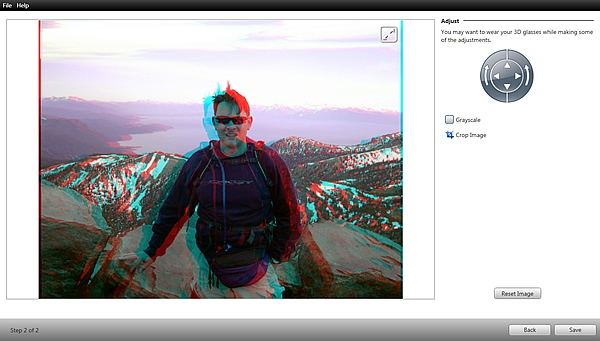
Figure 4: What 3D looks like at 10,776 ft.
When shooting your own images to convert into 3D (with a 2D camera), you take two photos. The console directs you to upload one image in the left eye location, and one image in the right eye location. The software then merges the two to create one 3D image. The newly created 3D image is an anaglyph: An image made up of two color layers, typically red and cyan, superimposed but offset, and opposite with respect to each other thus manufacturing the perception of depth. The console allows you to adjust the anaglyph's two color layers up down, left and right giving you the opportunity to tune in the image to the level of 3D clarity you desire. This process can happen quickly, if you aren't picky. If you strive for perfection, this process can take several photo shoots, many converted images, and ultimately a long time.
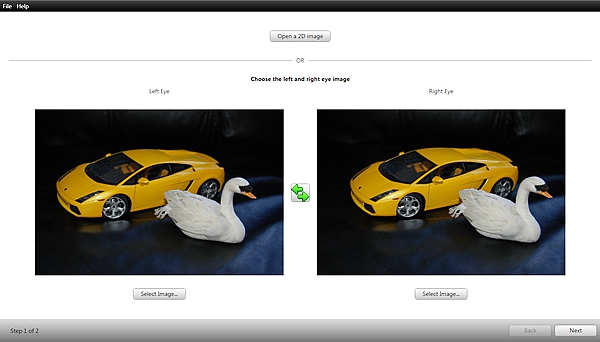
Figure 5: I know, it's a swan. Why the swan, why?
It was time for me to give it a try, so I grabbed my DSLR and took some charming photos of a bright yellow Lamborghini Gallardo and...uh, a swan; it's a long story. The trick, you see, to shooting a 3D image with a 2D camera is to take one photo and then slightly move the camera approximately 2-3 inches to the right and snap another photo. This emulates left and right eye locations. But be careful, too much separation and the images just won't come together once converted. And if that happens, your 3D image just ends up looking like a ghostly reflection. But eureka! When done properly, the resulting 3D image does actually pop out and come alive. It is easy to see that with some practice and patience, you could shoot some neat photography and really freak out your neighbors; which is why we really like the 3D feature - am I right!
3D Is Big And So Is The Suite
While 3D is all the rage right now, there are many other features to the Suite that are well worth mentioning. With Creator 2011 you can: Burn Audio CDs, Burn Data Discs, Create Backups, Create your own DVDs and Edit your Movies, Enhance your Photos and Create Photo Calendars and Cards, and Convert Media to specific file formats and hardware platforms; i.e.: iPhone, iPad, Zune and other mobile devices. And that's just a sampling of some of the features. Frankly, there's just too much in the Suite to cover in this review. Let me just touch on some of the features I use, and a few others that I found novel.
In the '80s we had the mix tape and a lot of really good music. The mix tape was the lyre of the romantic. Its composition was the poetry of a new generation that spoke words we could not, if not in a subtle fashion. Roxio's Burning Audio CD app lets us relive the embarassment all over again, but now in a faster and easier way. Needless to say, I use this app a lot. And with more than a thousand CDs in my collection, I have a lot to say.
All Your Music Belongs To Me-dia Manager
Managing my media can be a daunting task, but Roxio once again makes it easy. Within the Burning Audio CD app, for instance, you can drag and drop songs from any folder on your PC and into the Burn window. Roxio's Media Manager will offer to find any and all music related files on your computer, if you let it. Beware though, if you have an affinity for music, as I do, this could take a really long time; but only the first time. With all your data now organized in the console window it's easy to quickly put together that Breakfast Club mix CD on your mind since DEVO was whipping it.
Advanced features are available under Create Music Disc Projects. I especially like the ability to preview the entire CD before burning it. I find it helpful when deciding if I should have really put Space Age Love Song back to back with Pour Some Sugar on Me. Other options include the ability to edit your music and customize it for the appropriate audience and ambiance. This includes volume normalization, which is always useful and appreciated. Also included is Gracenote integration, making it easier to correctly title all those tracks you cried yourself to sleep with back in the '80s.









