


Monday, March 8, 2010
Seagate FreeAgent Theater+ HD Media Player Reviewed
Posted by Ron Hostetter in "Digital Home Hardware & Accessories" @ 08:00 AM
Internet Content
Selecting “Internet” from the home screen provides a menu of a handful of Internet content sources. These include YouTube, Picasa, flickr, as well as RSS audio and video feeds. The interface for YouTube is fairly intuitive, and it is easy to search for videos by pecking in a search term using the on-screen keyboard. Videos play in a small window, but can be played in full screen. Video quality was good for most videos I tried.
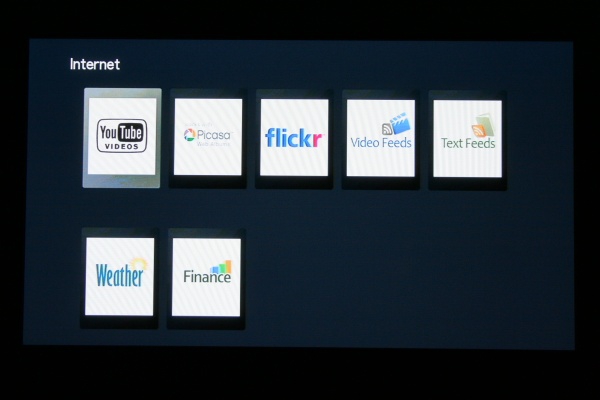
Figure 3: Available Internet content is limited, but hopefully Seagate is working on expanding this.
Unfortunately, I couldn’t find a way to add my own RSS feeds. I was hoping to access hulu.com content via RSS (I believe Boxee allows this), but hulu isn’t one of the preconfigured options, and apparently it doesn’t allow user configured feeds.
Unless there’s something I don’t know, the Internet content available on the Theater+ is fairly limited, with the biggest hole seeming to be the lack of Netflix integration.
UI Issues
As I mentioned before, I’ve been using my Xbox 360 to access content on my computer. The great thing about the Xbox is the gorgeous and intuitive user interface. In contrast, the Theater+ has a rather primitive interface. Menus are a nearly monochromatic blue and gray, and no content meta data is shown. When browsing my movie files, I only see the folder and file names, and no other information that I’ve stored with the files is available. At least the Xbox is able grab a snapshot from the video file to use as a thumbnail.
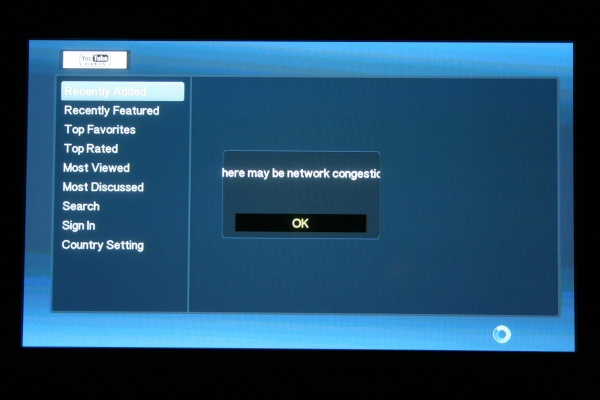
Figure 4: One example of user interface issues on the Theater+: An error message that is too large to fit in its window.
When browsing my network, the Theater+ seems to have the ability to store shortcuts. This would be a nice way to quickly get to my movies folder, which is normally several clicks away. Unfortunately, I never could figure out how to store a shortcut. There’s a “Shortcuts” folder, but apparently no way to store shortcuts.
The only way to interact with the Theater+ is using the remote control. There isn't even a power button on the device itself. This is fine, however the shape of the remote kept tricking me into holding it upside down. Somehow it just feels like it should be held with the fatter part of the remote in the palm of my hand. The remote has a limited number of buttons (D-Pad, Play, Pause, etc.). It's adequate for most content, but it would be nice to have some additional buttons for things like DVD Menu, etc.
Connectivity
The Theater+ connects to your home theater in a variety of ways, including HDMI, component or composite connections. It also has 2 USB ports which can be used to connect other hard drives, flash drives, cameras, or any other USB device. Of course, you will lose one of those USB ports if you choose to use the wireless network adapter.
The Theater+ also has a optical digital audio output port.
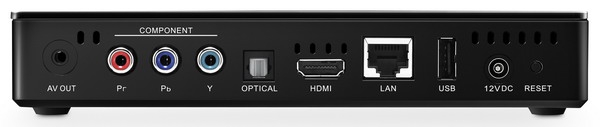
Figure 5: The back panel of the FreeAgent Theater Plus boasts a myriad of connection options.
Conclusions
The Theater+ is simply one of many devices either on the market or coming soon that provide access to digital content in the living room. While using the external hard drive and sync software seems cumbersome, it does allow all content to be local to the device. The USB ports allow other types of drives and devices to be connected to the Theater+ as well. Though the choices are currently limited, I can see a day when Seagate opens up a world of internet content (hopefully user configurable) as well. The vast array of supported codecs means you will most likely not have to spend a great deal of time converting content to match your device. And, hopefully, a prettier and more intuitive interface is only a firmware update away.
Ron Hostetter is a software sales engineer by day, a gadget lover by night. He has worked in the IT field for over 20 years and loves reading about and playing with technology. He lives in Kansas City, Missouri with his lovely wife, his son and daughter, and their two dogs. He enjoys playing guitar and watching the Kansas City Royals, both of which he finds very frustrating.

Do you enjoy using new hardware, software and accessories, then sharing your experience with others? Then join us on the Thoughts Media Review Team! We're looking for individuals who find it fun to test new gear and give their honest opinions about the experience. It's a volunteer role with some great perks. Interested? Then click here for more information.









